Ir al contenido
ImágenesGratis

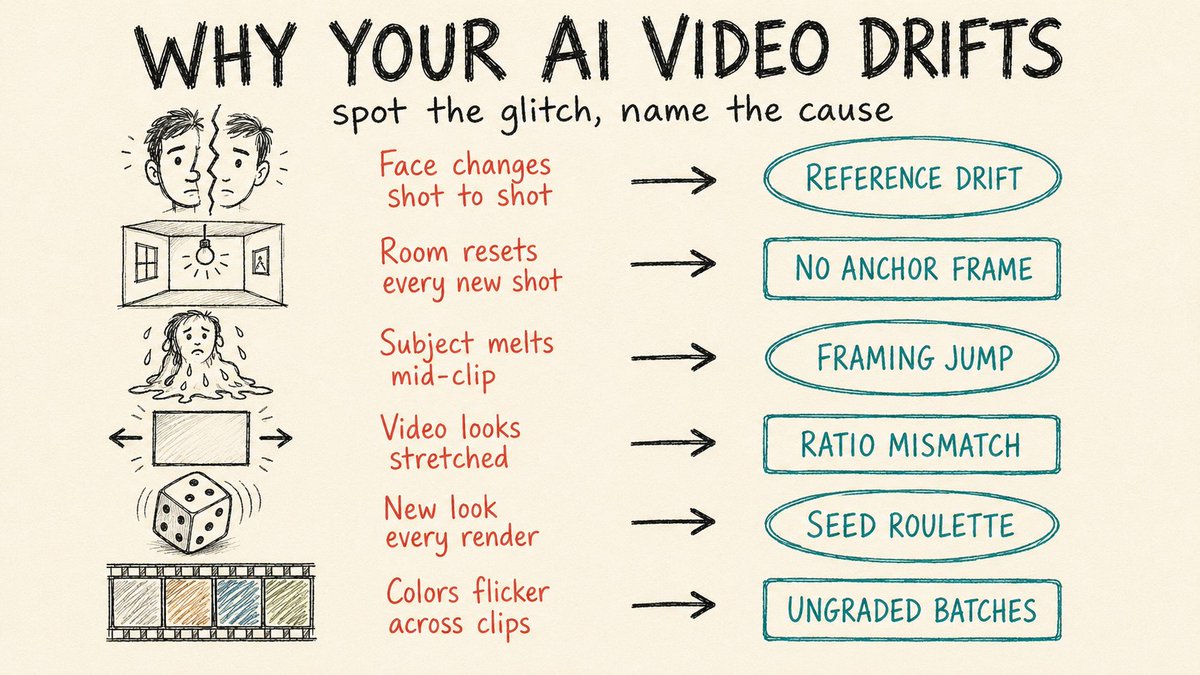
7 razones por las que tu video con IA pierde continuidad

Una guía práctica sobre las razones por las que los personajes pierden continuidad en el video generado con IA, con una corrección de 30 segundos para cada una: imágenes de referencia fijas, encadenado de fotogramas, relaciones de aspecto, semillas y etalonaje unificado.

Generación de imágenes

Ejemplos de la fuente

Estas imágenes provienen de la fuente original. DROPIDEA no ha probado estos ejemplos; los resultados dependen del modelo y los ajustes.

Listo para personalizar

Tu prompt

Inglés

Sustituye las variables en rojo por tus datos. Copia el texto completo y úsalo con tu agente preferido.

TXT MD Versión en inglés
7 reasons your AI video breaks continuity. Your character changes face by shot three. Each one has a 30-second fix. 1. Lock one reference image. Pick a single high-quality portrait, crop it tight to 60-80% of the frame, and feed that exact file into every shot. The drift starts the moment you swap references between generations. 2. Use your last frame as the next first frame. Save the final frame of each clip and upload it as the opening frame of the next. Lighting, location, and props carry over instead of resetting to a fresh guess. 3. Keep first and last frames close in framing. Jumping from a wide shot to an extreme close-up forces the model to invent a camera move it can't do, and you get a smeared morph. Move medium to medium-close, or move the subject inside the same frame. 4. Match the frame's aspect ratio to the output. Upload a 16:9 still but render to 9:16, and the model stretches to fill. Set both to the same ratio before you generate. 5. Reuse the seed from your best take. When one generation nails the look, lock its seed and regenerate with small prompt tweaks. Random seeds hand you a different face every run. 6. Grade every clip to one reference. Clips from different batches drift in color temperature and contrast even when the character holds. Pull them all to a single grade in your editor, trim the unstable half-second at each clip's head and tail, and drop short cross-dissolves over the cuts that still jump. 7. Stop stuffing one prompt with five actions. Short clips can't hold a full sequence, so the model rushes and breaks. Use a multi-shot storyboard like Kling 3.0 or Seedance 2.0, or sequence shots with [cut] markers that share the same reference images.
Ver resultados

Tu prompt

7 reasons your AI video breaks continuity. Your character changes face by shot three. Each one has a 30-second fix. 1. Lock one reference image. Pick a single high-quality portrait, crop it tight to 60-80% of the frame, and feed that exact file into every shot. The drift starts the moment you swap references between generations. 2. Use your last frame as the next first frame. Save the final frame of each clip and upload it as the opening frame of the next. Lighting, location, and props carry over instead of resetting to a fresh guess. 3. Keep first and last frames close in framing. Jumping from a wide shot to an extreme close-up forces the model to invent a camera move it can't do, and you get a smeared morph. Move medium to medium-close, or move the subject inside the same frame. 4. Match the frame's aspect ratio to the output. Upload a 16:9 still but render to 9:16, and the model stretches to fill. Set both to the same ratio before you generate. 5. Reuse the seed from your best take. When one generation nails the look, lock its seed and regenerate with small prompt tweaks. Random seeds hand you a different face every run. 6. Grade every clip to one reference. Clips from different batches drift in color temperature and contrast even when the character holds. Pull them all to a single grade in your editor, trim the unstable half-second at each clip's head and tail, and drop short cross-dissolves over the cuts that still jump. 7. Stop stuffing one prompt with five actions. Short clips can't hold a full sequence, so the model rushes and breaks. Use a multi-shot storyboard like Kling 3.0 or Seedance 2.0, or sequence shots with [cut] markers that share the same reference images.

Qué obtienes

  • Una guía completa de 7 razones por las que el video con IA pierde continuidad.
  • Correcciones prácticas de no más de 30 segundos cada una.
  • Conservación exacta de valores técnicos como 16:9, 9:16, 60-80%, los nombres Kling 3.0 y Seedance 2.0, y los marcadores [cut].
  • Texto formateado y listo para publicar como post educativo o artículo breve.

Casos de uso

  • Un post educativo en un blog o boletín sobre producción de video con IA.
  • Contenido para cuentas de redes sociales especializadas en creación de video.
  • Una referencia rápida para un equipo de edición o generación de contenido con problemas de deriva de personajes.
  • Material de formación en talleres sobre herramientas de video con IA.

Cómo usarlo

  • Lee las siete razones en orden para entender dónde se rompe típicamente la continuidad en la generación de video con IA.
  • Aplica primero la corrección 1 fijando una única imagen de referencia recortada al 60-80% del encuadre para todas las tomas.
  • Encadena el último fotograma como fotograma inicial del siguiente clip, como en la corrección 2, para conservar iluminación, locación y utilería.
  • Ajusta la relación de aspecto y la semilla antes de generar, como en las correcciones 4 y 5, para evitar estiramientos y cambios de rostro.
  • Unifica el etalonaje y recorta los inicios y finales inestables, como en la corrección 6, en tu editor.
  • Usa un guion gráfico de varias tomas o marcadores [cut], como en la corrección 7, en lugar de llenar un solo prompt con cinco acciones.

Prompts relacionados