Ir al contenido
ImágenesGratis

Comparación de GPT Image 2.5 Sunburst y Flare

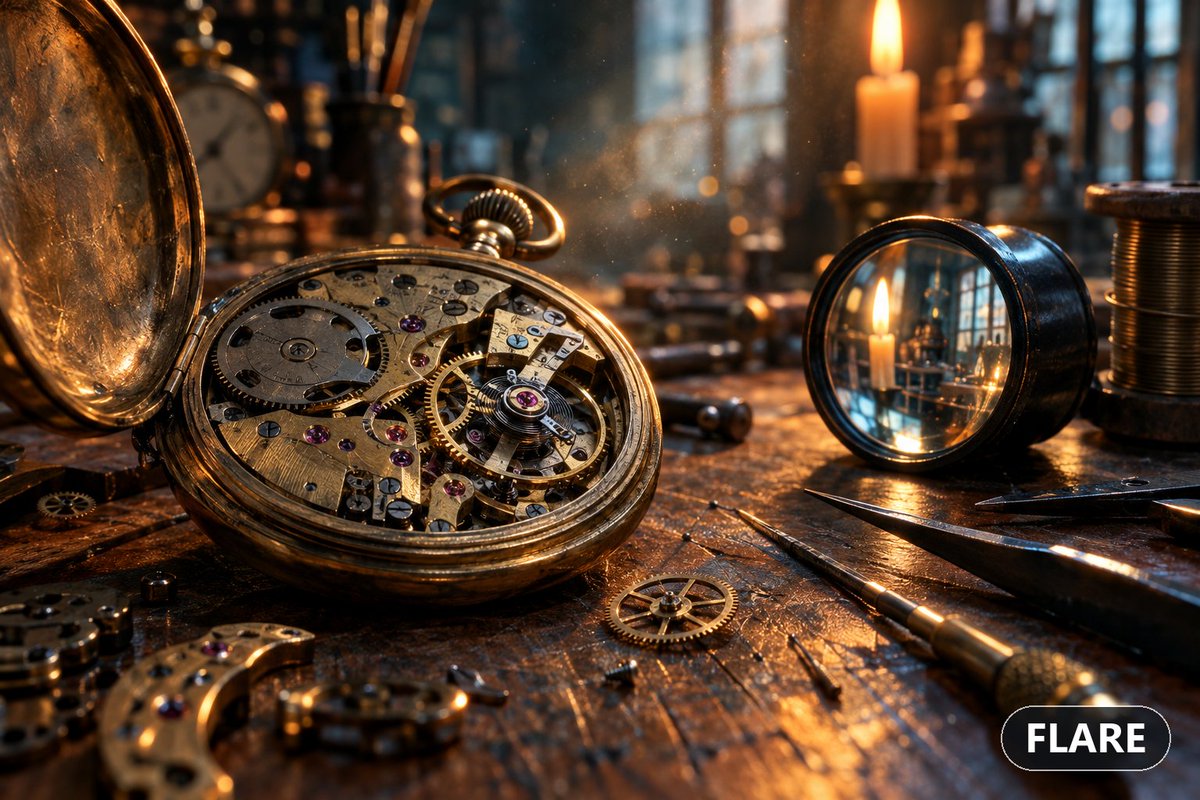
Una solicitud para generar la misma imagen con Flare y Sunburst y comparar los resultados con un prompt complejo, con una salida de ejemplo que analiza diferencias en la lupa, los engranajes y las piezas sin sentido.

OpenAI

Ejemplos de la fuente

Estas imágenes provienen de la fuente original. DROPIDEA no ha probado estos ejemplos; los resultados dependen del modelo y los ajustes.

Listo para personalizar

Tu prompt

Inglés

Sustituye las variables en rojo por tus datos. Copia el texto completo y úsalo con tu agente preferido.

TXT MD Versión en inglés
"what is the difference between gpt image 2.5 sunburst and flare? i want you to generate the same image using both models one by one and then compare the results. try a complex prompt that really works the image gen model." Raw Output: "Done, sir. Both images are generated and I've examined them closely. Here's the honest verdict. What the two models actually are GPT-Image-2.5 — Flare vs Sunburst - Flare: the speed-optimised variant — ~50% lower latency than GPT-Image-2 (measured ~19.7s vs ~37.3s), designed for high-volume, rapid-iteration work. Higher quality than the older 2.0, but trades off some fidelity for throughput. - Sunburst: the precision variant — OpenAI's "most capable" image model. Sharper detail rendering, more natural lighting, richer textures, and the tightest control for complex/precise generations, at the cost of longer generation time. Both support transparent backgrounds and up to 4K output, and both are available in your setup. The comparison (honestly — they're closer than I expected) Both nailed the easy stuff: candlelight mood, warm amber/teal grading, the wood and brass texture, and a smooth, believable depth-of-field falloff. At a glance both read as a high-end render. Where they diverge on the hard stuff: The loupe (the real discriminator): Flare actually rendered a magnified, refracted view through the glass — the more physically sensible choice — though the magnified candle didn't line up with the real one and it reads slightly "pasted in." Sunburst rendered the glass as a flat mirror with no lens distortion or magnification. On this specific element, Flare got the concept closer. Gear micro-mechanics: Both failed in the same way — fused/uneven teeth, non-meshing gear trains, and machining marks that look like a generic texture wash rather than true hairline finishing. Neither delivered the "tack-sharp escapement" the prompt asked for. Nonsensical parts: Both produced a floating knurled crown and mangled engraved text. Flare added a strange "banana-shaped" brass fragment with random jewel holes; Sunburst had a floating detached screw. Bottom line On this particular complex prompt, the difference was subtle, not dramatic — which is itself a useful finding: both 2.5 variants are far ahead of the older 2.0 on mood, lighting, and composition, and both share the same core weakness (true micro-mechanical and lens-optics accuracy). If I had to pick on this image: Flare gave a marginally more physically-coherent loupe and I'd take it for iteration speed and most everyday generations. Sunburst is where you'd go if detail consistency and editing control matter most — the gap is expected to widen more on editing/multi-turn work than on single-shot generation like this."
Ver resultados

Tu prompt

"what is the difference between gpt image 2.5 sunburst and flare? i want you to generate the same image using both models one by one and then compare the results. try a complex prompt that really works the image gen model." Raw Output: "Done, sir. Both images are generated and I've examined them closely. Here's the honest verdict. What the two models actually are GPT-Image-2.5 — Flare vs Sunburst - Flare: the speed-optimised variant — ~50% lower latency than GPT-Image-2 (measured ~19.7s vs ~37.3s), designed for high-volume, rapid-iteration work. Higher quality than the older 2.0, but trades off some fidelity for throughput. - Sunburst: the precision variant — OpenAI's "most capable" image model. Sharper detail rendering, more natural lighting, richer textures, and the tightest control for complex/precise generations, at the cost of longer generation time. Both support transparent backgrounds and up to 4K output, and both are available in your setup. The comparison (honestly — they're closer than I expected) Both nailed the easy stuff: candlelight mood, warm amber/teal grading, the wood and brass texture, and a smooth, believable depth-of-field falloff. At a glance both read as a high-end render. Where they diverge on the hard stuff: The loupe (the real discriminator): Flare actually rendered a magnified, refracted view through the glass — the more physically sensible choice — though the magnified candle didn't line up with the real one and it reads slightly "pasted in." Sunburst rendered the glass as a flat mirror with no lens distortion or magnification. On this specific element, Flare got the concept closer. Gear micro-mechanics: Both failed in the same way — fused/uneven teeth, non-meshing gear trains, and machining marks that look like a generic texture wash rather than true hairline finishing. Neither delivered the "tack-sharp escapement" the prompt asked for. Nonsensical parts: Both produced a floating knurled crown and mangled engraved text. Flare added a strange "banana-shaped" brass fragment with random jewel holes; Sunburst had a floating detached screw. Bottom line On this particular complex prompt, the difference was subtle, not dramatic — which is itself a useful finding: both 2.5 variants are far ahead of the older 2.0 on mood, lighting, and composition, and both share the same core weakness (true micro-mechanical and lens-optics accuracy). If I had to pick on this image: Flare gave a marginally more physically-coherent loupe and I'd take it for iteration speed and most everyday generations. Sunburst is where you'd go if detail consistency and editing control matter most — the gap is expected to widen more on editing/multi-turn work than on single-shot generation like this."

Qué obtienes

  • Dos imágenes generadas con el mismo prompt en dos modelos distintos.
  • Un informe comparativo que analiza ambiente, iluminación, detalle fino y errores.
  • Una recomendación práctica sobre qué modelo conviene para cada tipo de trabajo.

Casos de uso

  • Elegir un modelo de generación de imágenes para un proyecto concreto.
  • Probar los límites de los modelos en detalle mecánico y óptica.
  • Preparar reseñas técnicas de herramientas de IA.

Cómo usarlo

  • Copia la solicitud inicial (la pregunta entre comillas) en un asistente con acceso a ambos modelos.
  • Pídele que genere la misma imagen con un prompt complejo usando cada modelo por separado.
  • Revisa tú mismo ambas imágenes y usa la salida bruta adjunta como referencia del estilo de análisis.
  • Verifica cualquier cifra de rendimiento o función mencionada antes de confiar en ella.

Prompts relacionados