Ir al contenido
ImágenesGratis

Guía del sistema de diseño creativo mo9ba

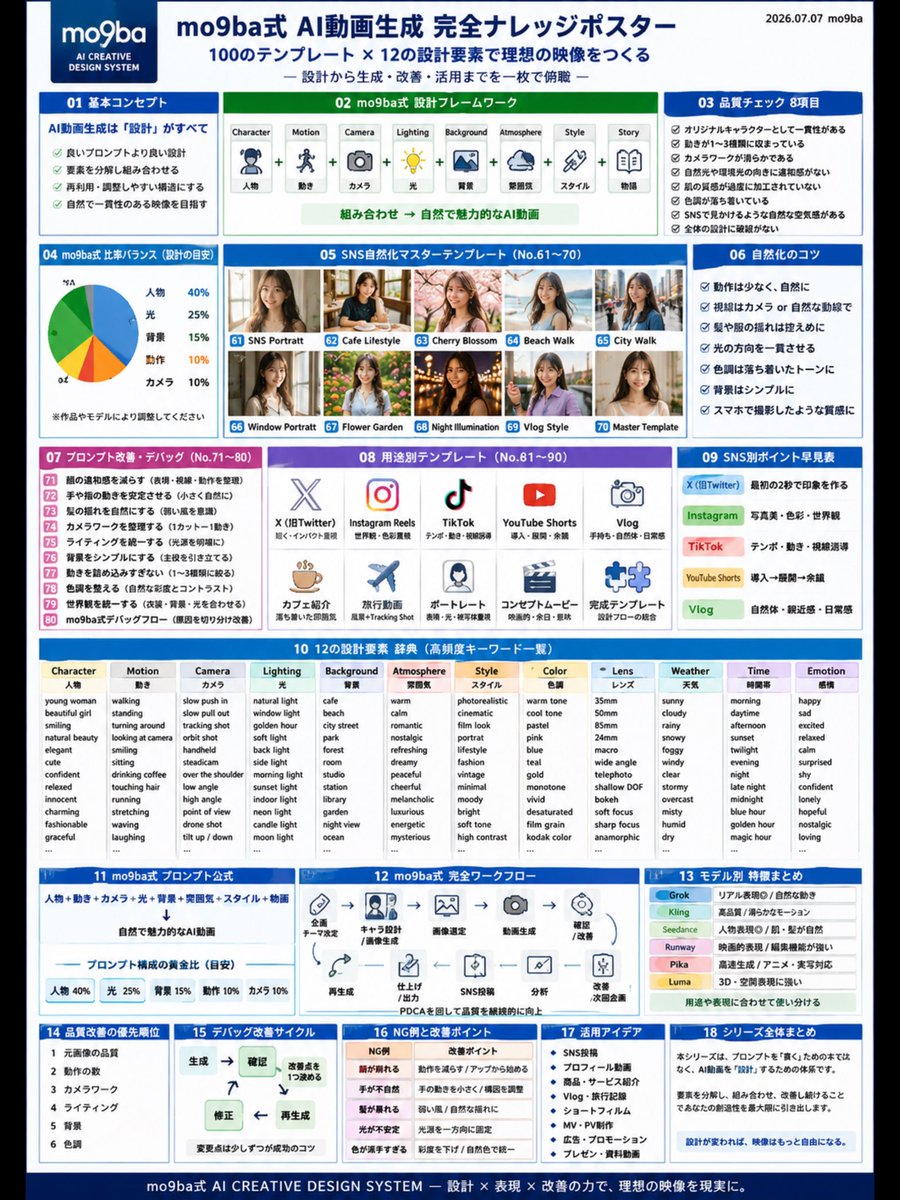
Un póster de conocimiento que explica el método mo9ba: tratar el video con IA como un sistema de diseño creativo en lugar de prompts aislados. Cubre el orden de pensamiento de Personaje a Historia, 8 controles de calidad tras la generación, diseño por plataforma (X, Instagram, TikTok, YouTube Shorts, Vlog), consejos para un aspecto natural, un ciclo de mejora PDCA y un diccionario de diseño combinable.

Generación de imágenes

Ejemplos de la fuente

Estas imágenes provienen de la fuente original. DROPIDEA no ha probado estos ejemplos; los resultados dependen del modelo y los ajustes.

Listo para personalizar

Tu prompt

Inglés

Sustituye las variables en rojo por tus datos. Copia el texto completo y úsalo con tu agente preferido.

TXT MD Versión en inglés
🔴【① #AIVideoGeneration is about "design," not "#prompts"] What you need in the era of making AI videos is not a magic sentence, but a "design blueprint." Character ↓ Motion ↓ Camera ↓ Lighting ↓ Background ↓ Atmosphere ↓ Story When you think in this order, the quality of your AI videos becomes stable all at once. In the mo9ba method, it is organized not as a Prompt but as the AI Creative Design System. 🔴【② 8 Quality Check Items for AI Videos】 Points to look at after generation👇 ✅ Character consistency ✅ Motion is limited to 1–3 types ✅ Camera is stable ✅ Light direction is natural ✅ Skin texture is not over-processed ✅ Background is organized ✅ Looks natural on SNS ✅ No breakdown in the overall design For AI videos, the power of review is more important than creation. 🔴【③ mo9ba Method AI Video Design Frame】 AI videos can be organized into the following 8 elements. ① Character|Person ② Motion|Movement ③ Camera|Camera ④ Lighting|Light ⑤ Background|Background ⑥ Atmosphere|Mood ⑦ Style|Style ⑧ Story|Narrative When you break down and then combine these 8 elements, regeneration, correction, and application become easier. 🔴【④ Differences in AI Videos for SNS】 X: Make an impression in the first 2 seconds Instagram: Photo beauty, color, worldview TikTok: Tempo, movement, eye-line guidance YouTube Shorts: Intro → Development → Lingering aftertaste Vlog: Natural feel, familiarity, everyday feel Even with the same AI video, just changing the design based on the posting platform changes how it gets across. 🔴【⑤ Tips to Make AI Videos Look Natural】 To reduce the AI-like feel, ・Keep motion minimal ・Keep gaze natural ・Keep hair movement subtle ・Unify the light direction ・Keep tones light and calm ・Keep the background simple ・Give it a texture like it was shot on a smartphone Naturalness over flashiness. This is the basics of AI videos that look natural on SNS without any sense of discomfort. 🔴【⑥ AI Video Production is PDCA】 For AI videos, an improvement cycle is more important than aiming to complete them in one shot. Generate ↓ Check ↓ Decide on 1 improvement point ↓ Correct ↓ Regenerate Face breaks down Hands look unnatural Movement is stiff Light is unnatural If you separate and check the causes, the quality gradually rises. 🔴【⑦ mo9ba Method AI Creative Design System】 Think of it not as a prompt collection, but as a "design dictionary" for AI videos. Character Motion Camera Lighting Background Atmosphere Style Color Lens Weather Time Emotion Story By combining these, it becomes an AI video production system that can expand infinitely, rather than a one-off Prompt. 🔴【⑧ Final Conclusion】 What is important in AI video generation is, not writing a good prompt, but creating a good design. Decide the character. Narrow down the motion. Choose the camera. Adjust the lighting. Organize the background. Add the story. When the design changes, the imagery becomes far more free. #AIVideoGeneration #GenerativeAI #ImageToVideo #AIVideo #AICreative #PromptEngineering #GenerativeAIUtilization #AIBeauty #NaturalizationPrompt #SNSOperation #AIVideo #Shorts #Instagram #TikTok #PromptDesign #Grok #Kling #Runway #PromptEngineering #ImageToVideo #mo9baKnowledgePoster #Memo
Ver resultados

Tu prompt

🔴【① #AIVideoGeneration is about "design," not "#prompts"] What you need in the era of making AI videos is not a magic sentence, but a "design blueprint." Character ↓ Motion ↓ Camera ↓ Lighting ↓ Background ↓ Atmosphere ↓ Story When you think in this order, the quality of your AI videos becomes stable all at once. In the mo9ba method, it is organized not as a Prompt but as the AI Creative Design System. 🔴【② 8 Quality Check Items for AI Videos】 Points to look at after generation👇 ✅ Character consistency ✅ Motion is limited to 1–3 types ✅ Camera is stable ✅ Light direction is natural ✅ Skin texture is not over-processed ✅ Background is organized ✅ Looks natural on SNS ✅ No breakdown in the overall design For AI videos, the power of review is more important than creation. 🔴【③ mo9ba Method AI Video Design Frame】 AI videos can be organized into the following 8 elements. ① Character|Person ② Motion|Movement ③ Camera|Camera ④ Lighting|Light ⑤ Background|Background ⑥ Atmosphere|Mood ⑦ Style|Style ⑧ Story|Narrative When you break down and then combine these 8 elements, regeneration, correction, and application become easier. 🔴【④ Differences in AI Videos for SNS】 X: Make an impression in the first 2 seconds Instagram: Photo beauty, color, worldview TikTok: Tempo, movement, eye-line guidance YouTube Shorts: Intro → Development → Lingering aftertaste Vlog: Natural feel, familiarity, everyday feel Even with the same AI video, just changing the design based on the posting platform changes how it gets across. 🔴【⑤ Tips to Make AI Videos Look Natural】 To reduce the AI-like feel, ・Keep motion minimal ・Keep gaze natural ・Keep hair movement subtle ・Unify the light direction ・Keep tones light and calm ・Keep the background simple ・Give it a texture like it was shot on a smartphone Naturalness over flashiness. This is the basics of AI videos that look natural on SNS without any sense of discomfort. 🔴【⑥ AI Video Production is PDCA】 For AI videos, an improvement cycle is more important than aiming to complete them in one shot. Generate ↓ Check ↓ Decide on 1 improvement point ↓ Correct ↓ Regenerate Face breaks down Hands look unnatural Movement is stiff Light is unnatural If you separate and check the causes, the quality gradually rises. 🔴【⑦ mo9ba Method AI Creative Design System】 Think of it not as a prompt collection, but as a "design dictionary" for AI videos. Character Motion Camera Lighting Background Atmosphere Style Color Lens Weather Time Emotion Story By combining these, it becomes an AI video production system that can expand infinitely, rather than a one-off Prompt. 🔴【⑧ Final Conclusion】 What is important in AI video generation is, not writing a good prompt, but creating a good design. Decide the character. Narrow down the motion. Choose the camera. Adjust the lighting. Organize the background. Add the story. When the design changes, the imagery becomes far more free. #AIVideoGeneration #GenerativeAI #ImageToVideo #AIVideo #AICreative #PromptEngineering #GenerativeAIUtilization #AIBeauty #NaturalizationPrompt #SNSOperation #AIVideo #Shorts #Instagram #TikTok #PromptDesign #Grok #Kling #Runway #PromptEngineering #ImageToVideo #mo9baKnowledgePoster #Memo

Qué obtienes

  • Una metodología de diseño mo9ba completa para video con IA en lugar de prompts aislados
  • Una lista de control de calidad de 8 puntos tras la generación
  • Un marco de 8 elementos descomponibles y recombinables
  • Guía de diseño específica para cada red social
  • Consejos prácticos para un aspecto natural, como filmado con smartphone
  • Un ciclo de mejora PDCA para elevar la calidad gradualmente
  • Un diccionario de diseño ampliado (Personaje, Movimiento, Cámara, Iluminación, Fondo, Atmósfera, Estilo, Color, Lente, Clima, Tiempo, Emoción, Historia)

Casos de uso

  • Creadores de video con IA que publican en X, Instagram, TikTok y YouTube Shorts
  • Diseñadores de prompts que buscan resultados más estables y repetibles
  • Equipos de marketing digital que producen videos cortos para campañas sociales
  • Formadores y consultores que explican flujos de trabajo de video con IA
  • Cualquier creador que quiera un sistema estructurado de revisión y mejora

Cómo usarlo

  • Lee la sección ① y adopta el orden de pensamiento: Personaje, Movimiento, Cámara, Iluminación, Fondo, Atmósfera, Historia antes de escribir cualquier prompt.
  • Tras cada generación, aplica la lista de control de 8 puntos de la sección ② al resultado e identifica fallos.
  • Descompón tu idea con los 8 elementos de la sección ③ y luego combínalos para facilitar la regeneración y corrección.
  • Ajusta el diseño según la plataforma con la guía de la sección ④ (impresión en los primeros 2 segundos en X, belleza fotográfica en Instagram, ritmo en TikTok).
  • Aplica los consejos de naturalidad de la sección ⑤ y sigue el ciclo PDCA de la sección ⑥: genera, revisa, decide 1 punto de mejora, corrige, regenera.

Prompts relacionados