Ir al contenido
ImágenesGratis

"read ABOUT ME first, save in CLAUDE OUTPUTS, use AskUserQuestion when unclear, don't over-explain." 8: Connectors are free. Turn

"read ABOUT ME first, save in CLAUDE OUTPUTS, use AskUserQuestion when unclear, don't over-explain." 8: Connectors are free. Turn

OpenAI

Ejemplos de la fuente

Estas imágenes provienen de la fuente original. DROPIDEA no ha probado estos ejemplos; los resultados dependen del modelo y los ajustes.

Listo para personalizar

Tu prompt

Texto original

Sustituye las variables en rojo por tus datos. Copia el texto completo y úsalo con tu agente preferido.

TXT MD Versión en inglés
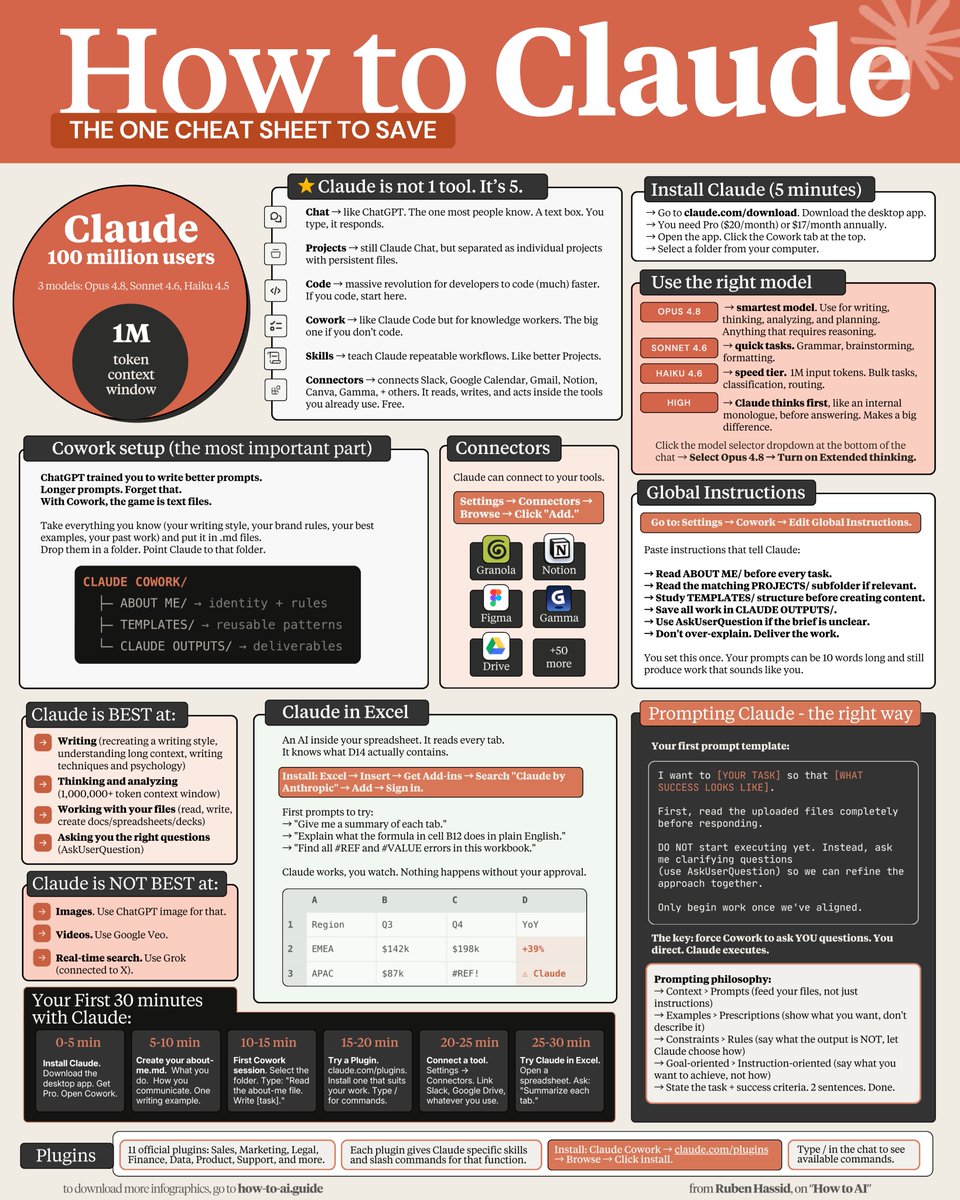
"read ABOUT ME first, save in CLAUDE OUTPUTS, use AskUserQuestion when unclear, don't over-explain." 8: Connectors are free. Turn them on. Slack, Gmail, Drive, Notion, Figma, Granola + 50 others. Claude reads your emails and messages mid-conversation. Zero copy-paste. 9: Force AskUserQuestion in every prompt. Claude stops guessing. It generates a form with clarifying questions. You click. Claude executes. Prompting ends. 10: Install Claude in Excel (3 minutes). Excel → Insert → Get Add-ins → Search "Claude by Anthropic" → Add → Sign in. Ctrl+Option+C to open. It now knows what cell D14 actually contains. 11: Install Plugins from claude .com/plugins. Sales, Marketing, Legal, Finance, Data, Product, Support + more. Each adds skills and slash commands. Type / in the chat to see them. 12: Skills replace your prompt library. Turn repeat workflows into slash commands. Type /negotiation-prep + one line. Claude pulls from Gmail, Slack, Granola. Drafts the email. Done. 13: Context > Prompts. Feed your files, not just prompts. That's the game. Download my own files at https://t.co/psB7XxB2Y4. Don't pay anything. Reply to the email to get the link 14: Examples > Prescriptions. Paste 3 posts you wrote. "Write like this." Claude copies voice faster from examples than from 500 words of description. 15: Images = Use ChatGPT Image (with Thinking). Claude doesn't generate realistic images (yet). 16: Real-time search = Use Grok. Connected to X. Covers 99% of what you need. 17: Videos = Use Google Veo-4 Right tool, right job. Stop wasting tokens. ----- To download all of my Claude infographics: Step 1. Go to https://t.co/psB7XxB2Y4. Step 2. Subscribe for free. Don't pay anything. Step 3. Open my welcome email (most skip this). Step 4. Hit the automatic reply button inside. Step 5. Download my infographics from my Notion. Bonus. Enjoy my best copy-paste prompts, too.
Ver resultados

Tu prompt

"read ABOUT ME first, save in CLAUDE OUTPUTS, use AskUserQuestion when unclear, don't over-explain." 8: Connectors are free. Turn them on. Slack, Gmail, Drive, Notion, Figma, Granola + 50 others. Claude reads your emails and messages mid-conversation. Zero copy-paste. 9: Force AskUserQuestion in every prompt. Claude stops guessing. It generates a form with clarifying questions. You click. Claude executes. Prompting ends. 10: Install Claude in Excel (3 minutes). Excel → Insert → Get Add-ins → Search "Claude by Anthropic" → Add → Sign in. Ctrl+Option+C to open. It now knows what cell D14 actually contains. 11: Install Plugins from claude .com/plugins. Sales, Marketing, Legal, Finance, Data, Product, Support + more. Each adds skills and slash commands. Type / in the chat to see them. 12: Skills replace your prompt library. Turn repeat workflows into slash commands. Type /negotiation-prep + one line. Claude pulls from Gmail, Slack, Granola. Drafts the email. Done. 13: Context > Prompts. Feed your files, not just prompts. That's the game. Download my own files at https://t.co/psB7XxB2Y4. Don't pay anything. Reply to the email to get the link 14: Examples > Prescriptions. Paste 3 posts you wrote. "Write like this." Claude copies voice faster from examples than from 500 words of description. 15: Images = Use ChatGPT Image (with Thinking). Claude doesn't generate realistic images (yet). 16: Real-time search = Use Grok. Connected to X. Covers 99% of what you need. 17: Videos = Use Google Veo-4 Right tool, right job. Stop wasting tokens. ----- To download all of my Claude infographics: Step 1. Go to https://t.co/psB7XxB2Y4. Step 2. Subscribe for free. Don't pay anything. Step 3. Open my welcome email (most skip this). Step 4. Hit the automatic reply button inside. Step 5. Download my infographics from my Notion. Bonus. Enjoy my best copy-paste prompts, too.

Prompts relacionados