Ir al contenido
ImágenesGratis

Lecciones de principiante al crear un MV con Seedance

La experiencia práctica de un principiante en producción de vídeo con Seedance 2.0: hojas de personajes, estructura de prompts, número de personajes, instrucciones de ritmo y cortes CUT, trabajo de cámara y consejos para ahorrar créditos mediante generación repetida y edición.

Generación de imágenes

Ejemplos de la fuente

Estas imágenes provienen de la fuente original. DROPIDEA no ha probado estos ejemplos; los resultados dependen del modelo y los ajustes.

Listo para personalizar

Tu prompt

Inglés

Sustituye las variables en rojo por tus datos. Copia el texto completo y úsalo con tu agente preferido.

TXT MD Versión en inglés
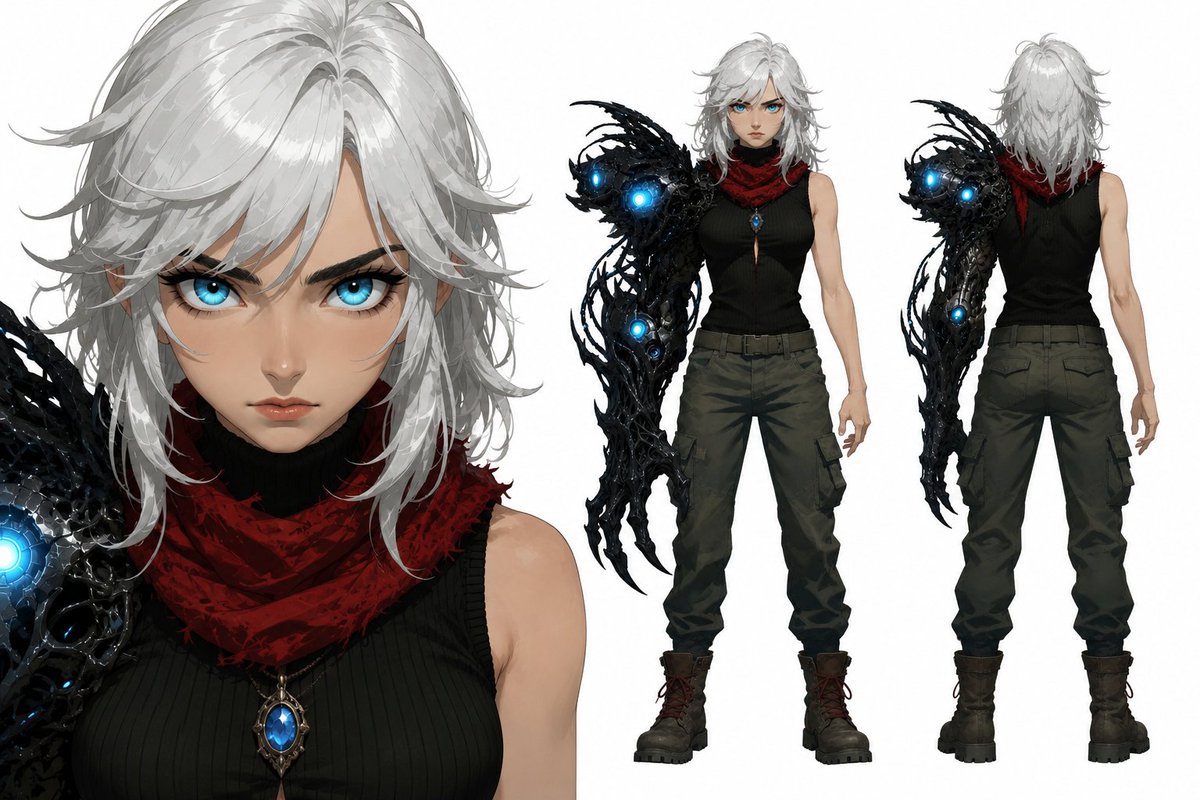
After sleeping only 5 hours a day for two weeks, I finally got 8 hours of sleep, and I feel like I've been reborn. With this renewed energy, I'd like to briefly share my thoughts and the lessons I learned while making this MV. These are my experiences after burning through a huge number of credits as a complete beginner in video production. I'll keep it simple and concise, based on Seedance 2.0. First, attaching a character sheet is not optional—it's essential. Create the character sheet simply, like the attached image. If you don't have close-up images, the generation model may blur the character's facial details or interpret them however it wants. For the body and outfit, front and back views are enough. You don't need to include various facial expressions. In fact, they can even become a cause of model drift. Second, about prompt structure and conciseness. Specify the role of each image in the image reference slots. In the CHARACTER block, explicitly describe the girl's appearance in text. Number of characters appearing This turned out to be a completely unexpected variable for me. For example, if I didn't include text like "One girl, one elite guardian. Maintain visual consistency with all references.", I found that duplicate copies of each character were generated much more often than I expected. This happened especially when three or more main characters appeared in the same shot. In the STYLE block, write only the essentials about the art style, lighting, and rendering method as briefly as possible. For realistic, semi-realistic, or 2D styles that Seedance already handles well, this prompt isn't really necessary. But for 2.5D, which Seedance struggles with, it helped a little. It doesn't have nearly as much impact as image references. (Optional) Overall tempo instructions for the clip's pacing and mood. This is also optional, but in my case I needed extremely fast-paced action. Before adding this instruction, the pacing felt as slow and frustrating as a sloth. Expression lock instructions (Optional depending on your needs) Describe scene events in order, separated into CUT 1, CUT 2, and so on. Seedance follows second-by-second CUT instructions surprisingly well. Think and direct from the director's chair. Camera work Honestly, this is the most important part of video production. It's the core element that determines the mood and quality of the video. Even if the characters themselves aren't particularly attractive, compelling backgrounds combined with good camera work can create beautiful cinematic shots. I couldn't memorize all the terms, so I organized various cinematic camera movements, including angle and composition terminology, into a chart for quick reference. Final frame description—the still image at the exact moment the clip ends. This part can also be omitted, but I recommend using it if you have a specific ending frame in mind. That's it for the prompt structure. Second, keep your prompts as short and concise as possible. Especially when your scene contains too many events for the selected video length, the entire clip tends to fall apart surprisingly often. Our credits are precious, aren't they? Third, unless you specifically want it, always specify "No background music." It only gets in the way during editing. It's better to use Suno or another good external audio source. Fourth, use Mini or Fast for testing, and if your scene contains bold action, I recommend testing with Standard (Low Quality) before using those two. It's not easy to get a successful result on the first generation. Unless you've reached a professional level, this lottery called the [Generate button] will force you to revise your prompts over and over again, so saving credits is better for your mental health. Fifth, don't expect a great video from your very first Generate. It only increases your stress. Unless you're already a professional, expecting a perfect 15-second clip on your first attempt is just setting yourself up for disappointment. Try multiple times, then edit and combine the results. That's how you'll end up with a satisfying final video. Here are two clips from the many failed generations. They failed, but they still had some usable shots. Of course, I didn't use them because better ones came later, but most failed clips contain hidden gems worth saving—sometimes as much as half of the 15-second clip. The production schedule wasn't easy, and I accumulated quite a bit of fatigue, but the joy the final result gave me was greater than all of that. Unfortunately, it wasn't chosen by the algorithm, but I'd like to believe that I grew one step further through this MV. Now that I've completed the MV that started it all, I'm preparing for a new challenge. I'll probably move toward a new world-building approach while focusing mainly on the short clips that the algorithm prefers. With that, I'll end this long post, and I wish all video creator communities the very best. 👏👏
Ver resultados

Tu prompt

After sleeping only 5 hours a day for two weeks, I finally got 8 hours of sleep, and I feel like I've been reborn. With this renewed energy, I'd like to briefly share my thoughts and the lessons I learned while making this MV. These are my experiences after burning through a huge number of credits as a complete beginner in video production. I'll keep it simple and concise, based on Seedance 2.0. First, attaching a character sheet is not optional—it's essential. Create the character sheet simply, like the attached image. If you don't have close-up images, the generation model may blur the character's facial details or interpret them however it wants. For the body and outfit, front and back views are enough. You don't need to include various facial expressions. In fact, they can even become a cause of model drift. Second, about prompt structure and conciseness. Specify the role of each image in the image reference slots. In the CHARACTER block, explicitly describe the girl's appearance in text. Number of characters appearing This turned out to be a completely unexpected variable for me. For example, if I didn't include text like "One girl, one elite guardian. Maintain visual consistency with all references.", I found that duplicate copies of each character were generated much more often than I expected. This happened especially when three or more main characters appeared in the same shot. In the STYLE block, write only the essentials about the art style, lighting, and rendering method as briefly as possible. For realistic, semi-realistic, or 2D styles that Seedance already handles well, this prompt isn't really necessary. But for 2.5D, which Seedance struggles with, it helped a little. It doesn't have nearly as much impact as image references. (Optional) Overall tempo instructions for the clip's pacing and mood. This is also optional, but in my case I needed extremely fast-paced action. Before adding this instruction, the pacing felt as slow and frustrating as a sloth. Expression lock instructions (Optional depending on your needs) Describe scene events in order, separated into CUT 1, CUT 2, and so on. Seedance follows second-by-second CUT instructions surprisingly well. Think and direct from the director's chair. Camera work Honestly, this is the most important part of video production. It's the core element that determines the mood and quality of the video. Even if the characters themselves aren't particularly attractive, compelling backgrounds combined with good camera work can create beautiful cinematic shots. I couldn't memorize all the terms, so I organized various cinematic camera movements, including angle and composition terminology, into a chart for quick reference. Final frame description—the still image at the exact moment the clip ends. This part can also be omitted, but I recommend using it if you have a specific ending frame in mind. That's it for the prompt structure. Second, keep your prompts as short and concise as possible. Especially when your scene contains too many events for the selected video length, the entire clip tends to fall apart surprisingly often. Our credits are precious, aren't they? Third, unless you specifically want it, always specify "No background music." It only gets in the way during editing. It's better to use Suno or another good external audio source. Fourth, use Mini or Fast for testing, and if your scene contains bold action, I recommend testing with Standard (Low Quality) before using those two. It's not easy to get a successful result on the first generation. Unless you've reached a professional level, this lottery called the [Generate button] will force you to revise your prompts over and over again, so saving credits is better for your mental health. Fifth, don't expect a great video from your very first Generate. It only increases your stress. Unless you're already a professional, expecting a perfect 15-second clip on your first attempt is just setting yourself up for disappointment. Try multiple times, then edit and combine the results. That's how you'll end up with a satisfying final video. Here are two clips from the many failed generations. They failed, but they still had some usable shots. Of course, I didn't use them because better ones came later, but most failed clips contain hidden gems worth saving—sometimes as much as half of the 15-second clip. The production schedule wasn't easy, and I accumulated quite a bit of fatigue, but the joy the final result gave me was greater than all of that. Unfortunately, it wasn't chosen by the algorithm, but I'd like to believe that I grew one step further through this MV. Now that I've completed the MV that started it all, I'm preparing for a new challenge. I'll probably move toward a new world-building approach while focusing mainly on the short clips that the algorithm prefers. With that, I'll end this long post, and I wish all video creator communities the very best. 👏👏

Qué obtienes

  • Una traducción árabe completa de la publicación original con todas sus lecciones y consejos técnicos.
  • Una metodología clara para la estructura de prompts en Seedance 2.0: bloques CHARACTER, STYLE y CUT.
  • Consejos prácticos para ahorrar créditos: probar con Mini, Fast o Standard (Low Quality) y no esperar perfección en la primera generación.

Casos de uso

  • Para principiantes en producción de vídeo con IA que quieren evitar malgastar créditos.
  • Para creadores de MV o clips cortos que necesitan consistencia de personajes entre tomas.
  • Como referencia rápida para construir prompts eficaces en Seedance 2.0 antes de pulsar el botón Generate.

Cómo usarlo

  • Adjunta una Character Sheet sencilla con vistas frontal y posterior del cuerpo y el vestuario, más imágenes en primer plano del rostro para mantener los detalles.
  • Escribe un prompt conciso: asigna un rol a cada imagen de referencia, describe explícitamente la apariencia en el bloque CHARACTER e indica el número de personajes, p. ej. "One girl, one elite guardian. Maintain visual consistency with all references."
  • Mantén el bloque STYLE mínimo (estilo, iluminación, render) y añade opcionalmente instrucciones de ritmo general y de bloqueo de expresiones.
  • Divide los eventos de la escena en CUT 1, CUT 2 y siguientes, describe el trabajo de cámara, añade la descripción del fotograma final si tienes un final concreto y especifica siempre "No background music."
  • Prueba con Mini o Fast (o Standard (Low Quality) para acción intensa) antes de la generación final para ahorrar créditos.
  • Genera varias veces, luego edita y combina los resultados — incluso tomas útiles de generaciones fallidas — para construir tu vídeo final.

Prompts relacionados