Ir al contenido
ImágenesGratis

Guía de flujo de trabajo para anuncios cinematográficos móviles con IA

Guía completa paso a paso para crear anuncios cinematográficos de 30 segundos desde el teléfono con Seedance 2.5 y CapCut.

Generación de imágenes

Ejemplos de la fuente

Estas imágenes provienen de la fuente original. DROPIDEA no ha probado estos ejemplos; los resultados dependen del modelo y los ajustes.
Listo para personalizar

Tu prompt

Inglés

Sustituye las variables en rojo por tus datos. Copia el texto completo y úsalo con tu agente preferido.

TXT MD Versión en inglés
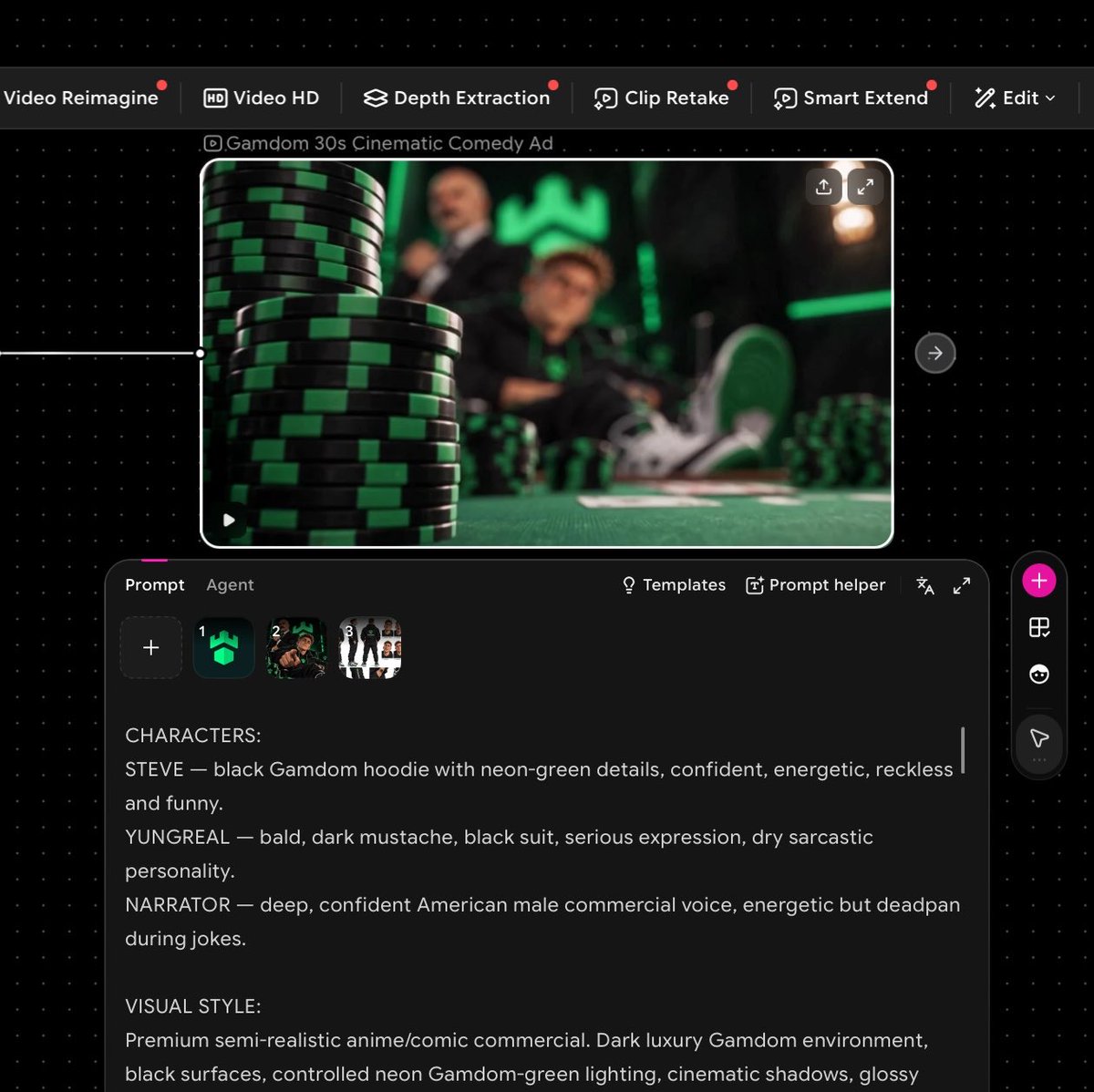
I made this entire video on my phone using just two tools: @OiiOii_AI for Seedance 2.5 @capcutapp for the final upscale and polish No PC. No complicated editing setup. And you can do it too. Here’s how: Start with the idea. I wanted a short cinematic GAMDOM ad, so I first mapped out the characters, setting, dialogue and overall direction. Create your reference images. This is important. Give each main character a clear reference image and include the correct brand/logo assets. Consistent references means more consistent generations. Open @OiiOii_AI and select Seedance 2.5. Upload your character and brand references, then use Omni Ref so Seedance has visual references to follow. Write ONE detailed prompt. Don’t just describe the scene. I included: timestamps + camera movements + character actions + dialogue + narrator + lighting + visual style + branding rules. For example: 0:00–0:04 Macro tracking shot across black-and-green casino chips. Rack focus reveals the characters behind the table… Then continue shot-by-shot until the full 30 seconds is mapped out. Lock your branding. For branded videos, explicitly tell the model to use the exact supplied logo and not redesign, distort or replace it. I repeated this rule throughout the prompt. Generate with Seedance 2.5. I used 16:9, 30 seconds and let Seedance handle the cinematic motion, dialogue scenes and camera work. Take the final generation into @capcutapp. This is where I upscale it and do the last bit of polishing sharpness, timing, audio levels and export quality. That’s basically it. Idea → references → detailed storyboard prompt → Seedance 2.5 on @OiiOii_AI → CapCut upscale → finished ad. All from my phone. The biggest difference isn’t having expensive equipment. It’s how detailed you are with the prompt and references.
Ver resultados

Tu prompt

I made this entire video on my phone using just two tools: @OiiOii_AI for Seedance 2.5 @capcutapp for the final upscale and polish No PC. No complicated editing setup. And you can do it too. Here’s how: Start with the idea. I wanted a short cinematic GAMDOM ad, so I first mapped out the characters, setting, dialogue and overall direction. Create your reference images. This is important. Give each main character a clear reference image and include the correct brand/logo assets. Consistent references means more consistent generations. Open @OiiOii_AI and select Seedance 2.5. Upload your character and brand references, then use Omni Ref so Seedance has visual references to follow. Write ONE detailed prompt. Don’t just describe the scene. I included: timestamps + camera movements + character actions + dialogue + narrator + lighting + visual style + branding rules. For example: 0:00–0:04 Macro tracking shot across black-and-green casino chips. Rack focus reveals the characters behind the table… Then continue shot-by-shot until the full 30 seconds is mapped out. Lock your branding. For branded videos, explicitly tell the model to use the exact supplied logo and not redesign, distort or replace it. I repeated this rule throughout the prompt. Generate with Seedance 2.5. I used 16:9, 30 seconds and let Seedance handle the cinematic motion, dialogue scenes and camera work. Take the final generation into @capcutapp. This is where I upscale it and do the last bit of polishing sharpness, timing, audio levels and export quality. That’s basically it. Idea → references → detailed storyboard prompt → Seedance 2.5 on @OiiOii_AI → CapCut upscale → finished ad. All from my phone. The biggest difference isn’t having expensive equipment. It’s how detailed you are with the prompt and references.

Guía de variables

GAMDOM

Nombre de la marca o producto a promocionar

En la sección de la idea inicial: 'I wanted a short cinematic GAMDOM ad'

Valor de ejemplo

GAMDOM

0:00–0:04 Macro tracking shot across black-and-green casino chips. Rack focus reveals the characters behind the table…

Descripción detallada de la toma incluyendo marcas de tiempo y cámara

En la sección del ejemplo de prompt

Valor de ejemplo

0:00–0:04 Macro tracking shot across black-and-green casino chips. Rack focus reveals the characters behind the table…

16:9

Relación de aspecto para el video generado

En los parámetros de generación: 'I used 16:9, 30 seconds'

Valor de ejemplo

16:9

30 seconds

Duración total del video

En los parámetros de generación: 'I used 16:9, 30 seconds'

Valor de ejemplo

30 seconds

Qué obtienes

  • Un flujo de trabajo móvil comprobado para redactar prompts de video consistentes y comerciales con IA.
  • Pautas para fijar la identidad de marca y mantener la consistencia de personajes usando anclajes visuales.
  • Un video cinemático final pulido en alta definición sin necesidad de software de escritorio complejo.

Casos de uso

  • Producción ágil desde el teléfono de anuncios y promociones de marca para redes sociales.
  • Creación rápida de storyboards animados y conceptos publicitarios para presentar a clientes.
  • Campañas de marketing independientes creadas íntegramente desde un dispositivo móvil.

Cómo usarlo

  • Define el concepto del anuncio, los personajes y prepara imágenes de referencia nítidas de los personajes y logotipos oficiales de la marca.
  • Abre la herramienta de generación de video (Seedance 2.5 en OiiOii_AI) y sube las referencias usando la opción de referencia visual (Omni Ref).
  • Escribe un prompt detallado estructurado como guion gráfico segundo a segundo con movimientos de cámara, acciones, diálogos e indicaciones fijas de marca.
  • Genera el video con la relación de aspecto y duración deseadas.
  • Importa el resultado a CapCut en el móvil para mejorar la resolución, afinar tiempos, balancear audio y exportar.

Prompts relacionados