Ir al contenido
ImágenesGratis

Diorama de figura coleccionable escapando del manga

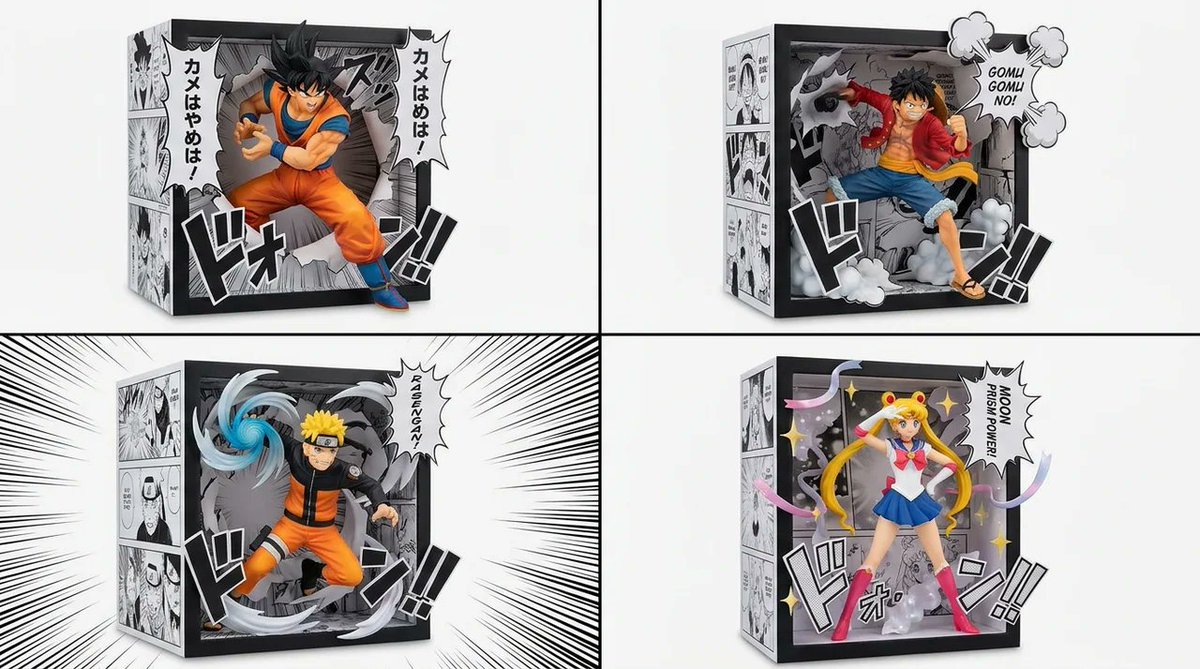
Plantilla de imagen que convierte cualquier sujeto en una figura coleccionable a todo color que escapa de un cubo de paneles de manga en blanco y negro, con páginas rasgadas, efectos de sonido audaces y líneas de velocidad, en una cuadrícula 2x2 limpia con relación 16:9.

Gemini

Ejemplos de la fuente

Estas imágenes provienen de la fuente original. DROPIDEA no ha probado estos ejemplos; los resultados dependen del modelo y los ajustes.

Listo para personalizar

Tu prompt

Inglés

Sustituye las variables en rojo por tus datos. Copia el texto completo y úsalo con tu agente preferido.

TXT MD Versión en inglés
2x2 grid, 16:9, do this for 4 famous mangas: INPUT: $ SUBJECT // Interpret the subject as a collectible figure escaping from its own illustrated source material. CORE = infer_identity($ SUBJECT) ACTION = infer_signature_action($ SUBJECT) POWER = infer_motion_or_emotional_force($ SUBJECT) PANELS = infer_story_panels($ SUBJECT) SFX = infer_sound_effects($ SUBJECT) // Build the physical manga shadowbox. SHADOWBOX = construct_corner_display( format = 'open-front cube / L-shaped manga diorama', walls = 'black-and-white manga panels', floor = 'comic page collage', frame = 'thin cardboard or museum display border', camera = 'clean product photography, three-quarter view' ) // Create the subject as the only full-color object. FIGURE = sculpt_collectible( subject = CORE, pose = ACTION, material = 'smooth painted resin / vinyl figure', proportions = 'stylized collectible, expressive, readable', color = 'subject-derived full-color palette', finish = 'matte toy-like paint with crisp details' ) // Make manga panels react to the figure. PAGE_BREAK = generate_breakout_effect( source = POWER, effects = [ 'torn panel borders', 'paper burst shapes', 'speed lines', 'impact clouds', 'floating speech bubbles', 'large comic sound effects', 'black ink motion marks' ], placement = 'behind and beneath the subject' ) RENDER: - $ SUBJECT becomes a colored physical figure emerging from a black-and-white manga panel cube. - The background, floor, and side walls are entirely monochrome manga pages. - The subject should look like it stepped out of the panels into 3D. - Include page tears, bold SFX lettering, speech bubbles, impact bursts, and speed lines. - Keep the composition clean like a collectible display product shot. - Avoid full-color backgrounds, messy realism, generic plastic toy scenes, and unreadable panel clutter.
Ver resultados

Tu prompt

2x2 grid, 16:9, do this for 4 famous mangas: INPUT: $ SUBJECT // Interpret the subject as a collectible figure escaping from its own illustrated source material. CORE = infer_identity($ SUBJECT) ACTION = infer_signature_action($ SUBJECT) POWER = infer_motion_or_emotional_force($ SUBJECT) PANELS = infer_story_panels($ SUBJECT) SFX = infer_sound_effects($ SUBJECT) // Build the physical manga shadowbox. SHADOWBOX = construct_corner_display( format = 'open-front cube / L-shaped manga diorama', walls = 'black-and-white manga panels', floor = 'comic page collage', frame = 'thin cardboard or museum display border', camera = 'clean product photography, three-quarter view' ) // Create the subject as the only full-color object. FIGURE = sculpt_collectible( subject = CORE, pose = ACTION, material = 'smooth painted resin / vinyl figure', proportions = 'stylized collectible, expressive, readable', color = 'subject-derived full-color palette', finish = 'matte toy-like paint with crisp details' ) // Make manga panels react to the figure. PAGE_BREAK = generate_breakout_effect( source = POWER, effects = [ 'torn panel borders', 'paper burst shapes', 'speed lines', 'impact clouds', 'floating speech bubbles', 'large comic sound effects', 'black ink motion marks' ], placement = 'behind and beneath the subject' ) RENDER: - $ SUBJECT becomes a colored physical figure emerging from a black-and-white manga panel cube. - The background, floor, and side walls are entirely monochrome manga pages. - The subject should look like it stepped out of the panels into 3D. - Include page tears, bold SFX lettering, speech bubbles, impact bursts, and speed lines. - Keep the composition clean like a collectible display product shot. - Avoid full-color backgrounds, messy realism, generic plastic toy scenes, and unreadable panel clutter.

Guía de variables

$ SUBJECT

El personaje o sujeto que se convierte en la figura coleccionable que escapa.

Después de "INPUT: " en la primera línea y dentro de infer_identity($ SUBJECT).

Valor de ejemplo

Naruto Uzumaki

'open-front cube / L-shaped manga diorama'

La forma de la caja de exposición física que rodea la figura.

El valor de format dentro de construct_corner_display.

Valor de ejemplo

'cubo de cristal abierto / diorama de manga en forma de L'

'smooth painted resin / vinyl figure'

El material y el acabado de la figura coleccionable.

El valor de material dentro de sculpt_collectible.

Valor de ejemplo

'resina pintada lisa / figura de vinilo'

Qué obtienes

  • Una cuadrícula 2x2 de imágenes de dioramas de manga en 16:9.
  • Una figura coleccionable a todo color del sujeto dentro de un cubo de paneles de manga en blanco y negro.
  • Efectos de escape: papel rasgado, líneas de velocidad, ráfagas de impacto, globos de diálogo y letras SFX llamativas.
  • Iluminación y composición limpia estilo fotografía de producto.

Casos de uso

  • Publicaciones en redes sociales para fans del manga y coleccionables.
  • Portadas o anuncios para tiendas de figuras y artículos coleccionables.
  • Ilustraciones para páginas de fans y comunidades de manga.
  • Material promocional para campañas de juguetes o estatuas inspiradas en el manga.

Cómo usarlo

  • Sustituye $ SUBJECT por un personaje famoso de manga o cualquier sujeto en ambas ubicaciones marcadas.
  • Si lo deseas, edita DISPLAY_FORMAT o FIGURE_MATERIAL para cambiar la forma de la caja o el material de la figura, manteniendo intactas las claves técnicas.
  • Conserva la cuadrícula 2x2, la relación 16:9 y la cantidad de 4 en la primera línea para generar la cuadrícula completa.
  • Pega la plantilla completa en tu herramienta de generación de imágenes y ejecútala para los 4 mangas famosos.
  • Revisa el resultado para confirmar que la figura es el único elemento con color sobre paneles monocromos, y vuelve a intentarlo si es necesario.

Prompts relacionados