Ir al contenido
ImágenesGratis

Prompt Cinematográfico de Video con Cuatro Planos Referencial

Plantilla de prompt para generar un video fotorrealista cinematográfico de 7.000 segundos con cuatro planos cronometrados y cortes duros limpios, recreando la actuación de un hombre en un jardín a partir de un video de referencia, con un ángulo de cámara de dron inspirado en una imagen de referencia. Requiere subir un video de actuación y una imagen de encuadre, y conserva el habla, el audio y la continuidad en cada corte.

Generación de imágenes

Ejemplos de la fuente

Estas imágenes provienen de la fuente original. DROPIDEA no ha probado estos ejemplos; los resultados dependen del modelo y los ajustes.

Listo para personalizar

Tu prompt

Inglés

Sustituye las variables en rojo por tus datos. Copia el texto completo y úsalo con tu agente preferido.

TXT MD Versión en inglés
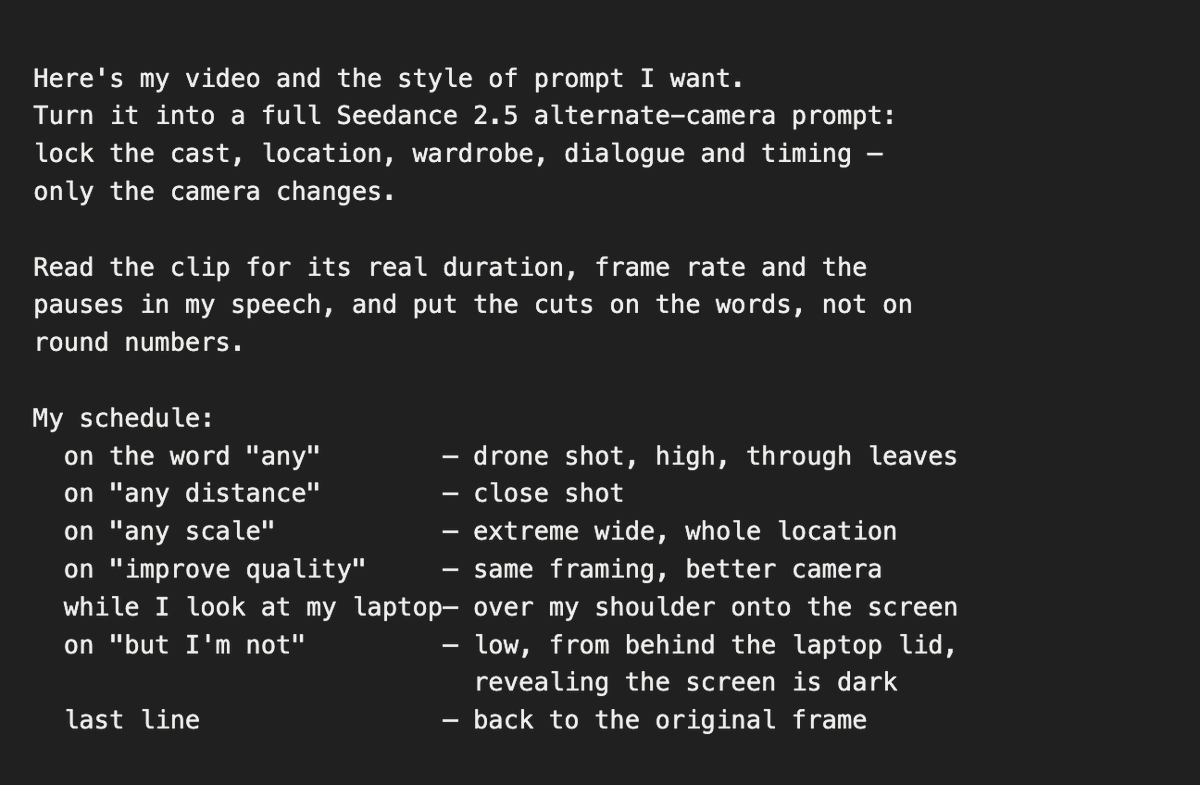
Give to Claude Code a short instruction like that (Image attached) and It will return a super detailed timestamps prompt like that. And you give this one to Seedance 2.5 with your video. That's all: REFERENCE INPUTS <<<video_1>>> = the reference performance video. <<<image_1>>> = a drone-framing reference still, used for camera vantage and composition only: an elevated, long-lens view looking down at a lone man at his table, shot through a mass of dark, heavily out-of-focus leaves and branches that frame the edges of the picture. Take nothing from it but that camera position and that foreground-foliage framing. Its location, its people, its props, its colour and its light must not appear in the output. The camera order and timestamps below follow the first 7.000 seconds of the supplied 13.334-second source clip, 1920x1080, 30 fps. MASTER DIRECTION Create one photorealistic, cinematic 7.000-second, 16:9 video containing the four shots below, separated by three clean hard cuts at the specified times. Recreate the same garden piece-to-camera as <<<video_1>>>, as if all four camera setups captured the same take simultaneously. The performance continues through every cut: output time t depicts the corresponding reference time t. Preserve the original speech, speed, gestures, pauses, gaze changes and action order, and keep the original voice and location audio in sync. Do not restart the performance when the camera changes. Keep every cut time exactly; end at 7.000 seconds without speeding up, freezing or adding a fade. CONTINUITY Use <<<video_1>>> for the single man on screen: his exact face, short dark cropped curly hair, full dark beard and mustache, age and build; his olive-green quarter-zip knit sweater with the small embroidered chest logo, the black t-shirt collar beneath it, the small black clip-on wireless microphone at that collar, and his light-blue jeans. Preserve the open dark grey laptop resting on his thighs, the light wooden garden bench with its thick cream cushions and matching cream-topped wooden side seat at frame right, the horizontal wooden slat fence, the tall bamboo at the left, the dense variegated broadleaf shrubs behind and right, the small potted plant beside the seat, and the soft, cool, overcast daylight with no harsh shadows. The camera may change position, height and screen direction; the man, the bench, the laptop and the planting retain their fixed physical positions in the garden. Match object states across every cut: laptop lid angle, hand positions and contacts, the microphone, the sweater's folds, and where his gaze is pointed at that instant. Do not add another person, a new prop, a second laptop, or any element absent from <<<video_1>>>. TIMECODED CAMERA SEQUENCE 01 | 0.000-1.302 seconds | Original frontal medium, locked off Begin exactly on the reference framing: a static eye-level medium shot, the man centred, seated on the bench with the open laptop on his lap, the bench arm and cushions filling the lower left, the cream side seat at frame right, bamboo and shrubs filling the background. He looks straight into the lens and begins the sentence, hands resting above the keyboard. No camera movement, matching the reference's tripod stillness and lens. This shot exists only to establish the original angle before it is replaced. 02 | 1.302-3.903 seconds | Elevated drone view, through the foliage Hard cut on the exact frame he says the word "any", so the new angle is already fully in place on that word. Move to a high drone-style camera hanging well above and in front of him, looking down at roughly 45-55 degrees, positioned as in <<<image_1>>>: a near foreground mass of dark, heavily out-of-focus leaves and branches crowds the top, the left edge and the lower corners, so the shot reads as though filmed from inside a tree canopy. He sits small in the clean centre gap, alone, still in the olive-green quarter-zip with the laptop open on his lap, and from this height the whole set is revealed around him: the light wooden bench, the cream cushions, the cream-topped side seat, the slat fence, the paving and the beds of bamboo and broadleaf shrubs. Long-lens compression, a slow gentle drone drift with a slight descent, no orbit and no snap zoom. He keeps speaking and gesturing toward the original camera position, which sits below and in front of him, so he never looks up into this camera. Keep the garden's own cool, soft, overcast daylight and its natural colour: do not borrow the warm hazy grade of <<<image_1>>>. 03 | 3.903-6.055 seconds | Close shot Hard cut to a tight eye-level close-up: head and the top of his shoulders only, shallow depth of field, the greenery behind him dissolved into soft blur. Cover the pause and the spoken line about distance, and hold through the short silence that follows it. Keep his facial proportions, beard and hairline exactly as the reference, with his gaze returning to the lens. Nearly fixed framing, no zoom. 04 | 6.055-7.000 seconds | Extreme wide, elevated Hard cut on the exact frame he begins the words "any scale", so the change of scale lands on the word. Move to a high, distant wide shot of the whole garden from above and behind the original camera: the man and the bench occupy a small portion of the lower-centre frame, with the full fence line, the bamboo, the paving and the surrounding planting revealed around them. He remains mid-sentence and mid-gesture at natural scale for this distance. Hold a stable, gently floating composition; no crash zoom. Hold this framing through the short silence after his line and end cleanly on it at 7.000 seconds, with no fade, no push in and no speed change. FINISH Preserve the reference's natural photographic texture, cool daylight colour, light direction, lens character, motion blur, focus behaviour and original audio through 7.000 seconds. Keep the drone-canopy framing only in shot 02. No additional cuts, transition morphs, invented actions, altered wardrobe, duplicated limbs or props, added titles, subtitles, captions, graphics, music, slow motion or speed changes. One finished 7.000-second video; one performance reference and one framing reference only.
Ver resultados

Tu prompt

Give to Claude Code a short instruction like that (Image attached) and It will return a super detailed timestamps prompt like that. And you give this one to Seedance 2.5 with your video. That's all: REFERENCE INPUTS <<<video_1>>> = the reference performance video. <<<image_1>>> = a drone-framing reference still, used for camera vantage and composition only: an elevated, long-lens view looking down at a lone man at his table, shot through a mass of dark, heavily out-of-focus leaves and branches that frame the edges of the picture. Take nothing from it but that camera position and that foreground-foliage framing. Its location, its people, its props, its colour and its light must not appear in the output. The camera order and timestamps below follow the first 7.000 seconds of the supplied 13.334-second source clip, 1920x1080, 30 fps. MASTER DIRECTION Create one photorealistic, cinematic 7.000-second, 16:9 video containing the four shots below, separated by three clean hard cuts at the specified times. Recreate the same garden piece-to-camera as <<<video_1>>>, as if all four camera setups captured the same take simultaneously. The performance continues through every cut: output time t depicts the corresponding reference time t. Preserve the original speech, speed, gestures, pauses, gaze changes and action order, and keep the original voice and location audio in sync. Do not restart the performance when the camera changes. Keep every cut time exactly; end at 7.000 seconds without speeding up, freezing or adding a fade. CONTINUITY Use <<<video_1>>> for the single man on screen: his exact face, short dark cropped curly hair, full dark beard and mustache, age and build; his olive-green quarter-zip knit sweater with the small embroidered chest logo, the black t-shirt collar beneath it, the small black clip-on wireless microphone at that collar, and his light-blue jeans. Preserve the open dark grey laptop resting on his thighs, the light wooden garden bench with its thick cream cushions and matching cream-topped wooden side seat at frame right, the horizontal wooden slat fence, the tall bamboo at the left, the dense variegated broadleaf shrubs behind and right, the small potted plant beside the seat, and the soft, cool, overcast daylight with no harsh shadows. The camera may change position, height and screen direction; the man, the bench, the laptop and the planting retain their fixed physical positions in the garden. Match object states across every cut: laptop lid angle, hand positions and contacts, the microphone, the sweater's folds, and where his gaze is pointed at that instant. Do not add another person, a new prop, a second laptop, or any element absent from <<<video_1>>>. TIMECODED CAMERA SEQUENCE 01 | 0.000-1.302 seconds | Original frontal medium, locked off Begin exactly on the reference framing: a static eye-level medium shot, the man centred, seated on the bench with the open laptop on his lap, the bench arm and cushions filling the lower left, the cream side seat at frame right, bamboo and shrubs filling the background. He looks straight into the lens and begins the sentence, hands resting above the keyboard. No camera movement, matching the reference's tripod stillness and lens. This shot exists only to establish the original angle before it is replaced. 02 | 1.302-3.903 seconds | Elevated drone view, through the foliage Hard cut on the exact frame he says the word "any", so the new angle is already fully in place on that word. Move to a high drone-style camera hanging well above and in front of him, looking down at roughly 45-55 degrees, positioned as in <<<image_1>>>: a near foreground mass of dark, heavily out-of-focus leaves and branches crowds the top, the left edge and the lower corners, so the shot reads as though filmed from inside a tree canopy. He sits small in the clean centre gap, alone, still in the olive-green quarter-zip with the laptop open on his lap, and from this height the whole set is revealed around him: the light wooden bench, the cream cushions, the cream-topped side seat, the slat fence, the paving and the beds of bamboo and broadleaf shrubs. Long-lens compression, a slow gentle drone drift with a slight descent, no orbit and no snap zoom. He keeps speaking and gesturing toward the original camera position, which sits below and in front of him, so he never looks up into this camera. Keep the garden's own cool, soft, overcast daylight and its natural colour: do not borrow the warm hazy grade of <<<image_1>>>. 03 | 3.903-6.055 seconds | Close shot Hard cut to a tight eye-level close-up: head and the top of his shoulders only, shallow depth of field, the greenery behind him dissolved into soft blur. Cover the pause and the spoken line about distance, and hold through the short silence that follows it. Keep his facial proportions, beard and hairline exactly as the reference, with his gaze returning to the lens. Nearly fixed framing, no zoom. 04 | 6.055-7.000 seconds | Extreme wide, elevated Hard cut on the exact frame he begins the words "any scale", so the change of scale lands on the word. Move to a high, distant wide shot of the whole garden from above and behind the original camera: the man and the bench occupy a small portion of the lower-centre frame, with the full fence line, the bamboo, the paving and the surrounding planting revealed around them. He remains mid-sentence and mid-gesture at natural scale for this distance. Hold a stable, gently floating composition; no crash zoom. Hold this framing through the short silence after his line and end cleanly on it at 7.000 seconds, with no fade, no push in and no speed change. FINISH Preserve the reference's natural photographic texture, cool daylight colour, light direction, lens character, motion blur, focus behaviour and original audio through 7.000 seconds. Keep the drone-canopy framing only in shot 02. No additional cuts, transition morphs, invented actions, altered wardrobe, duplicated limbs or props, added titles, subtitles, captions, graphics, music, slow motion or speed changes. One finished 7.000-second video; one performance reference and one framing reference only.

Guía de variables

<<<video_1>>>

El video de referencia de actuación del que se recrea la escena; debe subirse junto con el prompt.

El token <<<video_1>>> aparece cuatro veces en total: una en la sección de entradas de referencia, una en la dirección principal (la frase 'as in <<<video_1>>>') y dos en continuidad (primera y última oración). Reemplaza las cuatro por el mismo identificador de video.

Valor de ejemplo

Tu clip del hombre con sudadera verde oliva sentado en el banco del jardín hablando a cámara

<<<image_1>>>

Una imagen de referencia usada solo para el punto de vista de cámara de dron y la composición; su ubicación, color e iluminación deben ignorarse; debe subirse junto con el prompt.

El token <<<image_1>>> aparece tres veces en total: una en las entradas de referencia, una en el plano 02 de la secuencia de cámara cronometrada (la frase 'as in <<<image_1>>>') y una al final del plano 02 (la frase del grading cálido brumoso). Reemplaza las tres por el mismo identificador de imagen.

Valor de ejemplo

Una toma elevada con lente larga a través de follaje oscuro desenfocado que enmarca los bordes del cuadro

Qué obtienes

  • Un video fotorrealista cinematográfico de 7.000 segundos en 16:9 con cuatro planos separados por tres cortes duros limpios cronometrados con precisión
  • Una recreación fiel de la actuación de referencia: rostro, vestuario, mobiliario, vegetación y luz de día nublada y fría
  • Ángulos de cámara variados: medio frontal original, vista elevada desde el dosel del dron, primer plano con poca profundidad y plano general elevadísimo
  • El habla original, gestos, pausas y audio de ubicación sincronizados a través de cada corte

Casos de uso

  • Producir piezas habladas a cámara con estilo multiperspectiva a partir de una sola toma de referencia
  • Crear contenido educativo o promocional cinematográfico desde un único clip de actuación personal
  • Convertir un video estático simple en una escena compositivamente variada sin volver a rodar
  • Probar encuadres aéreos y cercanos sobre un discurso existente manteniendo el audio sincronizado

Cómo usarlo

  • Sube tu video de referencia de actuación (<<<video_1>>>) y tu imagen de encuadre de dron (<<<image_1>>>) a Claude Code con una instrucción breve pidiendo un prompt súper detallado con marcas de tiempo como esta plantilla.
  • Copia la plantilla completa y reemplaza <<<video_1>>> en sus cuatro ubicaciones por el identificador de tu video, sin modificar ninguna marca de tiempo ni número de plano.
  • Reemplaza <<<image_1>>> en sus tres ubicaciones por tu imagen de encuadre aéreo, manteniendo intactas las instrucciones que prohíben tomar su color e iluminación.
  • Entrega el prompt resultante a Seedance 2.5 junto con el mismo video de referencia como fuente de actuación y audio.
  • No alteres los números, las marcas de tiempo ni los ajustes de resolución (1920x1080, 30 fps), pues son restricciones técnicas que gobiernan el ritmo y los cortes.
  • Revisa la salida para confirmar que se respetan los cuatro tiempos de corte y que termina limpiamente en 7.000 segundos sin fundido ni cambio de velocidad.

Prompts relacionados