Ir al contenido
ImágenesGratis

Flujo de vídeo de jefe de fantasía oscura

Un flujo completo para crear un personaje jefe de fantasía oscura cinematográfico, construir su mundo, generar tomas coherentes en Seedance 2.5 y montarlas en CapCut, desde la hoja de personaje hasta la edición final.

Generación de imágenes

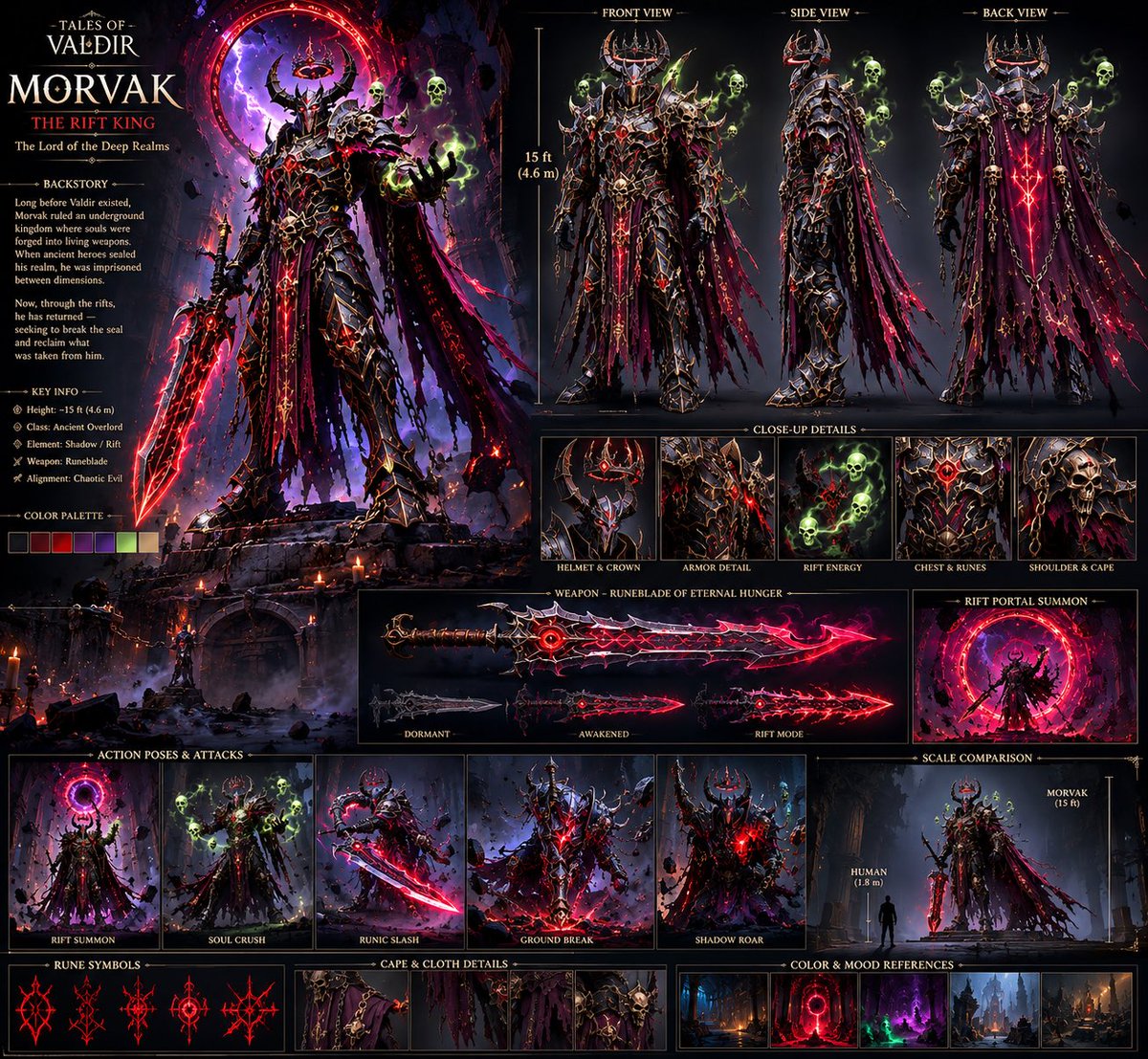
Ejemplos de la fuente

Estas imágenes provienen de la fuente original. DROPIDEA no ha probado estos ejemplos; los resultados dependen del modelo y los ajustes.

Listo para personalizar

Tu prompt

Inglés

Sustituye las variables en rojo por tus datos. Copia el texto completo y úsalo con tu agente preferido.

TXT MD Versión en inglés
“Create a cinematic dark-fantasy boss character sheet, front/side/back views, consistent 15-foot armored demon king, black rune-covered armor, horned crown, shredded purple cape, glowing red runes, spectral green skulls, massive cursed sword, highly detailed, realistic AAA game concept art.” 2. Build the World Once the character was locked, I created the environments around him instead of throwing him into random backgrounds. Cursed forests Ancient gothic cathedrals Underground kingdoms Massive Rift portals Deep realm cities Example prompt: “Vast underground gothic kingdom, colossal ruined cathedral, ancient stone bridges, hanging chains, burning braziers, red dimensional Rift portal glowing in the distance, dark blue atmospheric lighting, cinematic fantasy environment, realistic AAA game world.” 3. Generate the Shots in Seedance 2.5 This is where everything starts moving. I didn’t try to generate the entire movie in one prompt. I broke the story into individual cinematic shots and kept the character references consistent. Example: “MORVAK slowly walks toward the camera through a ruined cathedral, his shredded cape moving in the wind, red runes pulsing across his armor, green spectral skulls circling him, camera slowly pushes forward, cinematic lighting, dark fantasy, realistic movement, epic scale.” Then I’d generate different shots for: Establishing shots Character entrances Walking/attacking Rift activation Close-ups Power moments Final boss reveal 4. Compile Everything in CapCut After generating the clips: Import all the shots Arrange them according to the story Cut out weak frames Match the pacing Add transitions/sound design Adjust the overall look Then upscale the final edit for a cleaner output. The important part is that CapCut comes at the end. I don’t use editing to fix a bad generation. I build the character → build the world → generate controlled shots → then edit everything together. My biggest tip: Don’t start by asking AI to “make me a movie.” Build the world first. Build the character second. Then make the movie. That workflow alone can make your AI videos feel way more intentional and cinematic. Bizzy
Ver resultados

Tu prompt

“Create a cinematic dark-fantasy boss character sheet, front/side/back views, consistent 15-foot armored demon king, black rune-covered armor, horned crown, shredded purple cape, glowing red runes, spectral green skulls, massive cursed sword, highly detailed, realistic AAA game concept art.” 2. Build the World Once the character was locked, I created the environments around him instead of throwing him into random backgrounds. Cursed forests Ancient gothic cathedrals Underground kingdoms Massive Rift portals Deep realm cities Example prompt: “Vast underground gothic kingdom, colossal ruined cathedral, ancient stone bridges, hanging chains, burning braziers, red dimensional Rift portal glowing in the distance, dark blue atmospheric lighting, cinematic fantasy environment, realistic AAA game world.” 3. Generate the Shots in Seedance 2.5 This is where everything starts moving. I didn’t try to generate the entire movie in one prompt. I broke the story into individual cinematic shots and kept the character references consistent. Example: “MORVAK slowly walks toward the camera through a ruined cathedral, his shredded cape moving in the wind, red runes pulsing across his armor, green spectral skulls circling him, camera slowly pushes forward, cinematic lighting, dark fantasy, realistic movement, epic scale.” Then I’d generate different shots for: Establishing shots Character entrances Walking/attacking Rift activation Close-ups Power moments Final boss reveal 4. Compile Everything in CapCut After generating the clips: Import all the shots Arrange them according to the story Cut out weak frames Match the pacing Add transitions/sound design Adjust the overall look Then upscale the final edit for a cleaner output. The important part is that CapCut comes at the end. I don’t use editing to fix a bad generation. I build the character → build the world → generate controlled shots → then edit everything together. My biggest tip: Don’t start by asking AI to “make me a movie.” Build the world first. Build the character second. Then make the movie. That workflow alone can make your AI videos feel way more intentional and cinematic. Bizzy

Guía de variables

consistent 15-foot armored demon king, black rune-covered armor, horned crown, shredded purple cape

La apariencia y altura del jefe en la hoja de personaje; edítala como una unidad y mantén los detalles vinculados (runas rojas brillantes, capa desgarrada) coherentes en el prompt de toma.

Dentro del primer prompt citado, entre "front/side/back views," y "glowing red runes".

Valor de ejemplo

consistent 15-foot armored demon king, black rune-covered armor, horned crown, shredded purple cape

MORVAK

El nombre del jefe en el prompt de toma; reemplázalo en mayúsculas y mantenlo igual a tu referencia de personaje.

En el prompt de toma, sustituye la palabra antes de "slowly walks toward the camera".

Valor de ejemplo

MORVAK

Vast underground gothic kingdom, colossal ruined cathedral, ancient stone bridges, hanging chains, burning braziers, red dimensional Rift portal glowing in the distance

La ubicación y arquitectura del prompt de entorno; edítalo para cambiar el mundo conservando iluminación y estilo.

Prompt de entorno de ejemplo, desde "Vast" hasta "in the distance".

Valor de ejemplo

Vast underground gothic kingdom, colossal ruined cathedral, ancient stone bridges, hanging chains, burning braziers, red dimensional Rift portal glowing in the distance

MORVAK slowly walks toward the camera through a ruined cathedral, his shredded cape moving in the wind

El movimiento del jefe en el prompt de toma; cámbialo en cada toma manteniendo fijos los elementos de apariencia del personaje.

Prompt de toma tras "Example:", desde "MORVAK" hasta "in the wind".

Valor de ejemplo

MORVAK slowly walks toward the camera through a ruined cathedral, his shredded cape moving in the wind

Qué obtienes

  • Un prompt listo para una hoja de personaje de jefe con vistas frontal/lateral/posterior en estilo de arte conceptual realista de juegos AAA.
  • Un prompt de entorno cinematográfico para construir un mundo de fantasía oscura coherente.
  • Un prompt de toma cinematográfica con movimiento del personaje, cámara e iluminación.
  • Una lista de tipos de tomas necesarias para cubrir toda la historia.
  • Pasos claros de edición en CapCut desde el orden hasta el escalado.

Casos de uso

  • Crear un vídeo corto cinematográfico de jefe final estilo AAA.
  • Construir un mundo de fantasía oscura coherente para narrativa visual con IA.
  • Diseñar promociones de juegos o proyectos de fantasía.
  • Producir metraje cinematográfico con personaje consistente en varias tomas.

Cómo usarlo

  • Copia el prompt de la hoja de personaje (el primero) y ajusta la descripción del jefe si lo deseas, luego genera una imagen de referencia coherente.
  • Elige o adapta el prompt de entorno para construir un mundo coherente alrededor de tu personaje (bosques malditos, catedrales góticas, reinos subterráneos...).
  • En Seedance 2.5, genera las tomas una a una con el prompt de toma, manteniendo las referencias del personaje consistentes en todas las tomas (tomas de establecimiento, entradas, ataques, revelación del jefe...).
  • Importa los clips generados en CapCut, ordénalos según la historia, corta los fotogramas débiles y ajusta el ritmo.
  • Añade transiciones y diseño sonoro, ajusta el aspecto general y luego escala la edición final.

Prompts relacionados