Ir al contenido
ImágenesGratis

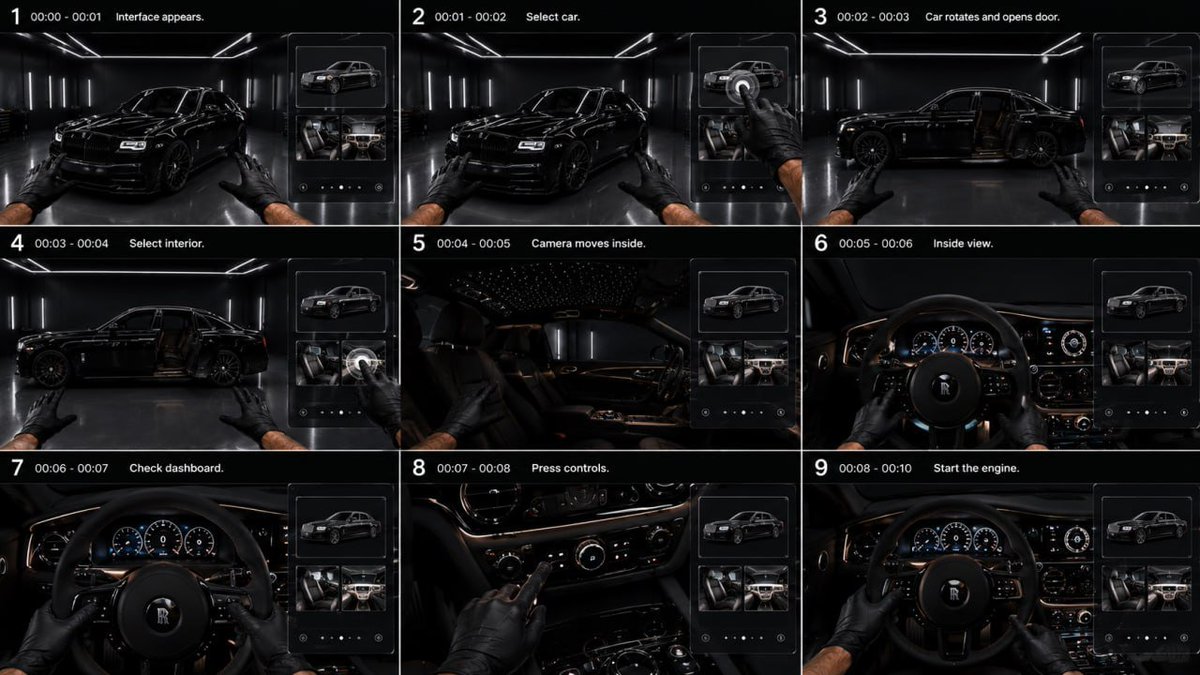
Storyboard de referencia para sedán negro de lujo

Prompt de comercial automotriz ultrarrealista de 10 segundos en 9:16: interfaz de cristal transparente para seleccionar exterior e interior, cámara que entra a la cabina en POV del conductor y arranque de motor estilo V12 en un garaje negro minimalista.

OpenAI

Ejemplos de la fuente

Estas imágenes provienen de la fuente original. DROPIDEA no ha probado estos ejemplos; los resultados dependen del modelo y los ajustes.

Listo para personalizar

Tu prompt

Inglés

Sustituye las variables en rojo por tus datos. Copia el texto completo y úsalo con tu agente preferido.

TXT MD Versión en inglés
GPT image 2 × Gemini Omni flash Prompt - REFERENCE STORYBOARD: Follow the uploaded storyboard strictly. Preserve the exact shot order, timing, first-person POV, vehicle identity, garage, interface design and interior continuity. DURATION: 10 sec. ASPECT RATIO: 9:16 STYLE: Ultra-realistic premium automotive commercial. Black minimalist luxury garage, glossy dark floor, thin white LED ceiling and wall lights, cinematic reflections, deep blacks. Same glossy black luxury sedan throughout. Two male hands in black gloves. Smooth natural movement. INTERFACE: Minimal transparent glass UI appears only on the right side. No text, no numbers, no logos. Show only high-quality 3D thumbnails: exterior car, front seats, dashboard/interior. Thin white outlines, subtle glass reflections. Interface must never cover the main vehicle. 0.0–1.0s — INTERFACE APPEARS First-person view facing the black sedan at a front three-quarter angle. A slim transparent interface smoothly slides in from the right. Top tile shows a 3D exterior model; lower tiles show luxury seats and dashboard. Both gloved hands remain visible. 1.0–2.0s — SELECT CAR Right hand reaches toward the interface and taps the exterior-car thumbnail with the index finger. A subtle circular selection pulse appears exactly under the fingertip. 2.0–3.0s — ROTATE + OPEN DOOR Immediately after the tap, the real car smoothly rotates in place into a perfect side profile. The rear-hinged driver door automatically opens outward, revealing the dark premium interior. Camera remains outside. 3.0–4.0s — SELECT INTERIOR Right hand taps the interior/dashboard thumbnail. The selected tile responds with a subtle glow. The open door remains visible. 4.0–5.0s — ENTER INTERIOR Camera smoothly moves forward through the open driver door into the cabin in one continuous motion. The interface fades away during the transition. No cut through solid geometry. 5.0–6.0s — DRIVER POV Camera settles naturally in the driver seat. First-person view of black leather steering wheel, premium analog/digital instrument cluster, polished metal controls, dark leather dashboard and subtle warm ambient lighting. Both gloved hands move onto the steering wheel. 6.0–7.0s — CHECK DASHBOARD Camera stays in driver POV. Hands slightly turn the steering wheel. Instrument cluster wakes up smoothly: gauges illuminate, needles perform a short startup sweep, dashboard ambient lighting activates. 7.0–8.2s — PRESS CONTROLS Right hand leaves the steering wheel and presses several physical center-console buttons sequentially. Each button reacts immediately with subtle illumination. Left hand remains on the wheel. Show tactile realistic finger contact. 8.2–10.0s — START ENGINE Right hand presses the engine START button once. Engine starts with a deep luxury V12-style rumble. Dashboard fully illuminates, gauge needles rise and stabilize. Subtle vibration passes through steering wheel and hands. Exterior lights softly reflect across the garage through the windshield. End on a centered first-person cockpit view with both hands on the steering wheel and engine running. STRICT: Exact sequence: interface → exterior selection → car rotates → door opens → interior selection → camera enters cabin → dashboard inspection → controls → engine start. No extra people. No floating hands. No duplicated fingers. No random camera cuts. No exterior redesign. No text or logos in UI. No interface after entering the cabin. Keep identical car, interior, hands and environment throughout. Realistic physical interactions and premium cinematic motion.
Ver resultados

Tu prompt

GPT image 2 × Gemini Omni flash Prompt - REFERENCE STORYBOARD: Follow the uploaded storyboard strictly. Preserve the exact shot order, timing, first-person POV, vehicle identity, garage, interface design and interior continuity. DURATION: 10 sec. ASPECT RATIO: 9:16 STYLE: Ultra-realistic premium automotive commercial. Black minimalist luxury garage, glossy dark floor, thin white LED ceiling and wall lights, cinematic reflections, deep blacks. Same glossy black luxury sedan throughout. Two male hands in black gloves. Smooth natural movement. INTERFACE: Minimal transparent glass UI appears only on the right side. No text, no numbers, no logos. Show only high-quality 3D thumbnails: exterior car, front seats, dashboard/interior. Thin white outlines, subtle glass reflections. Interface must never cover the main vehicle. 0.0–1.0s — INTERFACE APPEARS First-person view facing the black sedan at a front three-quarter angle. A slim transparent interface smoothly slides in from the right. Top tile shows a 3D exterior model; lower tiles show luxury seats and dashboard. Both gloved hands remain visible. 1.0–2.0s — SELECT CAR Right hand reaches toward the interface and taps the exterior-car thumbnail with the index finger. A subtle circular selection pulse appears exactly under the fingertip. 2.0–3.0s — ROTATE + OPEN DOOR Immediately after the tap, the real car smoothly rotates in place into a perfect side profile. The rear-hinged driver door automatically opens outward, revealing the dark premium interior. Camera remains outside. 3.0–4.0s — SELECT INTERIOR Right hand taps the interior/dashboard thumbnail. The selected tile responds with a subtle glow. The open door remains visible. 4.0–5.0s — ENTER INTERIOR Camera smoothly moves forward through the open driver door into the cabin in one continuous motion. The interface fades away during the transition. No cut through solid geometry. 5.0–6.0s — DRIVER POV Camera settles naturally in the driver seat. First-person view of black leather steering wheel, premium analog/digital instrument cluster, polished metal controls, dark leather dashboard and subtle warm ambient lighting. Both gloved hands move onto the steering wheel. 6.0–7.0s — CHECK DASHBOARD Camera stays in driver POV. Hands slightly turn the steering wheel. Instrument cluster wakes up smoothly: gauges illuminate, needles perform a short startup sweep, dashboard ambient lighting activates. 7.0–8.2s — PRESS CONTROLS Right hand leaves the steering wheel and presses several physical center-console buttons sequentially. Each button reacts immediately with subtle illumination. Left hand remains on the wheel. Show tactile realistic finger contact. 8.2–10.0s — START ENGINE Right hand presses the engine START button once. Engine starts with a deep luxury V12-style rumble. Dashboard fully illuminates, gauge needles rise and stabilize. Subtle vibration passes through steering wheel and hands. Exterior lights softly reflect across the garage through the windshield. End on a centered first-person cockpit view with both hands on the steering wheel and engine running. STRICT: Exact sequence: interface → exterior selection → car rotates → door opens → interior selection → camera enters cabin → dashboard inspection → controls → engine start. No extra people. No floating hands. No duplicated fingers. No random camera cuts. No exterior redesign. No text or logos in UI. No interface after entering the cabin. Keep identical car, interior, hands and environment throughout. Realistic physical interactions and premium cinematic motion.

Guía de variables

10 sec.

Duración total del vídeo en segundos; aparece una vez en la línea de duración.

Parte superior del prompt, justo tras "DURATION:" (árabe: «المدة:»).

Valor de ejemplo

15 sec.

9:16

Relación de aspecto vertical; consérvala en formato número:número.

La línea siguiente a la duración, tras "ASPECT RATIO:".

Valor de ejemplo

1:1

glossy black luxury sedan

Descripción del coche usado en todo el vídeo; puede cambiar color o clase manteniendo continuidad.

En la sección STYLE, dentro de "Same glossy black luxury sedan throughout."

Valor de ejemplo

SUV de lujo gris oscuro

Black minimalist luxury garage

Descripción del garaje/fondo que domina toda la escena.

Inicio de la sección STYLE, primera frase de descripción del entorno.

Valor de ejemplo

showroom blanco minimalista con luz tenue

black gloves

Color de los guantes en las dos manos masculinas visibles durante todo el vídeo.

En la sección STYLE, dentro de "Two male hands in black gloves."

Valor de ejemplo

guantes blancos

V12

Estilo de sonido del motor al arrancar en la toma final; conserva el código alfanumérico.

En la toma 8.2–10.0s — START ENGINE, dentro de "deep luxury V12-style rumble".

Valor de ejemplo

V8

Qué obtienes

  • Un vídeo comercial automotriz ultrarrealista de 10 segundos en 9:16
  • Secuencia exacta: interfaz de cristal → selección exterior → rotación del coche y apertura de puerta → selección interior → entrada de cámara → inspección del tablero → controles → arranque del motor
  • POV en primera persona con manos enguantadas e interacciones táctiles realistas en la interfaz y los botones
  • Interfaz transparente de miniaturas 3D sin texto ni logotipos, culminando con un rugido de motor estilo V12

Casos de uso

  • Anuncios verticales de coches de lujo para redes sociales como Reels y TikTok
  • Vitrinas interactivas de configuración de vehículos para salas de exhibición
  • Contenido de marketing para concesionarios y detallado automotriz interior/exterior
  • Estudios creativos de cortos en primera persona

Cómo usarlo

  • Sube el storyboard de referencia requerido antes de enviar, ya que el prompt exige seguirlo estrictamente.
  • Ajusta los valores editables como duración, relación de aspecto, descripción del coche, garaje, color de guantes y estilo de motor para tu campaña.
  • Copia el prompt completo y pégalo en tu herramienta de generación de vídeo compatible con GPT image 2 × Gemini Omni flash.
  • Mantén intactas todas las restricciones estrictas y los códigos de tiempo, pues garantizan el orden de tomas y la continuidad.
  • Envía y verifica que la interfaz aparezca solo a la derecha y que la cámara entre a la cabina sin cortes aleatorios.

Prompts relacionados