Ir al contenido
ImágenesGratis

Método de hoja de personajes de Midjourney desde imagen

Guía práctica para crear una hoja de personajes en Midjourney arrastrando una imagen desde la pestaña Create a Add to Prompt, añadiendo tu estilo, perfil y moodboard para mantener la estética, ingresando un prompt para una hoja de cuerpo completo en tres ángulos sobre fondo gris neutro, y corrigiendo el look de película vintage con un upscaler creativo y un nuevo prompt de detalle realista.

Midjourney

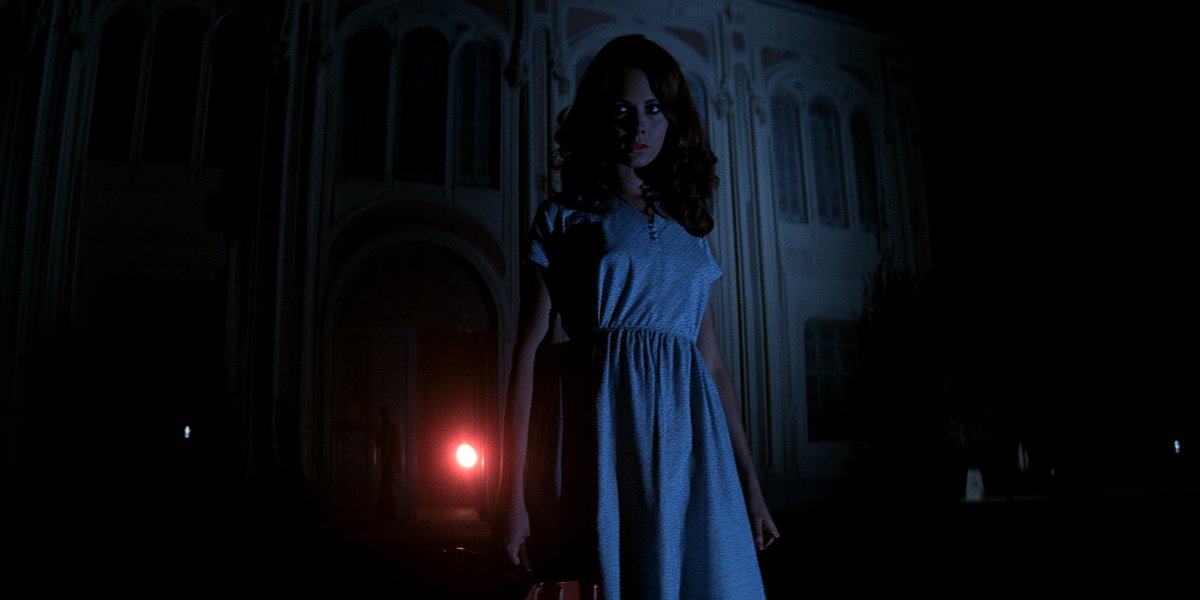
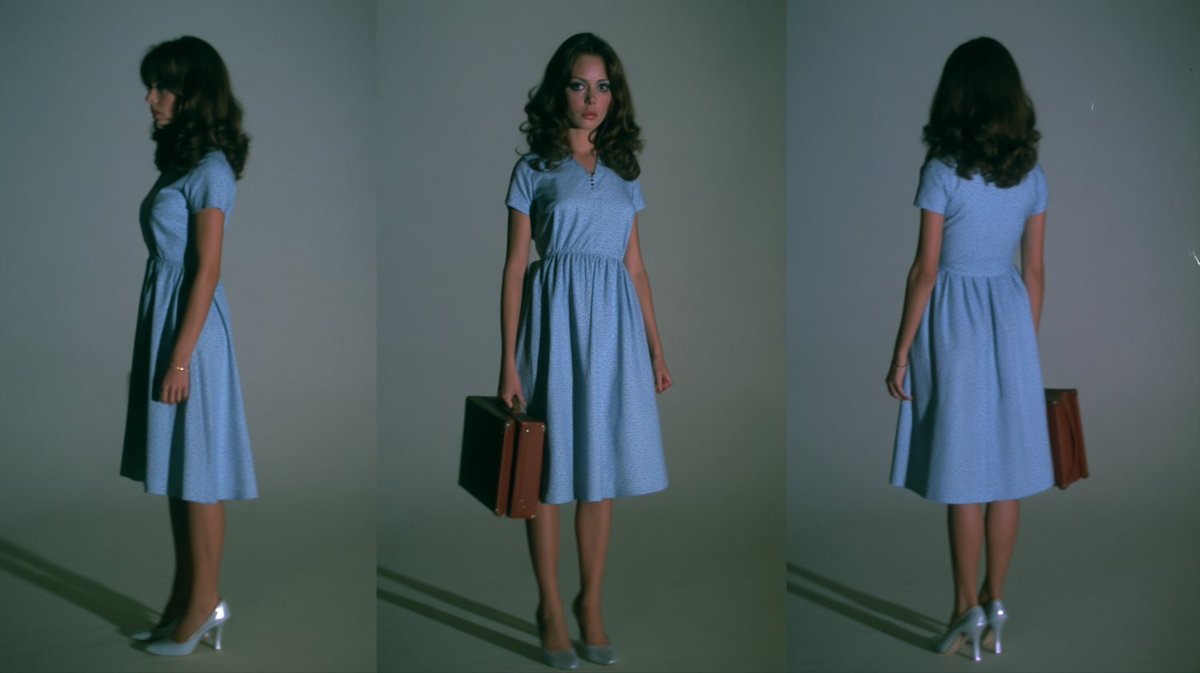
Ejemplos de la fuente

Estas imágenes provienen de la fuente original. DROPIDEA no ha probado estos ejemplos; los resultados dependen del modelo y los ajustes.
Listo para personalizar

Tu prompt

Inglés

Sustituye las variables en rojo por tus datos. Copia el texto completo y úsalo con tu agente preferido.

TXT MD Versión en inglés
Midjourney characater sheet method: drag an image from your Create tab into the prompt bar and drop it into Add to Prompt. If you used a specific style, profile, and moodboard, you might want to add them to the prompt to maintain the aesthetic (or choose a totally new to change things up!). Then enter a prompt along these lines (play around with order and wording): "studio photograph, create a character sheet of the woman - full form (head to feet), three angles (front, profile, rear), standing against a neutral gray background with soft lighting, detailed textures, natural skin tone and skin texture, it looks like a real photo, she's wearing a 1970s blue dress and heels" As you can see, the style, moodboard and profile I used to create the original has a very soft, vintage film look with some blur - that gets fixed by running it through a creative upscaler and prompting once again for "detailed textures, natural skin tone and skin texture, it looks like a real photo" (and you might want to tell it to maintain face details).
Ver resultados

Tu prompt

Midjourney characater sheet method: drag an image from your Create tab into the prompt bar and drop it into Add to Prompt. If you used a specific style, profile, and moodboard, you might want to add them to the prompt to maintain the aesthetic (or choose a totally new to change things up!). Then enter a prompt along these lines (play around with order and wording): "studio photograph, create a character sheet of the woman - full form (head to feet), three angles (front, profile, rear), standing against a neutral gray background with soft lighting, detailed textures, natural skin tone and skin texture, it looks like a real photo, she's wearing a 1970s blue dress and heels" As you can see, the style, moodboard and profile I used to create the original has a very soft, vintage film look with some blur - that gets fixed by running it through a creative upscaler and prompting once again for "detailed textures, natural skin tone and skin texture, it looks like a real photo" (and you might want to tell it to maintain face details).

Guía de variables

the woman

La descripción del personaje objetivo dentro del prompt citado; reemplázala por tu propio sujeto.

Dentro del prompt citado, en la frase: create a character sheet of the woman - full form (head to feet).

Valor de ejemplo

the man en lugar de the woman

1970s blue dress and heels

La descripción de ropa y accesorios; ajústala a tu solicitud conservando la estructura de la frase en inglés.

Dentro del prompt citado, al final de la frase: she's wearing a 1970s blue dress and heels.

Valor de ejemplo

she's wearing a red 1980s jumpsuit and boots

Qué obtienes

  • Una hoja de personaje de cuerpo completo, de la cabeza a los pies.
  • Tres ángulos del personaje: frontal, de perfil y trasero.
  • Fondo gris neutro con iluminación suave, tono de piel y textura naturales.
  • Una versión de alta resolución con texturas detalladas tras pasarla por el upscaler creativo.

Casos de uso

  • Crear referencias consistentes de personajes para cómics, libros e ilustraciones.
  • Diseñar personajes de moda y mostrar atuendos específicos desde varios ángulos.
  • Desarrollar hojas de referencia de personajes para juegos y animación.
  • Mantener una apariencia uniforme del personaje en proyectos de marketing y publicidad.

Cómo usarlo

  • Abre la pestaña Create en Midjourney y arrastra tu imagen original del personaje a la barra de prompts, soltándola en Add to Prompt.
  • Añade al prompt el estilo, perfil y moodboard usados en la imagen original para mantener la misma estética, o elige uno totalmente nuevo para cambiar el look.
  • Ingresa el prompt citado de la plantilla, ajustando la descripción del sujeto y del vestuario según tus necesidades y conservando las frases de detalle realista.
  • Experimenta con el orden y la redacción del prompt hasta obtener la mejor hoja de personaje.
  • Escala la imagen con un upscaler creativo y vuelve a pedir "detailed textures, natural skin tone and skin texture, it looks like a real photo".
  • Pide que mantenga los detalles del rostro durante el escalado para que los rasgos del personaje se conserven.

Prompts relacionados