Ir al contenido
ImágenesGratis

Render de vídeo de astronauta y asteroides en Seedance 2.0

Un prompt de vídeo de una sola toma que guía a Seedance 2.0 para usar un vídeo de referencia para el movimiento de cámara e image1 como primer fotograma, sustituyendo el cuadrado verde por un astronauta flotante entre asteroides con iluminación cinematográfica a contraluz.

Generación de imágenes

Ejemplos de la fuente

Estas imágenes provienen de la fuente original. DROPIDEA no ha probado estos ejemplos; los resultados dependen del modelo y los ajustes.

Listo para personalizar

Tu prompt

Inglés

Sustituye las variables en rojo por tus datos. Copia el texto completo y úsalo con tu agente preferido.

TXT MD Versión en inglés
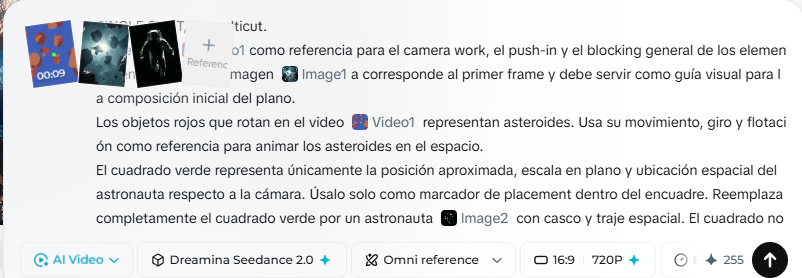
7. Render the video in Seedance 2.0 Use the restylized image of the first frame and the video with the mask so that Seedance 2.0 generates the complete clip. After playing with chatgpt and improving the prompt this is the one I used: SINGLE SHOT, no multicut. Use the video as a reference for the camera work, the push-in and the general blocking of the elements in the scene. The image1 corresponds to the first frame and must serve as a visual guide for the initial composition of the shot. The red objects that rotate in the video represent asteroids. Use their movement, spin and flotation as a reference to animate the asteroids in space. The green square represents only the approximate position, scale in shot and spatial location of the astronaut regarding the camera. Use it only as a placement marker inside the framing. Completely replace the green square with an astronaut of image1 with helmet and spacesuit. The square must not appear in the final result. It must serve solely as a reference of where to place the astronaut in the scene. The scene shows asteroids floating in space while the camera does a push-in towards an astronaut with helmet and spacesuit. The astronaut floats in zero gravity and occupies the position marked by the green square, with a very subtle, slow and controlled body animation. The astronaut does not perform effusive or agitated movements. Remains floating with very slow movements, almost suspended, maintaining a sensation of passive drift in space. The arms move only very slightly, with soft gestures as if they were displacing backwards by inertia or trying to stabilize with minimal effort. The body remains calm, with slow and natural micro-adjustments of balance in zero gravity. The legs remain completely still during the whole video. There is no leg movement whatsoever. All the body animation must concentrate solely on small, slow and subtle movements of the arms. The head also moves with a lot of containment. If there is nervousness, it must be felt only in a subtle way, through small slow gestures, not through abrupt movements. The general sensation must be of an astronaut lost and floating adrift, but expressed with a minimal, slow and credible performance. Very important: maintain the same relative position in frame, scale in shot and relationship with the camera indicated by the green square, but substitute that marker with the complete astronaut. The green square is only a location guide and must disappear completely in the final render. Important: backlit illumination, not frontlit. An intense light from the background illuminates the scene, creating silhouettes, strong rim light on the asteroids and the astronaut, dramatic spatial glow and cinematic contrast. Photorealistic style, cinematic, with a background of stars, spatial depth and credible flotation movement.
Ver resultados

Tu prompt

7. Render the video in Seedance 2.0 Use the restylized image of the first frame and the video with the mask so that Seedance 2.0 generates the complete clip. After playing with chatgpt and improving the prompt this is the one I used: SINGLE SHOT, no multicut. Use the video as a reference for the camera work, the push-in and the general blocking of the elements in the scene. The image1 corresponds to the first frame and must serve as a visual guide for the initial composition of the shot. The red objects that rotate in the video represent asteroids. Use their movement, spin and flotation as a reference to animate the asteroids in space. The green square represents only the approximate position, scale in shot and spatial location of the astronaut regarding the camera. Use it only as a placement marker inside the framing. Completely replace the green square with an astronaut of image1 with helmet and spacesuit. The square must not appear in the final result. It must serve solely as a reference of where to place the astronaut in the scene. The scene shows asteroids floating in space while the camera does a push-in towards an astronaut with helmet and spacesuit. The astronaut floats in zero gravity and occupies the position marked by the green square, with a very subtle, slow and controlled body animation. The astronaut does not perform effusive or agitated movements. Remains floating with very slow movements, almost suspended, maintaining a sensation of passive drift in space. The arms move only very slightly, with soft gestures as if they were displacing backwards by inertia or trying to stabilize with minimal effort. The body remains calm, with slow and natural micro-adjustments of balance in zero gravity. The legs remain completely still during the whole video. There is no leg movement whatsoever. All the body animation must concentrate solely on small, slow and subtle movements of the arms. The head also moves with a lot of containment. If there is nervousness, it must be felt only in a subtle way, through small slow gestures, not through abrupt movements. The general sensation must be of an astronaut lost and floating adrift, but expressed with a minimal, slow and credible performance. Very important: maintain the same relative position in frame, scale in shot and relationship with the camera indicated by the green square, but substitute that marker with the complete astronaut. The green square is only a location guide and must disappear completely in the final render. Important: backlit illumination, not frontlit. An intense light from the background illuminates the scene, creating silhouettes, strong rim light on the asteroids and the astronaut, dramatic spatial glow and cinematic contrast. Photorealistic style, cinematic, with a background of stars, spatial depth and credible flotation movement.

Guía de variables

astronaut

El sujeto humano que sustituye al cuadrado verde; edita el texto para cambiar el astronauta por otro sujeto.

Cada mención del astronauta en los párrafos del cuadrado verde, la descripción de la escena y el movimiento.

Valor de ejemplo

Un robot de exploración espacial en lugar del astronauta

green square

El color del marcador de posición en el vídeo de referencia.

Cada mención del cuadrado verde en la plantilla.

Valor de ejemplo

El cuadrado azul

red objects

El color de los objetos giratorios que representan los asteroides.

El párrafo de los objetos rojos en la plantilla.

Valor de ejemplo

Los objetos naranjas que giran en el vídeo

Qué obtienes

  • Un clip de vídeo continuo de una sola toma que comienza desde image1 como primer fotograma.
  • Un astronauta flotando lentamente en la posición del cuadrado verde con el cuadrado eliminado por completo.
  • Asteroides girando y flotando inspirados en el movimiento de los objetos rojos del vídeo de referencia.
  • Iluminación cinematográfica a contraluz con siluetas, luz de contorno intensa y contraste dramático.
  • Un movimiento de cámara de acercamiento (push-in) acorde al vídeo de referencia.

Casos de uso

  • Escenas espaciales cinematográficas realistas para montajes o anuncios.
  • Pruebas de movimiento de cámara y composición antes del rodaje real.
  • Contenido para redes sociales sobre espacio y exploración.
  • Secuencias de apertura para cortometrajes o clips promocionales.

Cómo usarlo

  • Reestiliza el primer fotograma del vídeo con el aspecto deseado usando una herramienta de edición antes del render.
  • Prepara el vídeo de referencia con la máscara donde se ven el cuadrado verde, la posición del astronauta y los objetos rojos giratorios.
  • Copia el prompt en árabe de arriba y ajusta los valores editables como el sujeto y los colores si es necesario.
  • Sube image1 (el primer fotograma reestilizado) y el vídeo de referencia a Seedance 2.0 como referencias obligatorias antes de generar.
  • Pega el prompt en el campo de texto y ejecuta el render, verificando que el resultado sea una sola toma sin cortes múltiples.

Prompts relacionados