Ir al contenido
ImágenesGratis

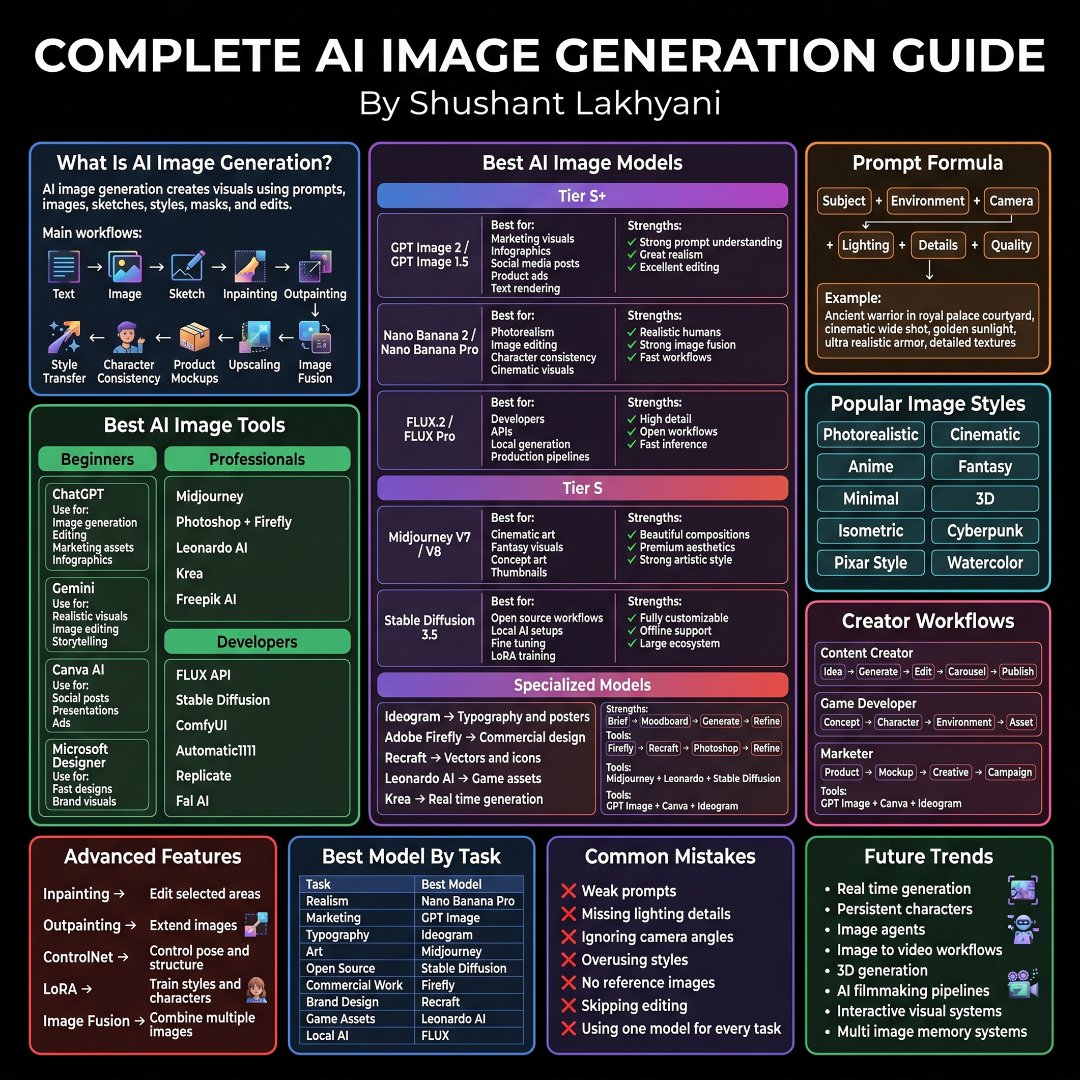
La guía completa de generación de imágenes con IA

Un mapa de conocimiento completo que cubre los fundamentos de la generación de imágenes con IA, los mejores modelos como GPT Image, Nano Banana, FLUX y Midjourney, la ingeniería de prompts, estilos populares, herramientas, el stack de desarrolladores, funciones avanzadas, flujos de creadores, errores comunes, tendencias futuras y maestría.

OpenAI

Ejemplos de la fuente

Estas imágenes provienen de la fuente original. DROPIDEA no ha probado estos ejemplos; los resultados dependen del modelo y los ajustes.

Listo para personalizar

Tu prompt

Inglés

Sustituye las variables en rojo por tus datos. Copia el texto completo y úsalo con tu agente preferido.

TXT MD Versión en inglés
Most people blame the AI. The real problem is they never learned the workflow Here's the complete AI image generation guide everyone should bookmark. 📂 AI Image Generation ┃ ┣ 📂 Fundamentals ┃ ┣ 📂 What Is AI Image Generation ┃ ┣ 📂 Text To Image ┃ ┣ 📂 Image Editing ┃ ┣ 📂 Sketch To Image ┃ ┣ 📂 Inpainting ┃ ┣ 📂 Outpainting ┃ ┣ 📂 Style Transfer ┃ ┣ 📂 Character Consistency ┃ ┣ 📂 Product Mockups ┃ ┣ 📂 Upscaling ┃ ┗ 📂 Image Fusion ┃ ┣ 📂 Best AI Models ┃ ┣ 📂 GPT Image 2 ┃ ┣ 📂 GPT Image 1.5 ┃ ┣ 📂 Nano Banana 2 ┃ ┣ 📂 Nano Banana Pro ┃ ┣ 📂 FLUX.2 ┃ ┣ 📂 FLUX Pro ┃ ┣ 📂 Midjourney V7 ┃ ┣ 📂 Midjourney V8 ┃ ┗ 📂 Stable Diffusion 3.5 ┃ ┣ 📂 Model Selection ┃ ┣ 📂 Marketing Visuals ┃ ┣ 📂 Social Media Posts ┃ ┣ 📂 Product Ads ┃ ┣ 📂 Photorealism ┃ ┣ 📂 Character Design ┃ ┣ 📂 Cinematic Visuals ┃ ┣ 📂 Concept Art ┃ ┣ 📂 Thumbnails ┃ ┣ 📂 Open Source Workflows ┃ ┗ 📂 Local Generation ┃ ┣ 📂 Prompt Engineering ┃ ┣ 📂 Subject ┃ ┣ 📂 Environment ┃ ┣ 📂 Camera ┃ ┣ 📂 Lighting ┃ ┣ 📂 Details ┃ ┣ 📂 Quality ┃ ┣ 📂 Composition ┃ ┣ 📂 Mood ┃ ┣ 📂 Textures ┃ ┗ 📂 Style Direction ┃ ┣ 📂 Popular Styles ┃ ┣ 📂 Photorealistic ┃ ┣ 📂 Cinematic ┃ ┣ 📂 Anime ┃ ┣ 📂 Fantasy ┃ ┣ 📂 Minimal ┃ ┣ 📂 3D ┃ ┣ 📂 Isometric ┃ ┣ 📂 Cyberpunk ┃ ┣ 📂 Pixar Style ┃ ┗ 📂 Watercolor ┃ ┣ 📂 AI Tools ┃ ┣ 📂 ChatGPT ┃ ┣ 📂 Gemini ┃ ┣ 📂 Canva AI ┃ ┣ 📂 Microsoft Designer ┃ ┣ 📂 Midjourney ┃ ┣ 📂 Photoshop Firefly ┃ ┣ 📂 Leonardo AI ┃ ┣ 📂 Krea ┃ ┣ 📂 Freepik AI ┃ ┗ 📂 FLUX Ecosystem ┃ ┣ 📂 Developer Stack ┃ ┣ 📂 FLUX API ┃ ┣ 📂 Stable Diffusion ┃ ┣ 📂 ComfyUI ┃ ┣ 📂 Automatic1111 ┃ ┣ 📂 Replicate ┃ ┗ 📂 Fal AI ┃ ┣ 📂 Specialized Models ┃ ┣ 📂 Ideogram ┃ ┣ 📂 Adobe Firefly ┃ ┣ 📂 Recraft ┃ ┣ 📂 Leonardo AI ┃ ┣ 📂 Krea ┃ ┗ 📂 Typography Generation ┃ ┣ 📂 Advanced Features ┃ ┣ 📂 Inpainting ┃ ┣ 📂 Outpainting ┃ ┣ 📂 ControlNet ┃ ┣ 📂 LoRA Training ┃ ┣ 📂 Pose Control ┃ ┣ 📂 Structure Control ┃ ┣ 📂 Character Training ┃ ┗ 📂 Multi Image Fusion ┃ ┣ 📂 Best Models By Task ┃ ┣ 📂 Realism → Nano Banana Pro ┃ ┣ 📂 Marketing → GPT Image ┃ ┣ 📂 Typography → Ideogram ┃ ┣ 📂 Art → Midjourney ┃ ┣ 📂 Open Source → Stable Diffusion ┃ ┣ 📂 Commercial Work → Firefly ┃ ┣ 📂 Brand Design → Recraft ┃ ┣ 📂 Game Assets → Leonardo AI ┃ ┗ 📂 Local AI → FLUX ┃ ┣ 📂 Creator Workflows ┃ ┣ 📂 Idea Generation ┃ ┣ 📂 Character Creation ┃ ┣ 📂 Environment Design ┃ ┣ 📂 Product Mockups ┃ ┣ 📂 Creative Assets ┃ ┣ 📂 Carousels ┃ ┣ 📂 Campaign Visuals ┃ ┣ 📂 Publishing ┃ ┗ 📂 Content Production ┃ ┣ 📂 Common Mistakes ┃ ┣ 📂 Weak Prompts ┃ ┣ 📂 Missing Lighting Details ┃ ┣ 📂 Ignoring Camera Angles ┃ ┣ 📂 Overusing Styles ┃ ┣ 📂 No Reference Images ┃ ┣ 📂 Skipping Editing ┃ ┗ 📂 Using One Model For Everything ┃ ┣ 📂 Future Trends ┃ ┣ 📂 Real Time Generation ┃ ┣ 📂 Persistent Characters ┃ ┣ 📂 Image Agents ┃ ┣ 📂 Image To Video ┃ ┣ 📂 3D Generation ┃ ┣ 📂 AI Filmmaking ┃ ┣ 📂 Interactive Visual Systems ┃ ┗ 📂 Multi Image Memory Systems ┃ ┗ 📂 Mastery ┣ 📂 Learn Prompting ┣ 📂 Pick The Right Model ┣ 📂 Build Repeatable Workflows ┣ 📂 Edit Outputs ┣ 📂 Create Consistent Assets ┗ 📂 Scale Content Production
Ver resultados

Tu prompt

Most people blame the AI. The real problem is they never learned the workflow Here's the complete AI image generation guide everyone should bookmark. 📂 AI Image Generation ┃ ┣ 📂 Fundamentals ┃ ┣ 📂 What Is AI Image Generation ┃ ┣ 📂 Text To Image ┃ ┣ 📂 Image Editing ┃ ┣ 📂 Sketch To Image ┃ ┣ 📂 Inpainting ┃ ┣ 📂 Outpainting ┃ ┣ 📂 Style Transfer ┃ ┣ 📂 Character Consistency ┃ ┣ 📂 Product Mockups ┃ ┣ 📂 Upscaling ┃ ┗ 📂 Image Fusion ┃ ┣ 📂 Best AI Models ┃ ┣ 📂 GPT Image 2 ┃ ┣ 📂 GPT Image 1.5 ┃ ┣ 📂 Nano Banana 2 ┃ ┣ 📂 Nano Banana Pro ┃ ┣ 📂 FLUX.2 ┃ ┣ 📂 FLUX Pro ┃ ┣ 📂 Midjourney V7 ┃ ┣ 📂 Midjourney V8 ┃ ┗ 📂 Stable Diffusion 3.5 ┃ ┣ 📂 Model Selection ┃ ┣ 📂 Marketing Visuals ┃ ┣ 📂 Social Media Posts ┃ ┣ 📂 Product Ads ┃ ┣ 📂 Photorealism ┃ ┣ 📂 Character Design ┃ ┣ 📂 Cinematic Visuals ┃ ┣ 📂 Concept Art ┃ ┣ 📂 Thumbnails ┃ ┣ 📂 Open Source Workflows ┃ ┗ 📂 Local Generation ┃ ┣ 📂 Prompt Engineering ┃ ┣ 📂 Subject ┃ ┣ 📂 Environment ┃ ┣ 📂 Camera ┃ ┣ 📂 Lighting ┃ ┣ 📂 Details ┃ ┣ 📂 Quality ┃ ┣ 📂 Composition ┃ ┣ 📂 Mood ┃ ┣ 📂 Textures ┃ ┗ 📂 Style Direction ┃ ┣ 📂 Popular Styles ┃ ┣ 📂 Photorealistic ┃ ┣ 📂 Cinematic ┃ ┣ 📂 Anime ┃ ┣ 📂 Fantasy ┃ ┣ 📂 Minimal ┃ ┣ 📂 3D ┃ ┣ 📂 Isometric ┃ ┣ 📂 Cyberpunk ┃ ┣ 📂 Pixar Style ┃ ┗ 📂 Watercolor ┃ ┣ 📂 AI Tools ┃ ┣ 📂 ChatGPT ┃ ┣ 📂 Gemini ┃ ┣ 📂 Canva AI ┃ ┣ 📂 Microsoft Designer ┃ ┣ 📂 Midjourney ┃ ┣ 📂 Photoshop Firefly ┃ ┣ 📂 Leonardo AI ┃ ┣ 📂 Krea ┃ ┣ 📂 Freepik AI ┃ ┗ 📂 FLUX Ecosystem ┃ ┣ 📂 Developer Stack ┃ ┣ 📂 FLUX API ┃ ┣ 📂 Stable Diffusion ┃ ┣ 📂 ComfyUI ┃ ┣ 📂 Automatic1111 ┃ ┣ 📂 Replicate ┃ ┗ 📂 Fal AI ┃ ┣ 📂 Specialized Models ┃ ┣ 📂 Ideogram ┃ ┣ 📂 Adobe Firefly ┃ ┣ 📂 Recraft ┃ ┣ 📂 Leonardo AI ┃ ┣ 📂 Krea ┃ ┗ 📂 Typography Generation ┃ ┣ 📂 Advanced Features ┃ ┣ 📂 Inpainting ┃ ┣ 📂 Outpainting ┃ ┣ 📂 ControlNet ┃ ┣ 📂 LoRA Training ┃ ┣ 📂 Pose Control ┃ ┣ 📂 Structure Control ┃ ┣ 📂 Character Training ┃ ┗ 📂 Multi Image Fusion ┃ ┣ 📂 Best Models By Task ┃ ┣ 📂 Realism → Nano Banana Pro ┃ ┣ 📂 Marketing → GPT Image ┃ ┣ 📂 Typography → Ideogram ┃ ┣ 📂 Art → Midjourney ┃ ┣ 📂 Open Source → Stable Diffusion ┃ ┣ 📂 Commercial Work → Firefly ┃ ┣ 📂 Brand Design → Recraft ┃ ┣ 📂 Game Assets → Leonardo AI ┃ ┗ 📂 Local AI → FLUX ┃ ┣ 📂 Creator Workflows ┃ ┣ 📂 Idea Generation ┃ ┣ 📂 Character Creation ┃ ┣ 📂 Environment Design ┃ ┣ 📂 Product Mockups ┃ ┣ 📂 Creative Assets ┃ ┣ 📂 Carousels ┃ ┣ 📂 Campaign Visuals ┃ ┣ 📂 Publishing ┃ ┗ 📂 Content Production ┃ ┣ 📂 Common Mistakes ┃ ┣ 📂 Weak Prompts ┃ ┣ 📂 Missing Lighting Details ┃ ┣ 📂 Ignoring Camera Angles ┃ ┣ 📂 Overusing Styles ┃ ┣ 📂 No Reference Images ┃ ┣ 📂 Skipping Editing ┃ ┗ 📂 Using One Model For Everything ┃ ┣ 📂 Future Trends ┃ ┣ 📂 Real Time Generation ┃ ┣ 📂 Persistent Characters ┃ ┣ 📂 Image Agents ┃ ┣ 📂 Image To Video ┃ ┣ 📂 3D Generation ┃ ┣ 📂 AI Filmmaking ┃ ┣ 📂 Interactive Visual Systems ┃ ┗ 📂 Multi Image Memory Systems ┃ ┗ 📂 Mastery ┣ 📂 Learn Prompting ┣ 📂 Pick The Right Model ┣ 📂 Build Repeatable Workflows ┣ 📂 Edit Outputs ┣ 📂 Create Consistent Assets ┗ 📂 Scale Content Production

Qué obtienes

  • Un árbol de conocimiento organizado que cubre la generación de imágenes con IA desde los fundamentos hasta la maestría.
  • Una lista curada de los mejores modelos, herramientas y stack de desarrolladores con los nombres técnicos preservados.
  • Orientación para seleccionar el modelo adecuado según el tipo de tarea.
  • Secciones dedicadas a errores comunes y tendencias futuras.

Casos de uso

  • Referencia para guardar como marcador para creadores y marketers que aprenden flujos de IA.
  • Hoja de ruta de aprendizaje para principiantes que avanzan de lo básico a técnicas como ControlNet y entrenamiento de LoRA.
  • Guía rápida de selección de modelos para proyectos de diseño, marketing y producción de contenido.
  • Contenido educativo para publicaciones en redes sociales o cursos de formación.

Cómo usarlo

  • Comienza con la sección de Fundamentos para entender conceptos clave como texto a imagen, edición de imágenes y transferencia de estilo.
  • Usa la sección de Selección de Modelo para elegir el modelo adecuado para tu tarea, como fotorrealismo o anuncios de producto.
  • Estudia Ingeniería de Prompts para crear prompts sólidos que cubran sujeto, entorno, cámara, iluminación y composición.
  • Consulta Mejores Modelos por Tarea para asignar la herramienta correcta a cada objetivo, p. ej. Ideogram para tipografía y Midjourney para arte.
  • Evita errores comunes como prompts débiles, falta de imágenes de referencia y abuso de estilos.
  • Sigue la ruta de Maestría construyendo flujos repetibles, editando resultados y escalando la producción de contenido.

Prompts relacionados