Ir al contenido
ImágenesGratis

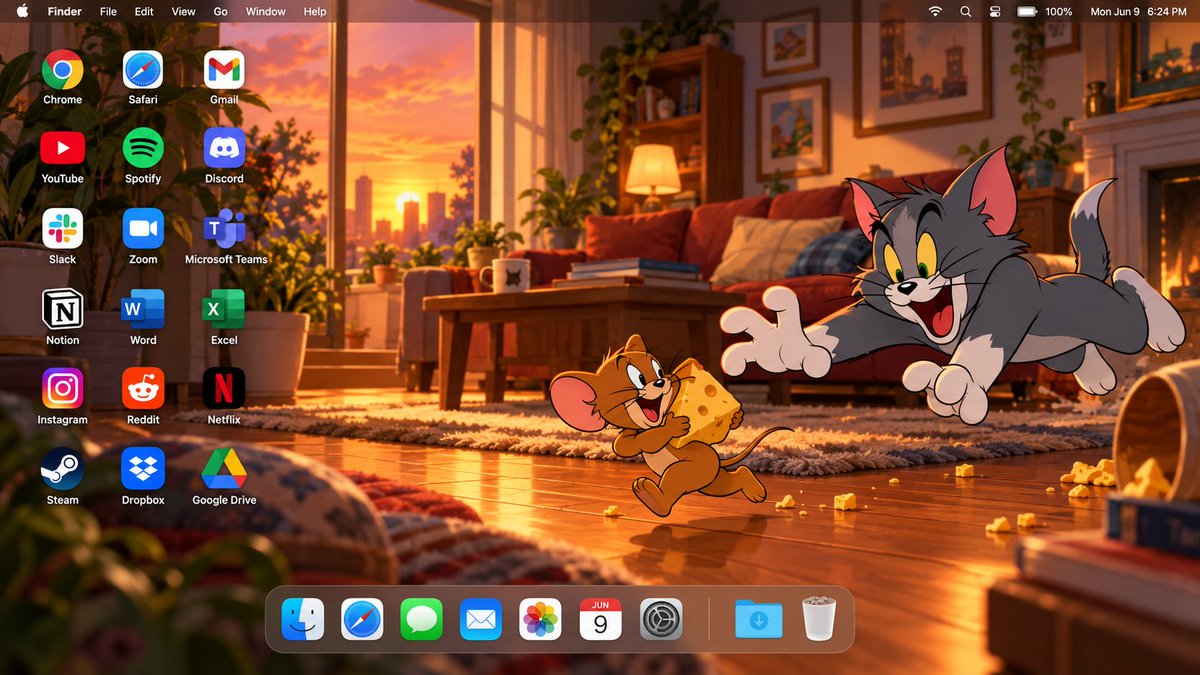
Fondo de escritorio macOS cinematográfico de Tom y Jerry

Prompt para generar una captura de pantalla completa de escritorio macOS 16:9 con Tom y Jerry en un entorno de dibujos animados cálido con interfaz nativa.

OpenAI

Ejemplos de la fuente

Estas imágenes provienen de la fuente original. DROPIDEA no ha probado estos ejemplos; los resultados dependen del modelo y los ajustes.

Listo para personalizar

Tu prompt

Inglés

Sustituye las variables en rojo por tus datos. Copia el texto completo y úsalo con tu agente preferido.

TXT MD Versión en inglés
Create a high-end 16:9 macOS desktop wallpaper screenshot featuring Tom and Jerry as the main characters. Build an original cinematic cartoon living-room scene at sunset, with warm window light entering from one side, wooden flooring, cozy furniture, soft shadows, scattered playful objects, and subtle atmospheric depth. Keep the environment original and polished, like a premium animated-film background. Place Tom and Jerry together on the RIGHT side of the desktop in an expressive playful storytelling moment. Preserve their recognizable classic cartoon appearance, proportions, colors, facial expressions, and original 2D animation aesthetic. Tom should react dramatically while Jerry appears mischievous. Keep both characters fully visible, not cropped, with faces, hands, tails, and important details clearly shown. Keep them clearly cartoon-styled, not realistic or redesigned. Reserve the LEFT side for desktop shortcuts. Add exactly 18 desktop application icons, arranged in 3 columns and 6 rows, with clean alignment, identical sizing, generous spacing, and crisp white labels. The applications must be: Chrome | Safari | Gmail YouTube | Spotify | Discord Slack | Zoom | Microsoft Teams Notion | Word | Excel Instagram | Reddit | Netflix Steam | Dropbox | Google Drive Do not add extra icons, do not duplicate icons, and do not omit any of them. Add a realistic translucent macOS menu bar across the full top edge. Include: Apple logo, Finder, File, Edit, View, Go, Window, Help on the left; and Wi‑Fi, battery, control icons, and a clock on the right. Keep it thin, elegant, and clearly macOS-style. Add a floating translucent macOS Dock along the bottom, positioned slightly toward the LEFT so Tom and Jerry remain unobstructed on the right. Dock icons: Finder, Safari, Messages, Mail, Photos, Calendar, System Settings, separator, Downloads, Trash. Use warm golden-orange lighting mixed with deep brown, cream, muted red, and soft blue accents. Add subtle cinematic lighting, depth, and atmosphere while keeping the overall image clearly cartoon-styled and clean. Final result: a premium edge-to-edge high-resolution 16:9 macOS desktop image combining a cinematic cartoon wallpaper with a realistic macOS interface. Balanced composition, strong character integration, polished lighting, clean typography, and clear negative space. Do not include: laptop frame, monitor frame, keyboard, mouse, open app windows, extra characters, duplicate icons, large titles, advertisements, banners, or watermark.
Ver resultados

Tu prompt

Create a high-end 16:9 macOS desktop wallpaper screenshot featuring Tom and Jerry as the main characters. Build an original cinematic cartoon living-room scene at sunset, with warm window light entering from one side, wooden flooring, cozy furniture, soft shadows, scattered playful objects, and subtle atmospheric depth. Keep the environment original and polished, like a premium animated-film background. Place Tom and Jerry together on the RIGHT side of the desktop in an expressive playful storytelling moment. Preserve their recognizable classic cartoon appearance, proportions, colors, facial expressions, and original 2D animation aesthetic. Tom should react dramatically while Jerry appears mischievous. Keep both characters fully visible, not cropped, with faces, hands, tails, and important details clearly shown. Keep them clearly cartoon-styled, not realistic or redesigned. Reserve the LEFT side for desktop shortcuts. Add exactly 18 desktop application icons, arranged in 3 columns and 6 rows, with clean alignment, identical sizing, generous spacing, and crisp white labels. The applications must be: Chrome | Safari | Gmail YouTube | Spotify | Discord Slack | Zoom | Microsoft Teams Notion | Word | Excel Instagram | Reddit | Netflix Steam | Dropbox | Google Drive Do not add extra icons, do not duplicate icons, and do not omit any of them. Add a realistic translucent macOS menu bar across the full top edge. Include: Apple logo, Finder, File, Edit, View, Go, Window, Help on the left; and Wi‑Fi, battery, control icons, and a clock on the right. Keep it thin, elegant, and clearly macOS-style. Add a floating translucent macOS Dock along the bottom, positioned slightly toward the LEFT so Tom and Jerry remain unobstructed on the right. Dock icons: Finder, Safari, Messages, Mail, Photos, Calendar, System Settings, separator, Downloads, Trash. Use warm golden-orange lighting mixed with deep brown, cream, muted red, and soft blue accents. Add subtle cinematic lighting, depth, and atmosphere while keeping the overall image clearly cartoon-styled and clean. Final result: a premium edge-to-edge high-resolution 16:9 macOS desktop image combining a cinematic cartoon wallpaper with a realistic macOS interface. Balanced composition, strong character integration, polished lighting, clean typography, and clear negative space. Do not include: laptop frame, monitor frame, keyboard, mouse, open app windows, extra characters, duplicate icons, large titles, advertisements, banners, or watermark.

Guía de variables

Tom and Jerry

Personajes animados e interacción

En el primer y segundo párrafo describiendo los personajes en el lado derecho

Valor de ejemplo

Tom y Jerry

at sunset, with warm window light entering from one side

Hora del día y estilo de iluminación

En la descripción de la escena en el primer párrafo

Valor de ejemplo

at sunset, with warm window light entering from one side

Qué obtienes

  • Captura de pantalla de fondo de escritorio macOS 16:9 de borde a borde de alta resolución.
  • Ilustración cinematográfica en estilo de animación 2D clásica con Tom y Jerry.
  • Interfaz realista de macOS que incluye barra de menú translúcida, cuadrícula de 18 iconos y Dock inferior.

Casos de uso

  • Fondos de pantalla personalizados para monitores de escritorio y portátiles.
  • Mockups de interfaz y presentaciones de diseño visual.
  • Contenido visual para redes sociales enfocado en animación nostálgica y tecnología.

Cómo usarlo

  • Copia el prompt completo en un generador de imágenes de IA que admita composiciones complejas e interfaz de usuario.
  • Puedes modificar los personajes o la iluminación manteniendo la estructura visual del escritorio.
  • Asegúrate de definir la relación de aspecto en 16:9 para obtener un fondo de pantalla panorámico perfecto.

Prompts relacionados