Ir al contenido
ImágenesGratis

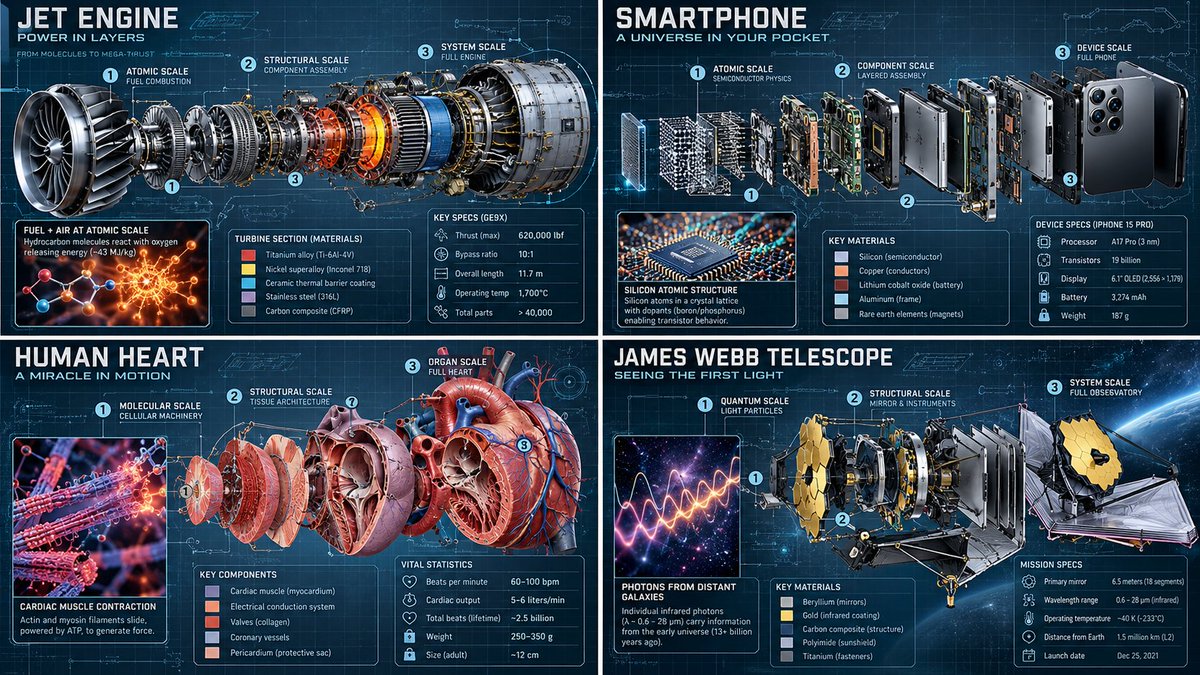
Infografía Técnica Editorial Despiezada Multiescala

Un prompt en pseudocódigo para generar infografías técnicas con despiece de tres capas y superposiciones de datos.

Generación de imágenes

Ejemplos de la fuente

Estas imágenes provienen de la fuente original. DROPIDEA no ha probado estos ejemplos; los resultados dependen del modelo y los ajustes.

Listo para personalizar

Tu prompt

Inglés

Sustituye las variables en rojo por tus datos. Copia el texto completo y úsalo con tu agente preferido.

TXT MD Versión en inglés
2x2 grid, 16:9, AI picks topics: class Multiscale_Technical_Editorial: def __init__(self, subject="[$SUBJECT]"): self.canvas = "Precision graph paper background (0.5mm grid), faint blueprint cyan tint, 30° axonometric view." self. lighting = "Cryo-EM inspired macro-lighting, harsh chamfer highlights." def execute_exploded_render_progression(self): # AI AUTO-INFERENCE: Deconstruct [$SUBJECT] into 3 distinct functional layers core = infer_innermost_components(self.subject) meso = infer_structural_framework(self.subject) macro = infer_outer_shell_or_environment(self.subject) # The Render Gradient (Prompt 4 + 3) layer_1 = f"INNERMOST CORE: {core} rendered as pure fundamental science (atomic interactions, quantum states, glowing mathematical Lagrangians)." layer_2 = f"MIDDLE EXPLOSION: {meso} floating in axial alignment, rendered as Technical CAD, color-coded by material (titanium, copper, lipid bilayer)." layer_3 = f"OUTERMOST SHELL: {macro} rendered photorealistically, showing micro-scale surface details, wear patterns, and environmental atmosphere." return [layer_1, layer_2, layer_3] def overlay_ui(self): vectors = "Dotted assembly vectors with sequential numbering connecting the exploded parts." cards = f"Hovering holographic data cards inferring exact material grades, genomic lengths, or operating temperatures of {self.subject}." return [vectors, cards] render_infographic(Multiscale_Technical_Editorial())
Ver resultados

Tu prompt

2x2 grid, 16:9, AI picks topics: class Multiscale_Technical_Editorial: def __init__(self, subject="[$SUBJECT]"): self.canvas = "Precision graph paper background (0.5mm grid), faint blueprint cyan tint, 30° axonometric view." self. lighting = "Cryo-EM inspired macro-lighting, harsh chamfer highlights." def execute_exploded_render_progression(self): # AI AUTO-INFERENCE: Deconstruct [$SUBJECT] into 3 distinct functional layers core = infer_innermost_components(self.subject) meso = infer_structural_framework(self.subject) macro = infer_outer_shell_or_environment(self.subject) # The Render Gradient (Prompt 4 + 3) layer_1 = f"INNERMOST CORE: {core} rendered as pure fundamental science (atomic interactions, quantum states, glowing mathematical Lagrangians)." layer_2 = f"MIDDLE EXPLOSION: {meso} floating in axial alignment, rendered as Technical CAD, color-coded by material (titanium, copper, lipid bilayer)." layer_3 = f"OUTERMOST SHELL: {macro} rendered photorealistically, showing micro-scale surface details, wear patterns, and environmental atmosphere." return [layer_1, layer_2, layer_3] def overlay_ui(self): vectors = "Dotted assembly vectors with sequential numbering connecting the exploded parts." cards = f"Hovering holographic data cards inferring exact material grades, genomic lengths, or operating temperatures of {self.subject}." return [vectors, cards] render_infographic(Multiscale_Technical_Editorial())

Guía de variables

[$SUBJECT]

El objeto técnico o biológico a deconstruir

Dentro del argumento subject en __init__ y en los comentarios del código

Valor de ejemplo

Quantum Processor Core

Qué obtienes

  • Una ilustración técnica editorial en formato 16:9 con vista axonométrica y papel milimetrado.
  • Desglose progresivo en tres niveles: núcleo cuántico/atómico, componentes CAD axiales y superficie exterior detallada.
  • Elementos de interfaz gráfica integrados con vectores de ensamblaje numerados y tarjetas de datos holográficas.

Casos de uso

  • Portadas y gráficos editoriales para publicaciones científicas y tecnológicas.
  • Presentación de prototipos futuristas y conceptos de ingeniería avanzada.
  • Infografías visuales para biotecnología, ciencia de materiales y computación cuántica.

Cómo usarlo

  • Reemplaza el marcador [$SUBJECT] con el objeto tecnológico, mecánico o biológico deseado.
  • Pega la estructura completa de pseudocódigo en tu generador de imágenes con IA.
  • Asegúrate de mantener la relación de aspecto 16:9 indicada en el encabezado.
  • Genera la imagen y revisa el desglose visual en tres niveles: núcleo científico, CAD técnico y acabado exterior fotorrealista.

Prompts relacionados