Ir al contenido
ImágenesGratis

Turn any outfit reference into a reusable fashion poster prompt ✨ I broke down this Korean-style lookbook layout into a GPT Image

Turn any outfit reference into a reusable fashion poster prompt ✨ I broke down this Korean-style lookbook layout into a GPT Image

OpenAI

Ejemplos de la fuente

Estas imágenes provienen de la fuente original. DROPIDEA no ha probado estos ejemplos; los resultados dependen del modelo y los ajustes.

Listo para personalizar

Tu prompt

Texto original

Sustituye las variables en rojo por tus datos. Copia el texto completo y úsalo con tu agente preferido.

TXT MD Versión en inglés
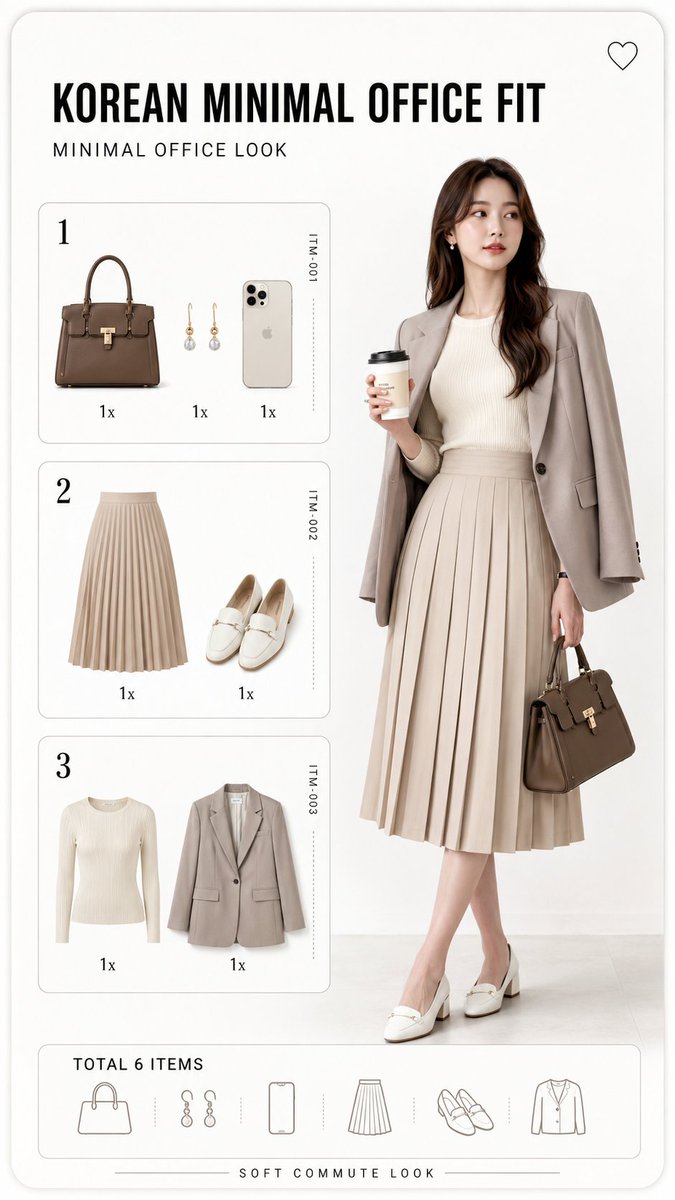
Turn any outfit reference into a reusable fashion poster prompt ✨ I broke down this Korean-style lookbook layout into a GPT Image 2 prompt template — with variables for text language, title, outfit items, model styling, checklist panels, and captions. Copy the structure, swap the variables, and build your own fashion prompt series 👇 ``` Create a vertical 9:16 fashion outfit breakdown poster in a clean Korean Y2K lookbook style. Design the image as a rounded-corner mobile fashion card on a bright white studio background. Use a minimal editorial layout with lots of negative space, soft gray panel borders, subtle shadows, crisp typography, pastel colors, and a polished fashion app UI feeling. Important text rule: All visible text in the image must be rendered in [TEXT_LANGUAGE], including the main title, subtitle, panel labels, quantity labels, total item label, and bottom caption. Use the exact following text: - Main title: "[MAIN_TITLE]" - Subtitle: "[SUB_TITLE]" - Bottom caption: "[BOTTOM_CAPTION]" - Total label: "[TOTAL_LABEL]" Top area: Add a bold main title in large typography, with the subtitle underneath in smaller clean uppercase or matching style depending on the language. Add a small outline heart icon in the top-right corner. Right side: Show a full-body adult female fashion model, early 20s, non-sexualized, cute confident pose, standing in soft studio lighting. She is holding a smartphone as if taking a selfie. Outfit: [OUTFIT_DESCRIPTION]. Keep the model realistic but slightly glossy and doll-like, like a premium digital fashion catalog. Left side: Create three stacked outfit checklist panels labeled “1”, “2”, and “3”. Panel 1 shows: [PANEL_1_ITEMS]. Panel 2 shows: [PANEL_2_ITEMS]. Panel 3 shows: [PANEL_3_ITEMS]. Each item should appear as an isolated product icon with a quantity label such as “1x”. Add tiny vertical item codes on the right side of each panel, like a fashion inventory card. Bottom-left area: Add the total item summary using “[TOTAL_LABEL]”, with small minimalist line icons representing all outfit items. Overall visual direction: playful fashion infographic, product flat-lay icons plus full-body model, white background, clean commercial poster composition, high-resolution, sharp details, legible text, no real brand logos, no watermark, no extra characters, no messy background. ```
Ver resultados

Tu prompt

Turn any outfit reference into a reusable fashion poster prompt ✨ I broke down this Korean-style lookbook layout into a GPT Image 2 prompt template — with variables for text language, title, outfit items, model styling, checklist panels, and captions. Copy the structure, swap the variables, and build your own fashion prompt series 👇 ``` Create a vertical 9:16 fashion outfit breakdown poster in a clean Korean Y2K lookbook style. Design the image as a rounded-corner mobile fashion card on a bright white studio background. Use a minimal editorial layout with lots of negative space, soft gray panel borders, subtle shadows, crisp typography, pastel colors, and a polished fashion app UI feeling. Important text rule: All visible text in the image must be rendered in [TEXT_LANGUAGE], including the main title, subtitle, panel labels, quantity labels, total item label, and bottom caption. Use the exact following text: - Main title: "[MAIN_TITLE]" - Subtitle: "[SUB_TITLE]" - Bottom caption: "[BOTTOM_CAPTION]" - Total label: "[TOTAL_LABEL]" Top area: Add a bold main title in large typography, with the subtitle underneath in smaller clean uppercase or matching style depending on the language. Add a small outline heart icon in the top-right corner. Right side: Show a full-body adult female fashion model, early 20s, non-sexualized, cute confident pose, standing in soft studio lighting. She is holding a smartphone as if taking a selfie. Outfit: [OUTFIT_DESCRIPTION]. Keep the model realistic but slightly glossy and doll-like, like a premium digital fashion catalog. Left side: Create three stacked outfit checklist panels labeled “1”, “2”, and “3”. Panel 1 shows: [PANEL_1_ITEMS]. Panel 2 shows: [PANEL_2_ITEMS]. Panel 3 shows: [PANEL_3_ITEMS]. Each item should appear as an isolated product icon with a quantity label such as “1x”. Add tiny vertical item codes on the right side of each panel, like a fashion inventory card. Bottom-left area: Add the total item summary using “[TOTAL_LABEL]”, with small minimalist line icons representing all outfit items. Overall visual direction: playful fashion infographic, product flat-lay icons plus full-body model, white background, clean commercial poster composition, high-resolution, sharp details, legible text, no real brand logos, no watermark, no extra characters, no messy background. ```

Prompts relacionados