Sistema Remix OS.. La mejor solución para ejecutar Android en tu computadora
 Por Admin
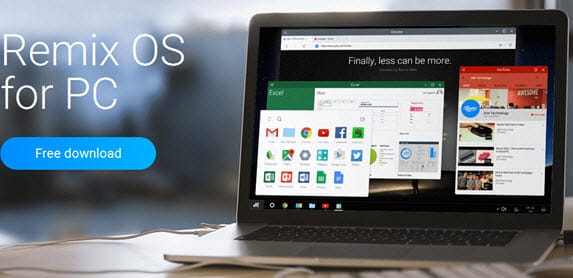
Muchos usuarios han experimentado problemas durante las últimas pruebas con diferentes programas para ejecutar Android en la computadora, como "Bluestacks", que ha tenido varios problemas durante largo tiempo.
Pero la empresa Jide
ofrece la mejor solución para disfrutar de aplicaciones y juegos de Android en la computadora e instalarlo como otro sistema operativo junto a Windows o Mac. La ventaja es que proporciona la mejor experiencia para usuarios de computadoras de escritorio. El sistema Remix para ejecutar Android en la computadora, y la empresa lanzó su sistema "Remix OS 2.0" con un tamaño de 692.15MB. Puedes instalar el sistema en una memoria USB y usarlo en cualquier pantalla externa o televisor para disfrutar del sistema siempre en tu mano. Lee también: 5 formas de ejecutar aplicaciones de Android en la computadora. La versión está disponible para descargar desde el sitio web oficial y descargarlo desde la página oficial "Remix OS 2.0". Encontrarás este mensaje al final de la página, marcaremos la casilla de verificación y descargaremos el sistema.
Puedes instalar el sistema en una memoria USB usando el programa "Rufus" o "WinToUSB", reiniciar la computadora y ajustar la configuración de inicio (Boot) para que la memoria USB se ejecute como primera opción para instalar el sistema. Luego, selecciona una partición diferente a la partición de Windows para instalar el sistema.
DROPIDEA
Esperamos que este artículo te haya aportado valor real. En DROPIDEA, siempre nos esforzamos por ofrecer contenido de alta calidad que te ayude a crecer y evolucionar en el espacio digital. Síguenos para más artículos y guías útiles.
Admin
DROPIDEA
Últimos artículos

Peak XV eleva el límite de sus inversiones semilla a 5 millones de dólares

Esperada cena entre el CEO de Anthropic y Donald Trump en medio de desacuerdos sobre la seguridad de la inteligencia artificial

Google prueba las compras directas de Flipkart a través de Gemini en la India

Crusoe cancela un acuerdo de 1.250 millones de dólares para turbinas de centros de datos