Cómo cambiar la apariencia de Facebook al nuevo diseño 2020 y activar el modo oscuro de Facebook
 Por Admin
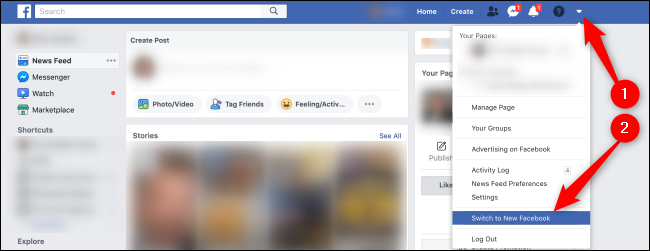
Cómo cambiar la apariencia de Facebook al nuevo diseño Artículo relacionado: Cómo evitar enviar solicitudes de amistad finalmente a tu perfil de Facebook Lee también: Explicación de cómo activar el modo oscuro Dark Mode para todos tus programas, dispositivos y sistemas operativos Facebook Messenger para Windows con un nuevo diseño Como Facebook ha generalizado el nuevo diseño en sus diversas aplicaciones en todas las plataformas, el nuevo diseño ahora está disponible a través de la aplicación Facebook Messenger para Windows, donde agregó muchas características que incluso difieren de la versión web, como: Recibir notificaciones de nuevos mensajes El modo oscuro para Facebook Messenger Compatibilidad con imágenes animadas GIF dentro de las conversaciones Mayor compatibilidad en videoconferencias grupales
Group Calls Sincronización de eventos en tiempo real en todos tus dispositivos Estas opciones se pueden obtener simplemente descargando la aplicación a través de la tienda de aplicaciones compatible con tu sistema operativo buscando la palabra Messenger y descargando la versión oficial de Facebook. Facebook Messenger – Windows
Facebook Messenger – MacOS
DROPIDEA
Esperamos que este artículo te haya aportado valor real. En DROPIDEA, siempre nos esforzamos por ofrecer contenido de alta calidad que te ayude a crecer y evolucionar en el espacio digital. Síguenos para más artículos y guías útiles.
Admin
DROPIDEA
Últimos artículos

Peak XV eleva el límite de sus inversiones semilla a 5 millones de dólares

Esperada cena entre el CEO de Anthropic y Donald Trump en medio de desacuerdos sobre la seguridad de la inteligencia artificial

Google prueba las compras directas de Flipkart a través de Gemini en la India

Crusoe cancela un acuerdo de 1.250 millones de dólares para turbinas de centros de datos