Cómo descargar fotos de Instagram en tamaño original para Android e iPhone
 Por Admin
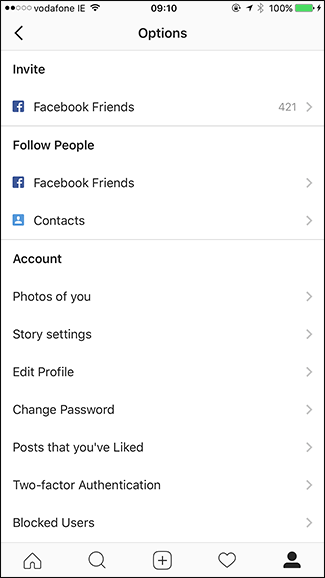
Al guardar fotos de Instagram en Android e iPhone, se guardan con una resolución de 1080×1080 píxeles, pero las cámaras de los teléfonos inteligentes actuales capturan imágenes de mucha mayor calidad. Es posible que desees guardar fotos de Instagram en su tamaño original después de editarlas y aplicar filtros y efectos, lo cual revisaremos en este artículo a través de la función Save Original Photos. Normalmente, la aplicación de Instagram elimina las fotos publicadas en Instagram Story durante 24 horas después de su publicación, pero también puedes desactivar esto y cambiarlo por una nueva función que te permite guardar fotos de publicaciones de Instagram en tu teléfono en su tamaño original y con las ediciones y efectos que agregó el usuario, para obtener una copia de alta resolución en tu teléfono que puedas usar en otras redes sociales. Guardar fotos de Instagram Guardar fotos de Instagram en su tamaño original en tu móvil requiere activar la función Save Original Photos disponible en la aplicación de Instagram para Android e iPhone. Después de activar esta función, la aplicación de Instagram guarda una copia de tus fotos originales en tu teléfono para que puedas compartirlas posteriormente en otras redes sociales con la máxima resolución de imagen y con los filtros y efectos de Instagram aplicados.
Ve a la configuración de Instagram presionando en Options y sigue los siguientes pasos: Dirígete hacia la parte inferior de la configuración Settings hasta que encuentres la opción "Save Original Photos" y activa la función presionando el botón ON. Ahora, cuando publiques una nueva foto en Instagram, se guardará una copia original de las fotos de Instagram en el tamaño original grande en tu teléfono acompañada por los filtros y las adiciones que aplicaste a la foto.
Lee también: Cómo ocultar fotos en Instagram después de esta actualización especial Instagram Archive. También puedes guardar las fotos publicadas a través de tu cuenta en Instagram Story desde la misma página de configuración en la sección Account, luego presiona en "Story Settings" y activa la función "Save Shared Photos" presionando On. Al publicar una nueva historia y fotos en Instagram, se guardará una copia de ellas en tu teléfono, sabiendo que las fotos se eliminaban después de 24 horas de publicarlas en Instagram, por lo que es una función especial para evitar que se eliminen las fotos de Instagram de la galería del teléfono.
¿Usas algún otro método para poder guardar fotos de Instagram en tu teléfono?
Comparte tu sugerencia con nosotros en los comentarios.
DROPIDEA
Esperamos que este artículo te haya aportado valor real. En DROPIDEA, siempre nos esforzamos por ofrecer contenido de alta calidad que te ayude a crecer y evolucionar en el espacio digital. Síguenos para más artículos y guías útiles.
Admin
DROPIDEA
Últimos artículos
¿Aprovechó Musk el lanzamiento de «Dots» de OpenAI a través del dominio dot.com?

Peak XV eleva el límite de sus inversiones semilla a 5 millones de dólares

Esperada cena entre el CEO de Anthropic y Donald Trump en medio de desacuerdos sobre la seguridad de la inteligencia artificial

Google prueba las compras directas de Flipkart a través de Gemini en la India