Solucionar el problema de Microsoft Word no responde Microsoft Word Not Responding
 Por Admin
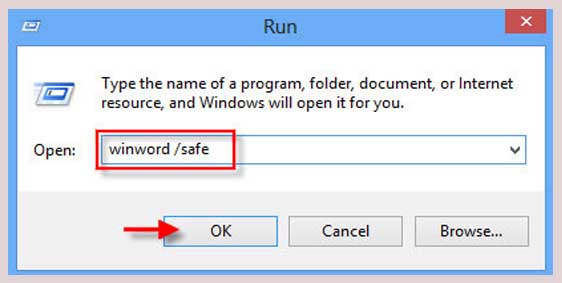
Microsoft Word no responde: ¿cómo puedes solucionarlo? Solución 1: Abre el Administrador de tareas Solución 2: Ejecutar en modo seguro Así es como lo haces: Lee también: Los 7 complementos más destacados de Microsoft Word que te facilitan el uso del programa de forma profesional Solución 3: Asegúrate de tener instaladas las últimas actualizaciones del sistema operativo Solución 4: Reparar la instalación O puedes elegir reparar Windows Esta vez intentaremos reparar los archivos dañados en el mismo programa Word, que pueden causar corrupción o que Word no responda.
Puedes seguir los siguientes pasos: harás clic derecho con el ratón en el icono de Inicio en tu equipo, luego seleccionarás Configuración – Settings. Seleccionaremos Aplicaciones – Apps, y luego seleccionaremos Aplicaciones instaladas – Installed Apps. Buscaremos Microsoft 365 u Office para que se muestre el paquete de programas de Office de Microsoft. Haciendo clic en los tres puntos junto a él, seleccionamos Modify. Se abrirá una nueva ventana titulada "Reparar tu Office" y te ofrecerá dos opciones: reparación rápida o reparación en línea. Si tu equipo está conectado a Internet, es mejor elegir la reparación en línea para ayudar a Word a descargar todos los archivos faltantes o dañados. Luego harás clic en la palabra Reparar. Desinstalar y reinstalar Word Si has llegado a este punto, significa que ninguna de las soluciones mencionadas anteriormente funcionó, pero no te desanimes. Reinstalar el programa Word desde cero reiniciará todas las configuraciones, archivos y cualquier cosa corrupta en el programa completamente.
Puedes desinstalar Word siguiendo estos pasos: harás clic derecho con el ratón en el icono de Inicio en tu equipo, luego seleccionarás Configuración – Settings. Seleccionaremos Aplicaciones – Apps, y luego seleccionaremos Aplicaciones instaladas – Installed Apps. Buscaremos Microsoft 365 u Office para que se muestre el paquete de programas de Office de Microsoft. Haciendo clic en los tres puntos junto a él, seleccionamos Desinstalar u Uninstall. Al hacer clic en Desinstalar, Windows comenzará a eliminar completamente la aplicación, y puedes descargarla nuevamente desde el sitio web de Microsoft. Soluciones temporales para Word no responde. Microsoft ofrece una versión web de su paquete de programas, y uno de estos programas es Word, por supuesto. La versión web es completamente gratuita y puedes completar tu trabajo a través de ella sin problemas. Se considera una solución temporal ya que la versión web no contiene todas las características y complementos, pero es adecuada para el 90% de todos los trabajos.
Puedes confiar en el paquete de aplicaciones de Google. Puedes usar Google Docs, que es un servicio web similar a la versión web de Word también, y está vinculado automáticamente a todos los servicios de Google y tu correo de Gmail. En conclusión, artículo relacionado: Descargar Microsoft Word gratis a través de 5 formas legales para todos los dispositivos. El artículo se actualizó el 16/1/2023 para añadir dos párrafos nuevos.
DROPIDEA
Esperamos que este artículo te haya aportado valor real. En DROPIDEA, siempre nos esforzamos por ofrecer contenido de alta calidad que te ayude a crecer y evolucionar en el espacio digital. Síguenos para más artículos y guías útiles.
Admin
DROPIDEA
Últimos artículos

Peak XV eleva el límite de sus inversiones semilla a 5 millones de dólares

Esperada cena entre el CEO de Anthropic y Donald Trump en medio de desacuerdos sobre la seguridad de la inteligencia artificial

Google prueba las compras directas de Flipkart a través de Gemini en la India

Crusoe cancela un acuerdo de 1.250 millones de dólares para turbinas de centros de datos