Agregar un comentario en PowerPoint – Usar la función Callout para información dentro de PowerPoint
 Por Admin
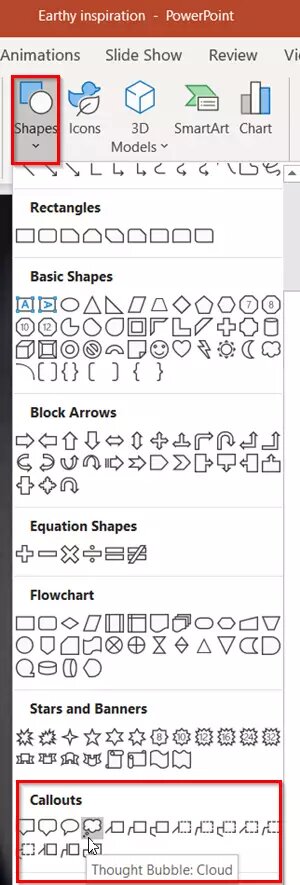
Los comentarios Callout dentro de PowerPoint se componen de múltiples propiedades, presentándose en diversos formatos (formas/cuadros/imágenes) que puedes utilizar para agregar información y aclaraciones como comentarios Callout dentro de las presentaciones. Puedes usarlos de forma estática o con efectos de animación múltiples. Lee también: 10 consejos para crear una presentación de PowerPoint profesional y destacada Lee también |
Los 10 mejores sitios para descargar plantillas de PowerPoint listas para usar Lee también: – Las mejores alternativas gratuitas a PowerPoint – 7 programas para crear presentaciones
DROPIDEA
Esperamos que este artículo te haya aportado valor real. En DROPIDEA, siempre nos esforzamos por ofrecer contenido de alta calidad que te ayude a crecer y evolucionar en el espacio digital. Síguenos para más artículos y guías útiles.
Admin
DROPIDEA
Últimos artículos

Peak XV eleva el límite de sus inversiones semilla a 5 millones de dólares

Esperada cena entre el CEO de Anthropic y Donald Trump en medio de desacuerdos sobre la seguridad de la inteligencia artificial

Google prueba las compras directas de Flipkart a través de Gemini en la India

Crusoe cancela un acuerdo de 1.250 millones de dólares para turbinas de centros de datos