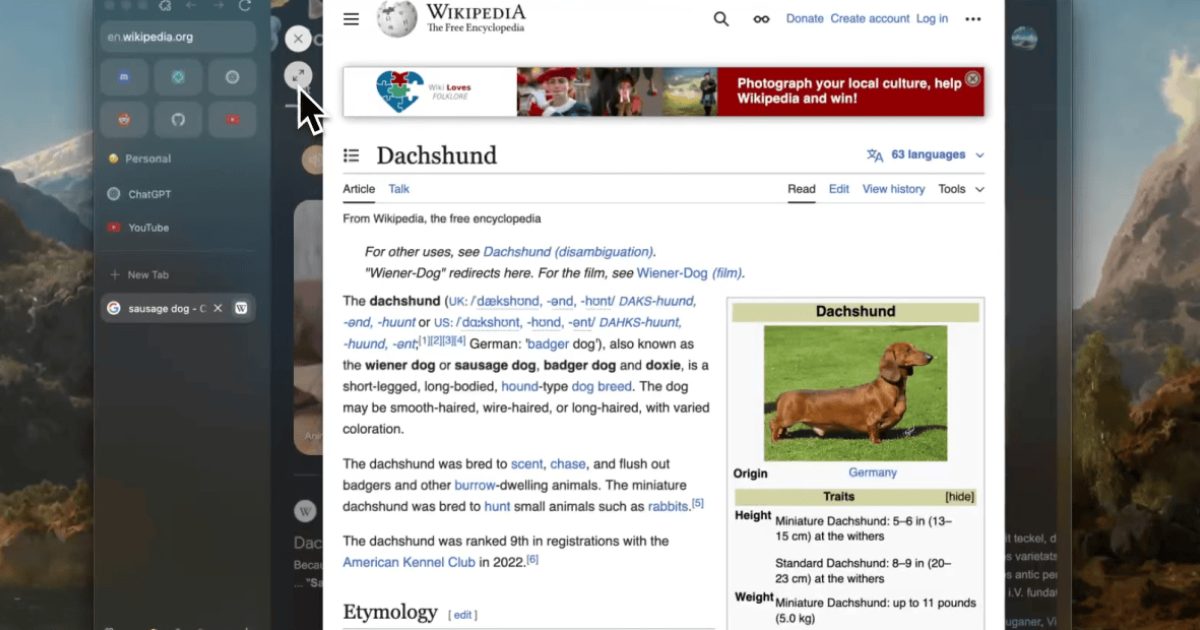
The announcement that Arc browser is being discontinued has left a void for a segment of users who saw in it a serious attempt to rethink what a browser looks like and how we interact with it. After Atlassian acquired the developing company and shifted its focus to the AI-powered Dia browser, finding an alternative became a necessity rather than a luxury. This is where Zen Browser stands out as one of the most compelling options, because it retains the ideas that made Arc special while shedding the heavy layers that bothered so many.
What Is Zen Browser?
Zen is a free, open-source project built on the Firefox engine, developed through volunteer contributions and donations. This model differs fundamentally from commercially backed browsers, since there's no need to turn browsing behavior into raw material for training language models or building advertising profiles. The team presents the project under a clear banner: elegant design and a focus on privacy, with attention paid to the user's experience rather than their data.
A Familiar Interface for Arc Users
Visually, the resemblance is so strong that it's hard to tell the two browsers apart at first glance. Zen offers a collection of the elements that made Arc's experience distinctive:
- A tab bar on the left side instead of across the top of the window.
- Pinned sites that act as a quick launcher for the apps you use daily.
- Separate "spaces" to divide work from personal use or different projects.
- Zen Mods, which allow a high degree of freedom in customizing the interface.
The fundamental difference is that this interface doesn't come bundled with a smart assistant trailing you in the sidebar, offering to carry out tasks on your behalf. Zen remains a web browser in the traditional sense of the word, and that is precisely what a large share of users are looking for today.
Features That Serve Focus
Among the experience's most notable highlights is Glance, which opens links in a temporary pop-up window layered over the current page. The feature is highly practical when browsing online stores or running a quick search, as it lets you check out a link and then close it without flooding your tab bar. And if you want to turn it into a full tab, it takes no more than a single click.
The browser also provides a floating bar that appears when you press Ctrl+T or Command+T, from which you can open a new tab, jump to an already-open tab, run a search through your preferred search engine, or even launch a particular extension. This kind of shortcut reduces reliance on the mouse and makes navigation faster.
Extensions and Customization
Since Zen is built on Firefox, it supports Firefox extensions directly. In practice, its handling of extensions appears more stable compared to alternatives that radically overhauled their interfaces, though some extensions don't display ideally given how different the interface design is from the norm. Zen Mods range from simple changes to the appearance of the active tab to a complete reorganization of how video is displayed in a small window.
Limitations to Know Before Switching
The experience isn't without shortcomings, the most significant being:
- DRM-protected content: Currently doesn't work, meaning platforms like Netflix, Spotify, Disney+, and HBO require another browser. The team is working on obtaining a Widevine license from Google.
- Web MIDI support: Limited due to reliance on the Firefox engine, which matters to users working in audio.
- Site customization: A feature similar to Boosts has been added, but it isn't intuitive and there's no official, easily browsable repository of ready-made tweaks, meaning each site has to be customized manually.
Conclusion
If what drew you to Arc was its AI features, then Dia is the natural extension of that path. But if what appealed to you was the interface and the approach to organizing tabs and spaces, paired with a desire to avoid extra layers and data collection, then Zen is worth trying. Anyone who tried it in its early, unstable releases may be surprised by how much the project has improved—provided they can accept working around limitations like playing protected content in another browser.
✦ بقلم فريق دروب أيديا
DROPIDEA
We hope this article has added real value to you. At DROPIDEA, we always strive to deliver high-quality content that helps you grow and evolve in the digital space. Follow us for more useful articles and guides.
Tags
Admin
DROPIDEA
Latest Articles

Short Seller Warned About Nvidia CEO's Ties Six Months Before the Scandal

Anthropic Pushes Ahead with IPO Plans Despite Market Turbulence

US Intelligence Memo: Alleged Recruitment Effort Targeting Nvidia's CEO

Independent Investigation at Nvidia into Its CEO's Relationship