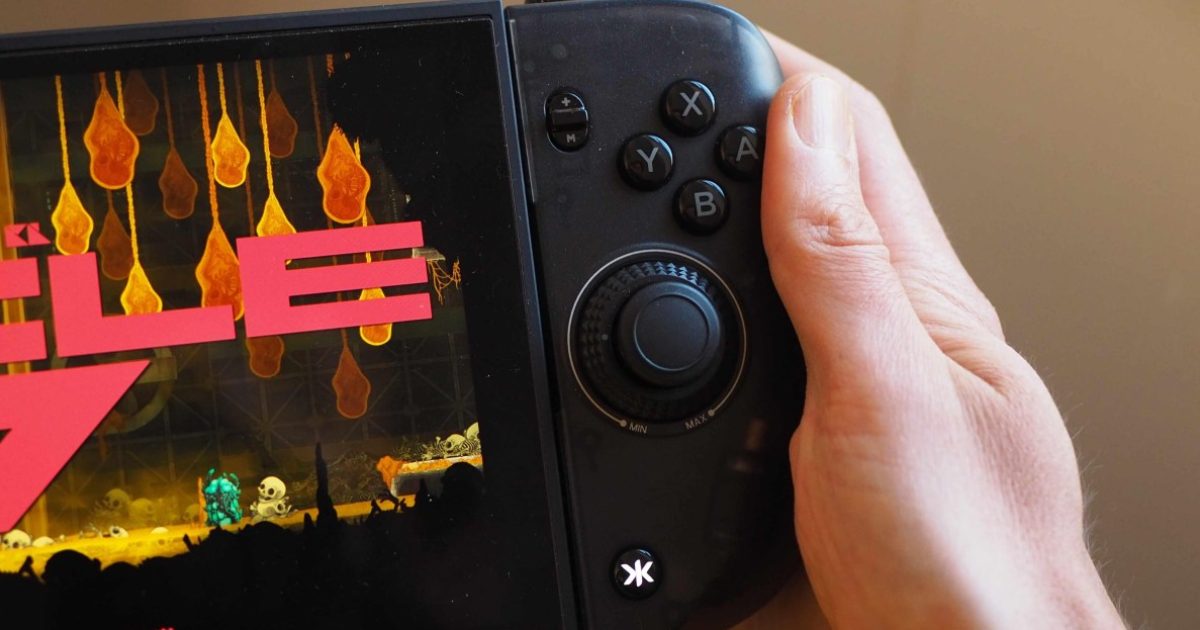
In the world of handheld gaming accessories, the difference between an excellent product and a frustrating one can come down to just a few millimeters in button placement. That's exactly what sums up the Nitro Deck 2 experience from Crkd — an accessory that's meant to serve as a practical alternative to Joy-Con controllers on the Nintendo Switch and Switch 2, yet stumbles over small details that make a big difference in daily use.
From First-Generation Star to Hesitant Successor
The original Nitro Deck was a notable success for an obvious reason: it solved the analog stick drift problem that plagued the original Switch. The accessory slid onto both sides of the console and offered sticks built with wear-resistant Hall Effect technology, all for just $59.99 — sparing players from having to disassemble and repair their Joy-Cons by hand.
The second generation arrives at $99.99 and claims dual compatibility with both the original Switch and the larger Switch 2. Its sticks are still better quality than those found in Nintendo's newest controllers, but this time they rely on neither Hall Effect nor TMR technology — a technical step backward that deserves attention given the price increase.
The Millimeter Problem: The Right Stick Gets in the Buttons' Way
The most glaring weakness in the new design is the distance between the right stick and the ABXY buttons. They sit so close together that your thumb collides with the stick when you try to press the buttons quickly, forcing an uncomfortable angle for hand movement.
Other companies address this issue in one of two ways:
- Widening the gap between the stick and the button cluster to give the thumb room to move.
- Shrinking the stick itself, as Nintendo did with the Switch 2 controllers, so the thumb can glide smoothly over it.
The Nitro Deck 2 took neither approach — a clear regression from the first generation's layout, and even more problematic compared with the symmetrical, Steam Deck-like layout of the Nitro Deck Plus. The result is keenly felt in games that demand fast, repeated reactions.
Dual Compatibility at the Cost of Peace of Mind
To achieve compatibility with both Switch models, Crkd replaced the previous slide-on design with a clamp-and-grip mounting system, using a screw mechanism at the back that can be loosened, tightened, or locked. The idea is clever from an engineering standpoint, but the price is a weaker sense of stability.
And here's where things get delicate: the company is asking owners of a $500 console to place complete trust in a mechanical clamp that stays tightened around the device. Even if no actual looseness shows up during use, simply worrying about your console's safety while playing is an unnecessary mental burden. A dedicated slide-on design built solely for the Switch 2 would have been far more reassuring.
Positives Worth Acknowledging
To be fair, the accessory does improve on its predecessor in several areas:
- Adjustable tension on both sticks, so you can tune how quickly the stick returns to center — faster or slower than the default setting.
- A bulkier design that offers better comfort for medium-sized hands in handheld mode.
- Customizable buttons: four on the back, plus an extra button near the triggers.
The Alternatives Available Today
This accessory category remains a limited market. The abxylute N6 failed to deliver a convincing experience, while Mobapad is expected to release a new version that looks promising. And if your only goal is improving comfort in handheld mode, there are lighter and cheaper solutions such as the Dbrand Killswitch 2 or the Mechanism Basecase — leaving you enough money left over for a good wireless controller with longer-lasting sticks and better rumble.
The Bottom Line
The Nitro Deck 2 remains a reasonably well-built product, but it isn't essential. The few millimeters off in the button layout, the downgrade in stick technology, and the less reassuring mounting mechanism all combine to make it a pick for those invested in advanced customization rather than a must-have upgrade. The bigger lesson here — for hardware designers in general — is that user experience is won or lost in the small details that never appear on a spec sheet.
✦ بقلم فريق دروب أيديا
DROPIDEA
We hope this article has added real value to you. At DROPIDEA, we always strive to deliver high-quality content that helps you grow and evolve in the digital space. Follow us for more useful articles and guides.
Tags
Admin
DROPIDEA
Latest Articles

Short Seller Warned About Nvidia CEO's Ties Six Months Before the Scandal

Anthropic Pushes Ahead with IPO Plans Despite Market Turbulence

US Intelligence Memo: Alleged Recruitment Effort Targeting Nvidia's CEO

Independent Investigation at Nvidia into Its CEO's Relationship