Skip to content
ImagesFree

Mobile Detail Page for Ergonomic Chair

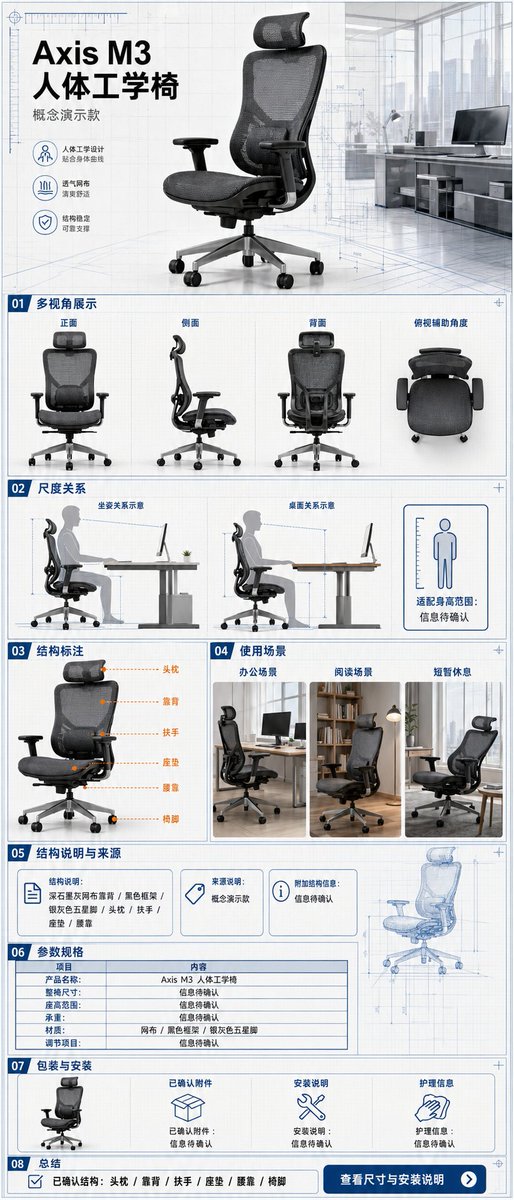
A mobile e-commerce product detail page template for an ergonomic office chair, styled as a modern architectural blueprint with a vertical grid and precise annotations, covering multiple product views, dimensions, usage scenes, evidence, parameters, and packaging, with no fabricated information.

Gemini

Source previews

These example images come from the original source. DROPIDEA has not independently tested these examples; results depend on the model and settings.

Ready to personalize

Your prompt

English

Replace the red variables with your information. Copy the full prompt and use it with your preferred agent.

TXT MD English version
A complete, continuous mobile e-commerce detail page for an ergonomic office chair, with an aspect ratio of {argument name="aspect ratio" default="3:7"}. The product is a concept model of the "{argument name="product name" default="Axis M3 Ergonomic Chair"}", featuring a dark graphite-gray mesh backrest, black frame, and silver-gray five-star base, clearly showing the headrest, armrests, seat cushion, and lumbar support, ensuring structural consistency across all views. The overall design uses a vertical grid system combining architectural blueprint and modern office space styles, using {argument name="color scheme" default="paper white, graphite gray, steel blue, and a subtle orange"} for annotations, paired with a clean thin sans-serif typeface and a monospaced parameter typeface. The hero section shows the product in a 3/4 view; then front, side, rear, and top auxiliary views are shown; dimensions are presented through the proportional relationship between a seated human figure and a desk, without inferring any applicable user height range; outline callouts label the headrest, backrest, armrests, seat cushion, lumbar support, and chair legs, with no internal exploded structure; scenes of working, reading, and brief napping are shown; the evidence section shows only the structural descriptions and sources provided by the user, with missing items marked as "Information to be confirmed"; the parameters section includes complete chair dimensions, seat height range, weight capacity, materials, and adjustment items, without guessing unknown values; the packaging section shows the chair body, confirmed accessories, assembly instructions, and care information, with missing accessories marked as "Information to be confirmed"; it ends with a structural confirmation summary and a "View dimensions and assembly instructions" prompt. All parameter units, dimension lines, and information cards must be fully filled in. It is strictly forbidden to include fictional ergonomic certifications, weight-capacity figures, adjustment levels, health-improvement claims, patents, or test results.
Preview results

Your prompt

A complete, continuous mobile e-commerce detail page for an ergonomic office chair, with an aspect ratio of {argument name="aspect ratio" default="3:7"}. The product is a concept model of the "{argument name="product name" default="Axis M3 Ergonomic Chair"}", featuring a dark graphite-gray mesh backrest, black frame, and silver-gray five-star base, clearly showing the headrest, armrests, seat cushion, and lumbar support, ensuring structural consistency across all views. The overall design uses a vertical grid system combining architectural blueprint and modern office space styles, using {argument name="color scheme" default="paper white, graphite gray, steel blue, and a subtle orange"} for annotations, paired with a clean thin sans-serif typeface and a monospaced parameter typeface. The hero section shows the product in a 3/4 view; then front, side, rear, and top auxiliary views are shown; dimensions are presented through the proportional relationship between a seated human figure and a desk, without inferring any applicable user height range; outline callouts label the headrest, backrest, armrests, seat cushion, lumbar support, and chair legs, with no internal exploded structure; scenes of working, reading, and brief napping are shown; the evidence section shows only the structural descriptions and sources provided by the user, with missing items marked as "Information to be confirmed"; the parameters section includes complete chair dimensions, seat height range, weight capacity, materials, and adjustment items, without guessing unknown values; the packaging section shows the chair body, confirmed accessories, assembly instructions, and care information, with missing accessories marked as "Information to be confirmed"; it ends with a structural confirmation summary and a "View dimensions and assembly instructions" prompt. All parameter units, dimension lines, and information cards must be fully filled in. It is strictly forbidden to include fictional ergonomic certifications, weight-capacity figures, adjustment levels, health-improvement claims, patents, or test results.

Variable guide

{argument name="aspect ratio" default="3:7"}

The page aspect ratio; default 3:7.

At the start of the template after "with an aspect ratio of".

Example value

9:16

{argument name="product name" default="Axis M3 Ergonomic Chair"}

The chair model name.

After "concept model of the", inside quotes.

Example value

Verta Pro 2 Ergonomic Chair

{argument name="color scheme" default="paper white, graphite gray, steel blue, and a subtle orange"}

Annotation color palette.

After "using" and before "for annotations".

Example value

ivory white, charcoal gray, navy blue

What you get

  • A vertical mobile detail page in a modern architectural blueprint style with a vertical grid.
  • A hero section in a 3/4 view plus front, side, rear, and top views.
  • Outline callouts for components and a human-scale dimensions section without assumptions.
  • Evidence, parameters, and packaging sections with "Information to be confirmed" labels for missing data.
  • A closing structural confirmation summary and a dimensions and assembly prompt.

Use cases

  • Product detail pages for online office furniture stores.
  • Mobile launch campaigns for ergonomic chair products.
  • Industrial design concept presentations before production.
  • Unified marketing assets blending technical blueprint and modern style.

How to use

  • Replace the default aspect ratio, product name, and color scheme with your own values if needed.
  • If you have real product photos, structural descriptions, and sources, attach them as reference images so the evidence section follows them.
  • Paste the template into an image generation tool and specify one continuous vertical mobile page as the output.
  • Review the result to confirm missing items are labeled "Information to be confirmed" and no fabricated data appears.
  • Adjust labels and dimensions to match actual product data, then export the page for your store.

Related prompts