Skip to content
ImagesFree

3D Product Commercial End Card Animation

A 5-second 16:9 commercial end card prompt featuring a rising and rotating beverage can against black, framed with bold typography and rim lighting.

Image generation

Source previews

These example images come from the original source. DROPIDEA has not independently tested these examples; results depend on the model and settings.

Ready to personalize

Your prompt

English

Replace the red variables with your information. Copy the full prompt and use it with your preferred agent.

TXT MD English version
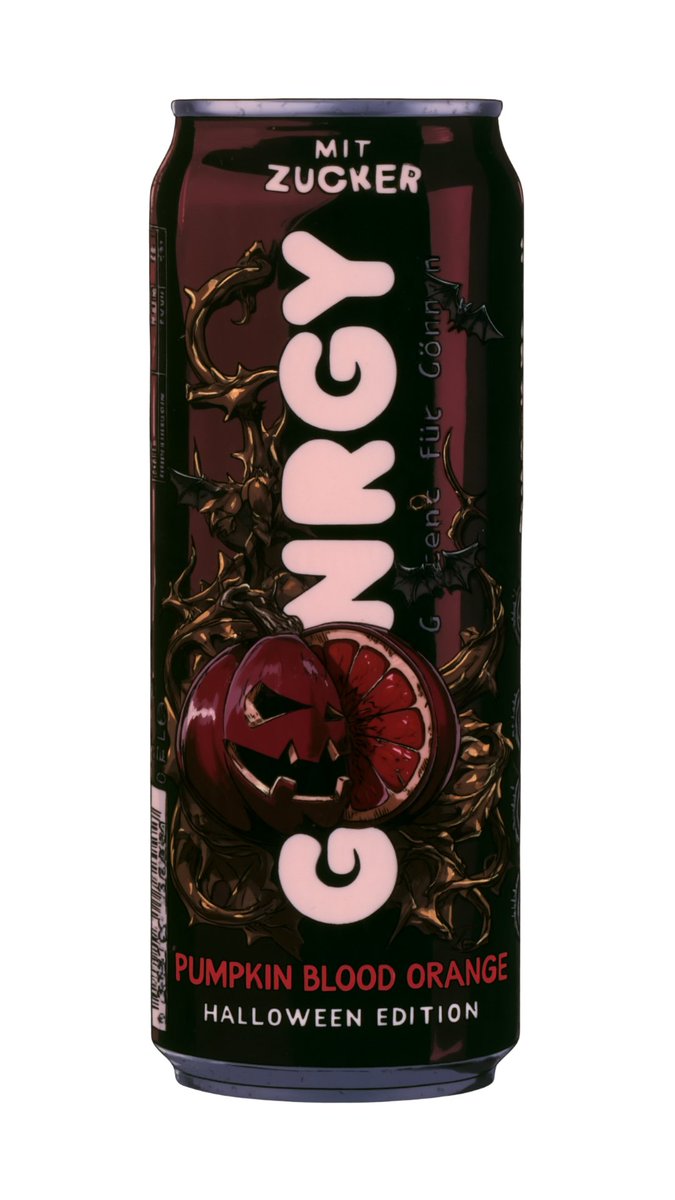
Step 5: The end card. The final shot puts the can front and center against black, with Pumpkin Blood Orange and Halloween Edition around it. Here is the finished clip and a reconstructed prompt for the shot. seedance prompt below: Create a 5 second, 16:9 product end card. Use the supplied Gönrgy Pumpkin Blood Orange Halloween Edition can image as the product reference. Preserve its exact proportions, packaging artwork, colors and label. Pure black background. The upright can rises into frame from below while briefly rotating around its vertical axis. It settles in the center with the front label facing the camera. Add subtle red rim lighting and a small reflection beneath the can. Reveal bold condensed typography around the product: “PUMPKIN” in white on the left. “BLOOD” in red above “ORANGE” in white on the right. Oversized dark red “HALLOWEEN” across the upper background and “EDITION” across the lower background, partially hidden behind the can. Keep the can dominant and the surrounding words readable. Hold the completed composition for the final second. One can only. No additional objects, captions or slogans. No distortion of the packaging or lettering.
Preview results

Your prompt

Step 5: The end card. The final shot puts the can front and center against black, with Pumpkin Blood Orange and Halloween Edition around it. Here is the finished clip and a reconstructed prompt for the shot. seedance prompt below: Create a 5 second, 16:9 product end card. Use the supplied Gönrgy Pumpkin Blood Orange Halloween Edition can image as the product reference. Preserve its exact proportions, packaging artwork, colors and label. Pure black background. The upright can rises into frame from below while briefly rotating around its vertical axis. It settles in the center with the front label facing the camera. Add subtle red rim lighting and a small reflection beneath the can. Reveal bold condensed typography around the product: “PUMPKIN” in white on the left. “BLOOD” in red above “ORANGE” in white on the right. Oversized dark red “HALLOWEEN” across the upper background and “EDITION” across the lower background, partially hidden behind the can. Keep the can dominant and the surrounding words readable. Hold the completed composition for the final second. One can only. No additional objects, captions or slogans. No distortion of the packaging or lettering.

Variable guide

Gönrgy Pumpkin Blood Orange Halloween Edition

Reference product name or packaging label

In the first reference paragraph identifying the supplied product image

Example value

Gönrgy Pumpkin Blood Orange Halloween Edition

PUMPKIN

The word revealed on the left side of the product

Within the typography specification for the left side

Example value

PUMPKIN

BLOOD

The top word revealed on the right side of the product

Within the typography specification for the upper-right side

Example value

BLOOD

ORANGE

The lower word revealed on the right side of the product

Within the typography specification below the upper-right word

Example value

ORANGE

HALLOWEEN

Oversized background text positioned across the upper section

Within the typography specification for the upper background

Example value

HALLOWEEN

EDITION

Oversized background text positioned across the lower section

Within the typography specification for the lower background

Example value

EDITION

What you get

  • A 5-second polished 16:9 commercial end card video.
  • Dynamic can rise-and-rotate entry settling perfectly in the frame center.
  • Surrounding synchronized typography highlighting flavor and edition notes.
  • Clean black studio backdrop with subtle red rim lighting and grounding reflections.

Use cases

  • Commercial end cards for beverage and packaged goods campaigns.
  • Seasonal promotional teasers for social media video ads.
  • Product launch reveals and packaging refresh showcases.

How to use

  • Upload your high-resolution product can reference image along with the prompt.
  • Customize the typography strings to reflect your campaign messaging.
  • Submit the prompt to a video generation model supporting product reference workflows.
  • Set the aspect ratio to 16:9 and duration to 5 seconds for optimal animation pacing.

Related prompts