Skip to content
ImagesFree

Complete AI Workflow for a Product Reference Sheet

A step-by-step workflow for creating product UGC: download a clear product image from Pinterest, upload it to ChatGPT or Google Flow, and use Nano Banana with a detailed prompt to generate a professional four-section advertising reference sheet ensuring full visual product consistency.

Gemini

Source previews

These example images come from the original source. DROPIDEA has not independently tested these examples; results depend on the model and settings.
Ready to personalize

Your prompt

English

Replace the red variables with your information. Copy the full prompt and use it with your preferred agent.

TXT MD English version
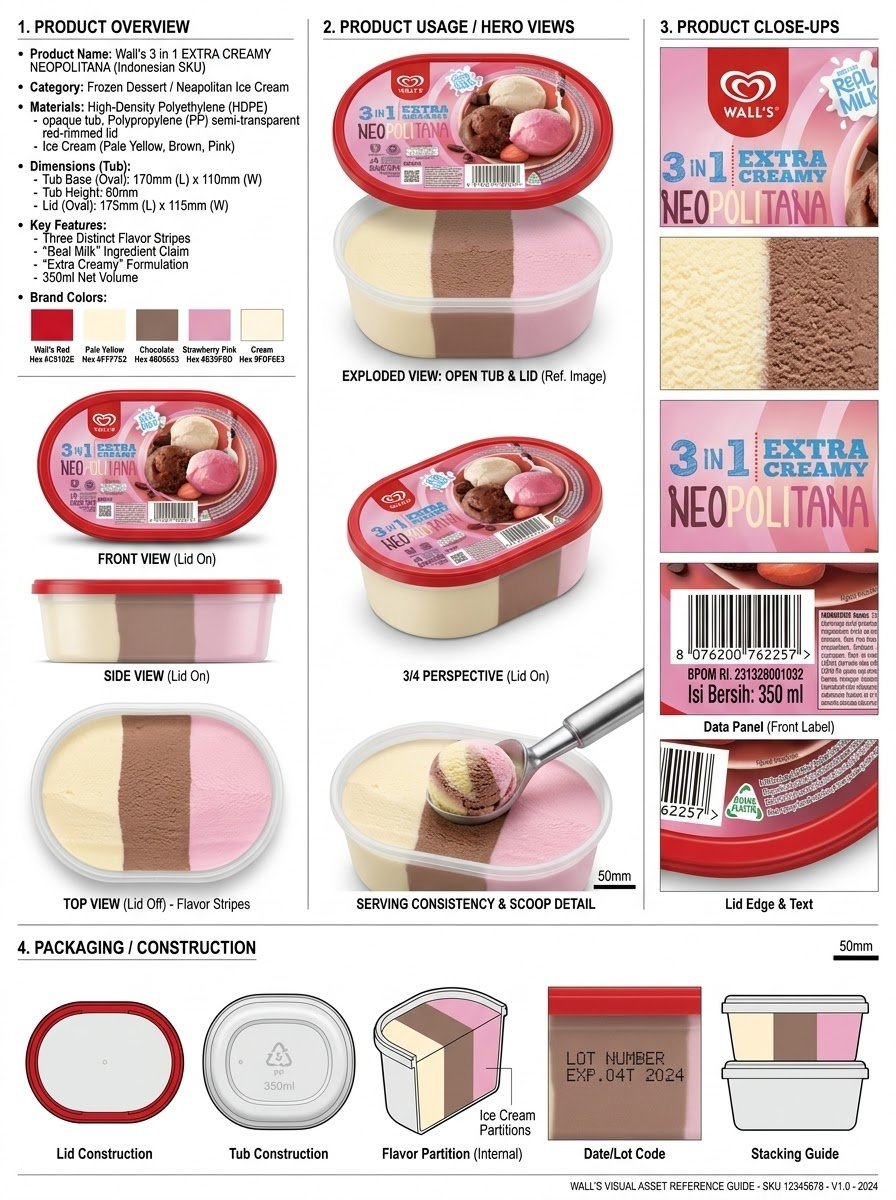
Here’s the complete step-by-step workflow I used to create this Fanice Ice Cream UGC using AI. STEP 1: Go to Pinterest and download a clear, high-quality image of the product you want to create the UGC for. Upload the product image to ChatGPT or Google Flow and use Nano Banana for image generation. Once the image is uploaded, paste the prompt below and run it. "Analyze the product and create a high-resolution, photorealistic, professional advertising reference sheet containing these four sections, on a clean white/neutral studio background, premium commercial product photography, soft controlled lighting, realistic materials, sharp details, subtle shadows, and a professional editorial grid. 1. PRODUCT OVERVIEW; name, category, materials, dimensions/size, key features, and brand colors. 2. PRODUCT USAGE/HERO VIEWS - front, back, side, 3/4, and functional/use view where relevant. 3. PRODUCT CLOSE-UPS - logo/label, texture/material, key components, packaging details, and other important identifying features. 4. PACKAGING / CONSTRUCTION - relevant packaging or structural views where applicable. The entire sheet must function as a visual continuity bible for AI image/video production. Every product view must depict the exact same physical product with absolute consistency. Do not redesign, add variants, alter branding, or change proportions. Use cean typography, clear section labels, thin dividers, balanced spacing, sophisticated production-design aesthetic."
Preview results

Your prompt

Here’s the complete step-by-step workflow I used to create this Fanice Ice Cream UGC using AI. STEP 1: Go to Pinterest and download a clear, high-quality image of the product you want to create the UGC for. Upload the product image to ChatGPT or Google Flow and use Nano Banana for image generation. Once the image is uploaded, paste the prompt below and run it. "Analyze the product and create a high-resolution, photorealistic, professional advertising reference sheet containing these four sections, on a clean white/neutral studio background, premium commercial product photography, soft controlled lighting, realistic materials, sharp details, subtle shadows, and a professional editorial grid. 1. PRODUCT OVERVIEW; name, category, materials, dimensions/size, key features, and brand colors. 2. PRODUCT USAGE/HERO VIEWS - front, back, side, 3/4, and functional/use view where relevant. 3. PRODUCT CLOSE-UPS - logo/label, texture/material, key components, packaging details, and other important identifying features. 4. PACKAGING / CONSTRUCTION - relevant packaging or structural views where applicable. The entire sheet must function as a visual continuity bible for AI image/video production. Every product view must depict the exact same physical product with absolute consistency. Do not redesign, add variants, alter branding, or change proportions. Use cean typography, clear section labels, thin dividers, balanced spacing, sophisticated production-design aesthetic."

What you get

  • A photorealistic, high-resolution advertising reference sheet on a clean white/neutral studio background.
  • Four organized sections: product overview, usage/hero views, close-ups, and packaging/construction.
  • Soft controlled lighting, subtle shadows, sharp details, and a sophisticated production-design aesthetic.

Use cases

  • Creating visually consistent UGC advertising content for food or commercial products.
  • Preparing a unified visual reference for scaled AI image and video production of a product.
  • Building brand reference sheets to preserve product identity across marketing campaigns.

How to use

  • Go to Pinterest, find a clear, high-quality image of the target product, and download it.
  • Upload the product image to ChatGPT or Google Flow and confirm it appears in the conversation before continuing.
  • Copy the prompt inside the quotation marks in this template, paste it into the tool, and run it with Nano Banana enabled for image generation.
  • Review the generated reference sheet and verify that every product view shows the exact same physical product with no branding or proportion changes.
  • Use the resulting sheet as a unified visual reference when generating additional AI images and videos of the product.

Related prompts