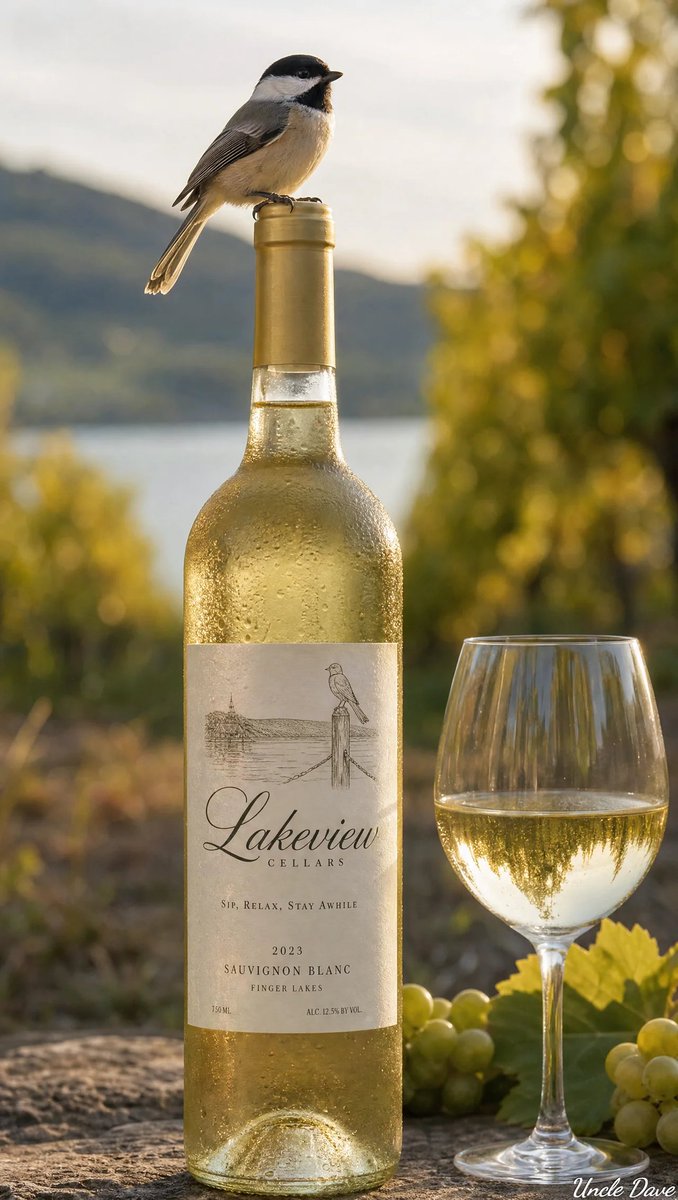
Result 1Image generation
A prompt to generate a photorealistic image of an ice-cold wine bottle with a soft-focus background, an object perched on the cap, and a label featuring a name and tag line, with AI selecting most values automatically.
These example images come from the original source. DROPIDEA has not independently tested these examples; results depend on the model and settings.
Replace the red variables with your information. Copy the full prompt and use it with your preferred agent.
[LOCATION_AND_ENVIRONMENT ]The place and environment around the bottle (default AI Choose).
The LOCATION_AND_ENVIRONMENT line in the settings list and the [LOCATION_AND_ENVIRONMENT ] token in the template body.
Example valueA rustic kitchen at sunset
[BACKGROUND]The soft-focus background (default AI Choose).
The BACKGROUND line in the settings and the [BACKGROUND] token in the template body.
Example valueA misty vineyard backdrop
[OBJECT]The object perched on the cap (default AI Choose).
The OBJECT line in the settings and the [OBJECT] token in the template body.
Example valueA small bird
[WINE_COLOR]The wine color; the default thematically appropriate stays literal.
The WINE_COLOR line in the settings and the [WINE_COLOR] token in the template body.
Example valueRuby red
[GLASS_COLOR]The glass color (default AI choose).
The GLASS_COLOR line in the settings and the [GLASS_COLOR] token in the template body.
Example valueDeep green
[IMAGES]Decorative imagery on the bottle and label (default AI Choose).
The IMAGES line in the settings and the [IMAGES] token in the template body.
Example valueClassic grapevine motifs
[FONT]The label font (default AI Choose).
The FONT line in the settings and the [FONT] token in the template body.
Example valueAn elegant serif
[NAME]The wine name on the label (default AI Choose).
The NAME line in the settings and the quoted [NAME] token in the template body.
Example valueNejma Rouge
[TAG_LINE]The tag line below the name (default AI Choose).
The TAG_LINE line in the settings and the quoted [TAG_LINE] token in the template body.
Example valueFrom sunlit vines
A 16:9 2x2 grid prompt that reinterprets items or dishes into avant-garde 1980s Memphis Group designer furniture in...
A comprehensive prompt for generating a luxury three-panel editorial fragrance campaign poster showcasing top, hear...
Editorial luxury perfume prompt uniting intimate cropped human presence, precision beveled glass flacon, and a tran...
A 5-second 16:9 commercial end card prompt featuring a rising and rotating beverage can against black, framed with...