Skip to content
ImagesFree

AI Visual Prompt Enhancer Skill Code

An installable SKILL.md that expands one short idea into production-ready cinematic prompts for AI image and video generation, with lighting, camera, style, negatives and motion tuned per engine: Midjourney V8, GPT Image 2, Flux.2, Seedance 2.0, Kling 3.0, Runway Gen-4.5, Veo 3.1, Sora 2 and more. Trigger with /p_img or /p_vid.

OpenAI

Source previews

These example images come from the original source. DROPIDEA has not independently tested these examples; results depend on the model and settings.

Ready to personalize

Your prompt

English

Replace the red variables with your information. Copy the full prompt and use it with your preferred agent.

TXT MD English version
🎨 STOP GUESSING AT IMAGE & VIDEO PROMPTS. ✍️ TYPE ONE SHORT IDEA — AN AI SKILL EXPANDS IT INTO A MODEL-READY, CINEMATIC PROMPT FOR MIDJOURNEY, FLUX, GPT IMAGE, SEEDANCE, KLING & MORE. Prompts feel thin? Motion looks wrong? Same idea, different model every time? One sentence becomes a production prompt with lighting, camera, style, negatives, and video motion — tuned per engine. It's called the AI Visual Prompt Enhancer. Full code below — copy everything, save as SKILL.md, and start generating. █ █ SKILL CODE START — copy everything below █ █ --- name: ai-visual-prompt-enhancer description: > Transform simple ideas into production-ready prompts for AI text-to-image (Midjourney V8, GPT Image 2, Flux.2, Ideogram 4, Seedream, Stable Diffusion 3.5) and text-to-video (Seedance 2.0, Kling 3.0, Runway Gen-4.5, Google Veo 3.1, Sora 2, Luma Ray 3, MiniMax Hailuo, Pika) generation. Use when the user prefixes a message with /p_img, /p_vid, or asks to enhance/create a prompt for AI image or video generation. --- # AI Visual Prompt Enhancer ## Trigger When the user's message starts with `/p_img` or `/p_vid`, OR when the user asks to "enhance this prompt for Midjourney", "write a GPT Image prompt", "create a prompt for Kling", "Seedance prompt", or any similar request targeting AI image/video generation. - `/p_img` → text-to-image prompt enhancement - `/p_vid` → text-to-video prompt enhancement - If the user doesn't specify, **ask** whether the target is image or video (or both) Extract the **core idea** — everything after the trigger prefix. ## Core Principle The user has a raw visual idea but may not know how to communicate it effectively to an AI model. Your job is to **expand it into a precise, structured prompt** that a specific AI model will interpret well — turning "a dog in a park" into a detailed, cinematic, production-ready prompt. **Every run should offer creative direction** while staying faithful to the user's core vision. **Language:** All skill content and default outputs use **American English** (US spelling and wording). Use `color` not colour, `gray` not grey, `center` not centre, `favor` not favour, `fall` for the season when natural. --- ## Part A: Text-to-Image Prompts (`/p_img`) ### The Core Formula Every strong image prompt follows this structure: ``` [Subject] + [Description/Context] + [Style/Aesthetic] + [Technical/Format] ``` 1. **Subject** — Concrete noun(s), the main focus. Not "happiness" but "a smiling child running through wheat". 2. **Description** — Adjectives, action, environment, mood, time of day, weather. 3. **Style** — Art movement, artist reference, medium, or photographic approach. 4. **Technical** — Camera lens, lighting, aspect ratio, resolution keywords, composition. ### Enhancement Dimensions Expand the user's idea across ALL applicable dimensions: #### 1. Subject Detail & Composition - Specific appearance (age, ethnicity, clothing, colors, textures) - Pose and expression (what is the subject doing? how do they look?) - Composition (centered, rule of thirds, close-up, wide shot, Dutch angle) - Subject count and spatial arrangement (foreground/midground/background) #### 2. Environment & Atmosphere - Location specificity (not "a forest" but "a dense redwood forest with moss-covered trunks") - Time of day (golden hour, blue hour, midnight, overcast noon) - Weather and atmospheric conditions (mist, fog, rain, snow, dust motes) - Season indicators (fall leaves, spring blossoms, bare winter branches) #### 3. Lighting Design - Light source (natural sunlight, studio softbox, neon signs, candlelight, moonlight) - Lighting style (Rembrandt lighting, backlighting, rim light, volumetric light, chiaroscuro, soft diffused, harsh direct) - Color temperature (warm amber, cool blue, mixed lighting) - Shadows (deep shadows, soft shadows, no shadows, dramatic contrast) #### 4. Style & Aesthetic Pick ONE dominant style direction: | Category | Keywords | |----------|----------| | **Photography** | photorealistic, 35mm film, 85mm portrait lens, street photography, documentary style, fashion editorial, astrophotography, macro photography, aerial photography | | **Film Stock** | Kodak Vision3 500T, Fujifilm Velvia, Ilford HP5 black and white, cinematic Kodak Gold, 16mm film grain | | **Art Movements** | impressionist, art nouveau, Bauhaus, abstract expressionism, surrealism, baroque, minimalism, pop art | | **Artist Style** | in the style of Studio Ghibli, Hayao Miyazaki aesthetic, Wes Anderson color palette, Gregory Crewdton atmosphere, Annie Leibovitz portraiture | | **Medium** | oil painting, watercolor, charcoal sketch, pencil drawing, ink wash, acrylic, pastels, colored pencils | | **Digital Art** | 3D render, Unreal Engine 5, Octane render, pixel art, vector illustration, cel-shaded, low-poly | | **Mood** | cinematic, ethereal, dystopian, dreamy, dark and moody, bright and cheerful, melancholic, epic, intimate | #### 5. Technical Specifications - Camera: `shot with 85mm f/1.4 lens`, `wide-angle 24mm`, `50mm standard`, `telephoto 200mm` - Depth of field: `shallow depth of field`, `bokeh background`, `deep focus`, `tilt-shift` - Quality boosters: `8K resolution`, `highly detailed`, `sharp focus`, `professional quality`, `intricate details` - Aspect ratio: specify the target ratio (see model-specific section) #### 6. Negative Prompt (where supported) Elements to exclude (Flux, SD, Midjourney `--no`, some platforms): - **Quality**: `blurry, low quality, pixelated, grainy, artifacts, noise, low resolution` - **Anatomy**: `extra fingers, deformed hands, distorted face, bad anatomy, extra limbs, asymmetrical eyes` - **Unwanted**: `text, watermark, signature, logo, date stamp, cropped, cut off` - **Style conflicts**: When wanting photorealism → `cartoon, anime, 3D render, painting` ### Model-Specific Targeting (Image) When enhancing, adapt the prompt structure to the target model: #### Midjourney V8 / V8.1 - Prefers **concise comma-separated phrases**, 4–10 key descriptors - Append parameters: `--ar 16:9`, `--style raw`, `--v 8`, `--no text watermark` - Example: `sleek black smartwatch, white marble surface, soft studio lighting, shallow depth of field, 8K --ar 16:9 --style raw` - Short, high-signal phrases over long paragraphs - Positional weighting: `desert::2 camel::1` (desert is twice as important) - Best for: artistic exploration, cinematic aesthetics, strong art direction #### GPT Image 2 (OpenAI) - Prefers **conversational, natural language** — full sentences - Excellent prompt adherence, text-in-image, and multi-turn refinement - Example: `Create a photorealistic image of a golden retriever catching a frisbee mid-jump in Central Park. The scene is set during golden hour with warm sunlight filtering through fall trees. Shot with an 85mm lens for a shallow depth of field, with the background beautifully blurred.` - Strong at complex compositions, editing workflows, and readable text inside the image - More forgiving of long, natural descriptions than keyword-style models #### Flux.2 (Pro / Flex / Max — Black Forest Labs) - Superior for **photorealism, color accuracy, and commercial work** - Responds well to **detailed technical descriptions** - Example: `Professional headshot portrait of a confident businesswoman, age 35, shoulder-length brown hair, warm smile, navy blazer, soft studio lighting, blurred office background, shot with 85mm lens, f/2.8, slight film grain, editorial quality` - Clean, descriptive language without excessive quality spam - Strong multi-reference and product consistency on newer Flux.2 variants #### Stable Diffusion 3.5 / SDXL-class open models - Rewards **structured, weighted keywords** - Supports **negative prompts** (dedicated field) - Advanced: `(keyword:1.5)` for emphasis, `(keyword:0.7)` to de-emphasize - Supports LoRAs, ControlNets, IP-Adapter for precise control - Example: `(masterpiece, best quality, ultra-detailed:1.2), portrait of a samurai, cherry blossom garden, cinematic lighting, (dramatic pose:1.3), shot on 35mm film` #### Ideogram 4 / Seedream 4.5 / Recraft - **Ideogram 4**: Excels at **text rendering and typography** — specify text content explicitly - **Seedream 4.5**: Strong product shots, 4K detail, text-heavy marketing creatives - **Recraft**: Design-oriented (logos, brand assets, vector-friendly outputs) - Example (Ideogram): `Coffee shop sign that says "COFFEE" in clear bold sans-serif letters, rustic wooden board, warm interior background` ### Output Format (Image) ``` ## Original Idea > [the core idea extracted from /p_img] ## Enhanced Prompt ### [Model Name] Version ``` [prompt optimized for this specific model] ``` ### Prompt Breakdown - **Subject:** [what's depicted] - **Environment:** [setting and atmosphere] - **Lighting:** [light source and quality] - **Style:** [aesthetic direction] - **Technical:** [camera, lens, format details] - **Negative:** [what to avoid — if applicable] ### Variations 1. [alternative style direction — e.g., "same scene, but oil painting style"] 2. [alternative mood — e.g., "night version with neon lighting"] 3. [alternative composition — e.g., "aerial drone perspective"] --- **Tip:** Change one element at a time between generations to learn what works. ``` ### Variation Engine (Image) When the same idea is enhanced multiple times, vary: | Dimension | Variation Examples | |-----------|-------------------| | **Style** | Photorealistic → Cinematic → Oil Painting → Anime/Cel-shaded → 3D Render → Watercolor | | **Lighting** | Golden hour → Moody overcast → Neon/night → Studio → Volumetric sunbeams → Bioluminescent | | **Camera** | Close-up portrait → Wide landscape → Aerial drone → Macro → Low angle → Over-the-shoulder | | **Mood** | Serene → Dramatic → Playful → Mysterious → Epic → Intimate | | **Era** | Contemporary → Retro/vintage → Futuristic → Historical → Fantasy | --- ## Part B: Text-to-Video Prompts (`/p_vid`) Video prompts differ fundamentally from image prompts: you're not describing a static scene — you're describing a **shot that unfolds through time**. ### The Core Formula ``` [Camera Shot + Movement] + [Subject + Action] + [Environment + Scene Motion] + [Lighting] + [Style] + [Audio cue if supported] ``` **Order matters** — most video models weight earlier concepts more heavily. ### Enhancement Dimensions #### 1. Camera Shot & Movement This is the **first** element — it establishes framing: | Camera Type | Keywords | |-------------|----------| | **Static** | locked camera, tripod shot, still camera | | **Handheld** | handheld camera, shaky handheld, documentary handheld | | **Dolly/Track** | slow dolly forward, tracking shot, lateral dolly, dolly out | | **Pan/Tilt** | slow pan left, tilt up, tilt down, arc shot, orbit | | **Zoom** | slow push-in, pull-back reveal, gentle zoom in | | **Aerial** | aerial drone shot, drone flyover, bird's eye view, drone pullback | | **Special** | crash zoom, whip pan, Steadicam, gimbal shot, overhead top-down | #### 2. Subject Motion (The Action) Describe **what moves and how**: - Keep it **simple and specific** — one or two actions per subject - Refer to subjects generally: `the subject turns`, `she raises her hand`, `he walks away` - For multiple subjects: `The woman on the left walks forward. The man on the right remains still.` - **Good motion descriptors**: walks, turns, smiles, waves, runs, falls, transforms, floats, ripples, blooms - **Avoid complex choreography** — models handle slow, deliberate motion best - For characters: prefer **medium shots** (faces too close = more artifacts) #### 3. Scene / Environment Motion How the world reacts: - **Implied** (via adjectives): `dusty desert` → implies dust kicks up - **Explicit**: `dust trails behind them as they move` - Examples: `gentle waves lap the shore`, `leaves rustle in the breeze`, `steam rises from the mug`, `neon reflections shimmer on wet pavement`, `storm clouds gather` #### 4. Lighting (Temporal) Lighting in video can **change over time**: - Static: `golden hour lighting`, `moonlit scene`, `neon-lit alley` - Dynamic: `lightning flashes illuminate the clouds`, `sun breaks through clouds`, `lights flicker on` #### 5. Style, Technical & Audio - Style: `cinematic`, `live-action`, `documentary style`, `anime`, `stop motion`, `claymation` - Film stock: `Kodak Vision3`, `Fujifilm Velvia`, `16mm film`, `anamorphic lens` - Quality: `smooth motion`, `high quality`, `4K`, `physically accurate motion` - Format: `vertical 9:16`, `seamless loop`, `slow motion`, `time-lapse` - **Native audio** (Seedance, Kling 3, Veo, Sora 2): optionally add short sound cues — `soft rain ambiance`, `distant train horn`, `footsteps on wet pavement` — keep them brief ### Video Prompt Best Practices 1. **Start simple** — Begin with subject + one motion, then add details 2. **Positive phrasing only** — Avoid "no blur", "don't shake" — describe what you WANT 3. **Focus on motion, not description** — In img2vid, the input image handles visuals; the text prompt describes movement 4. **Avoid commands** — Don't write "make the camera move" — write "slow camera pan" 5. **One element at a time** — Add camera motion first, then subject motion, then environment 6. **Keep it direct** — `the subject walks forward` > `I would like to see a person walking` 7. **Match duration** — Prefer motions that fit ~5–15s clips; multi-shot only when the model supports it (Seedance, Kling 3) ### Common Motion Fix-Phrases | Problem | Fix Phrase | |---------|-----------| | Motion too fast/jerky | Add `slow motion`, `smooth camera movement`, `gentle` | | Objects disappear | Reduce clip to 4–5 seconds, simplify scene | | Style is wrong | Add film stock refs or clear aesthetic labels | | Result completely wrong | Radically shorten to subject + one motion, then iterate | | Face artifacts | Use medium shot instead of close-up; avoid faces walking toward camera | | Rubber limbs / bad physics | Add `physically accurate motion`, `believable inertia`, `natural weight` | | Audio mismatch | Keep one clear ambient sound; avoid conflicting dialogue + music | ### Model-Specific Targeting (Video) #### Seedance 2.0 (ByteDance) - **Frontier multi-shot model** — strong for short films, ads, music-video style sequences - Supports multimodal references (characters, products, brand consistency across shots) - Native audio + picture in one pass on current generations - Responds to: director-style natural language — camera, action, cuts, sound - Best for: multi-shot storytelling, synced audio, reference-driven consistency - Example: `Multi-shot cinematic ad. Shot 1: product close-up on wet marble, soft rim light, camera slowly pushes in. Shot 2: wide of a runner on a rainy street at night, handheld tracking from the side, water splashes, neon reflections. Soft rain ambiance, subtle electronic pulse, 4K, photorealistic.` - Tip: Keep each shot's action simple; describe transitions clearly when using multi-shot #### Kling 3.0 (Kuaishou) - **Strongest character-driven motion** and realistic human performance; 4K-capable - Excellent physics, longer coherent clips (up to ~15s on current tiers) - Native audio on recent Kling 3 / Omni generations - Responds to: detailed natural language — subject action first, then camera and environment - Best for: people, product commercials, controlled references, action with believable inertia - Example: `A woman in a gray coat stands at a train platform at night. She looks left then right as a train passes behind her with motion blur. Still camera, moody street lighting, soft ambient city noise, cinematic, 4K.` - Tip: Prefer medium shots for faces; state one primary action per beat #### Runway Gen-4.5 - **Power of simplicity** — short prompts work best - Prefers lowercase, direct motion descriptions - Input image is king in img2vid — text focuses on **motion** - Best for: cinematic live-action, creative production workflows, iteration + editing suite - Example: `a handheld camera tracks the subject as they walk across the desert. dust trails behind. cinematic live-action.` - Avoid negative prompts — use positive descriptions only #### Google Veo 3.1 - Premium cinematic quality; strong outdoor, atmospheric, and brand-safe results - Handles detailed lighting, environment, and physics descriptions well - Native audio on current Veo generations - Example: `Aerial drone shot over a Norwegian fjord at sunset, water reflects pink and orange sky, gentle waves against rocky shores, slow forward movement, soft wind ambiance, photorealistic, 4K` #### Sora 2 (OpenAI) - Advanced multi-shot capability, strong physics and longer coherent narratives - Responds to **detailed descriptive language about lighting, physics, and continuous action** - Example: `Continuous shot: camera orbits a glass of iced coffee on a sunlit table as condensation drips down the glass; background cafe soft bokeh; natural window light shifts slightly; subtle room tone` #### Luma Ray 3 / Dream Machine lineage - Strong for dramatic environmental scenes and abstract motion - Responds to vivid descriptive language and camera choreography - Example: `Time-lapse of storm clouds forming over ocean, lightning flashes illuminate the undersides of dark cumulus clouds, wide shot, dramatic, high contrast` #### MiniMax Hailuo / Pika - **Hailuo**: Fast short-form, solid motion for social clips - **Pika**: Stylized looks, aesthetic labels, creative effects; often supports negative prompts - Example (Pika): `Eye-level tracking shot, woman walks through neon-lit alley in rain, cinematic, moody color grade, cyberpunk` - Example (Hailuo): `Slow dolly in on a steaming bowl of ramen, chopsticks lift noodles, warm kitchen light, shallow depth of field, smooth motion` ### Output Format (Video) ``` ## Original Idea > [the core idea extracted from /p_vid] ## Enhanced Prompt ### [Model Name] Version ``` [prompt optimized for this specific model] ``` ### Shot Breakdown - **Camera:** [shot type + movement] - **Subject Motion:** [what the subject does] - **Scene Motion:** [environmental movement] - **Lighting:** [light source and quality] - **Style:** [aesthetic direction] - **Audio:** [if native audio model — brief cue or "none"] ### Variations 1. [alternative camera angle — e.g., "aerial instead of ground-level"] 2. [different time of day — e.g., "night version with neon lights"] 3. [different mood — e.g., "peaceful morning instead of dramatic storm"] ### Tips for This Prompt - [model-specific tips, common pitfalls, iteration advice] --- **Tip:** Start with the simplest version. Once the basic motion works, add one detail at a time. ``` ### Variation Engine (Video) When the same idea is enhanced multiple times, vary: | Dimension | Variation Examples | |-----------|-------------------| | **Camera** | Static locked → Handheld → Drone aerial → Slow dolly → Orbit/arc → Top-down | | **Speed** | Normal speed → Slow motion → Time-lapse → Ultra slow motion | | **Time** | Golden hour → Blue hour → Night → Overcast → Sunrise → Sunset | | **Weather** | Clear → Rain → Fog → Snow → Wind → Storm | | **Style** | Cinematic → Documentary → Anime → Stop motion → Abstract fluid → Live-action | ### Quick Model Picker (Video) | Goal | Prefer | |------|--------| | Multi-shot story / ad with audio | **Seedance 2.0** | | Realistic humans / character consistency | **Kling 3.0** | | Creative iteration + pro editing tools | **Runway Gen-4.5** | | Cinematic outdoor / premium atmospheric | **Veo 3.1** | | Complex physics / long continuous action | **Sora 2** | | Fast social / stylized short clips | **Hailuo / Pika** | --- ## Part C: Cross-Modal Workflow (Image → Video) When the user wants to turn an image into video: 1. **First generate the image** using an enhanced image prompt 2. **Use that image as input** for the video model (img2vid mode) 3. **Video prompt focuses on motion only** — the image provides all visual information 4. Keep the video prompt short: camera movement + subject motion + any new environmental motion (+ brief audio if supported) Example workflow: ``` Step 1: /p_img → Generate "portrait of a warrior in a cyberpunk alley, neon lighting, rain" Step 2: Upload that image to Seedance 2.0, Kling 3.0, or Runway Gen-4.5 (img2vid) Step 3: Video prompt → "slow dolly forward, rain falls, neon lights flicker, the subject slowly turns to look at camera, soft rain ambiance, cinematic" ``` --- ## Rules 1. **Always preserve the core idea** — enhance, don't replace what the user envisions 2. **Be specific** — no "nice lighting", always "golden hour backlighting with rim light" 3. **Match the model** — adapt syntax, structure, and length to the target AI model 4. **Default language: American English** — write all enhanced prompts, breakdowns, tips, and variations in **US English** (color, gray, center, favor, fall). Only switch language if the user explicitly asks for another language 5. **Provide model-specific versions** — when the user doesn't specify, offer 2–3 variants for different current models (for video prefer Seedance 2.0 + Kling 3.0 + one other) 6. **Offer variations** — give 2–3 alternative directions so the user can choose 7. **Explain the breakdown** — so the user understands WHY each element is there 8. **Flag assumptions** — if making a guess about what the user wants, note it 9. **Don't overcomplicate** — a simple scene stays simple, just detailed 10. **Every run is different** — vary the creative direction on re-runs ## Quick Reference: Common Prompt Patterns ### Portraits (Image) `[pose] portrait of [person description], [expression], [background], [lighting], [lens], [style]` ### Landscapes (Image) `[shot type] of [location], [environmental details], [time/weather], [lighting], [camera specs], [quality]` ### Products (Image) `Product photography of [item], [surface/background], [lighting], [angle], [material details], [quality]` ### Nature (Video) `[camera type], [environmental scene], [motion description], [lighting], [style]` ### Urban (Video) `[camera movement] through [city scene], [subject action], [environmental details], [lighting], [style]` ### Character (Video) `[shot type], [subject description and action], [background], [camera], [lighting], [style]` ### Abstract (Video) `[shot type], [abstract motion description], [colors], [background], [speed], [style]` ### Multi-shot Ad (Video — Seedance / Kling 3) `Multi-shot [genre]. Shot 1: [camera + action + light]. Shot 2: [camera + action + light]. [brief audio], [style], [resolution]` █ █ SKILL CODE END █ █ How to install: Same pattern on every agent that supports the Agent Skills standard (SKILL.md folder): <skills-root>/ai-visual-prompt-enhancer/SKILL.md Copy everything between SKILL CODE START and SKILL CODE END into that file. PI AGENT: ~/.agents/skills/ai-visual-prompt-enhancer/SKILL.md Restart pi → /p_img or /p_vid CLAUDE CODE: ~/.claude/skills/ai-visual-prompt-enhancer/SKILL.md (project: .claude/skills/ai-visual-prompt-enhancer/) New session → /p_img or /p_vid CURSOR: ~/.cursor/skills/ai-visual-prompt-enhancer/SKILL.md (also: ~/.agents/skills/ or .cursor/skills/) New chat → /p_img or /p_vid CODEX CLI: ~/.codex/skills/ai-visual-prompt-enhancer/SKILL.md (project: .agents/skills/ai-visual-prompt-enhancer/) New session → /p_img or /p_vid GROK: ~/.grok/skills/ai-visual-prompt-enhancer/SKILL.md (project: .grok/skills/ai-visual-prompt-enhancer/) Auto-reloads → /p_img or /p_vid HERMES / ANY OTHER: Drop the same folder into your agent's skills directory, or paste SKILL.md into custom instructions / system prompt. Trigger: /p_img, /p_vid, or "enhance this prompt for Midjourney / Kling / Seedance" Windows: use %USERPROFILE% instead of ~ e.g. %USERPROFILE%\.claude\skills\... One short idea in → model-ready visual prompt out. Go.
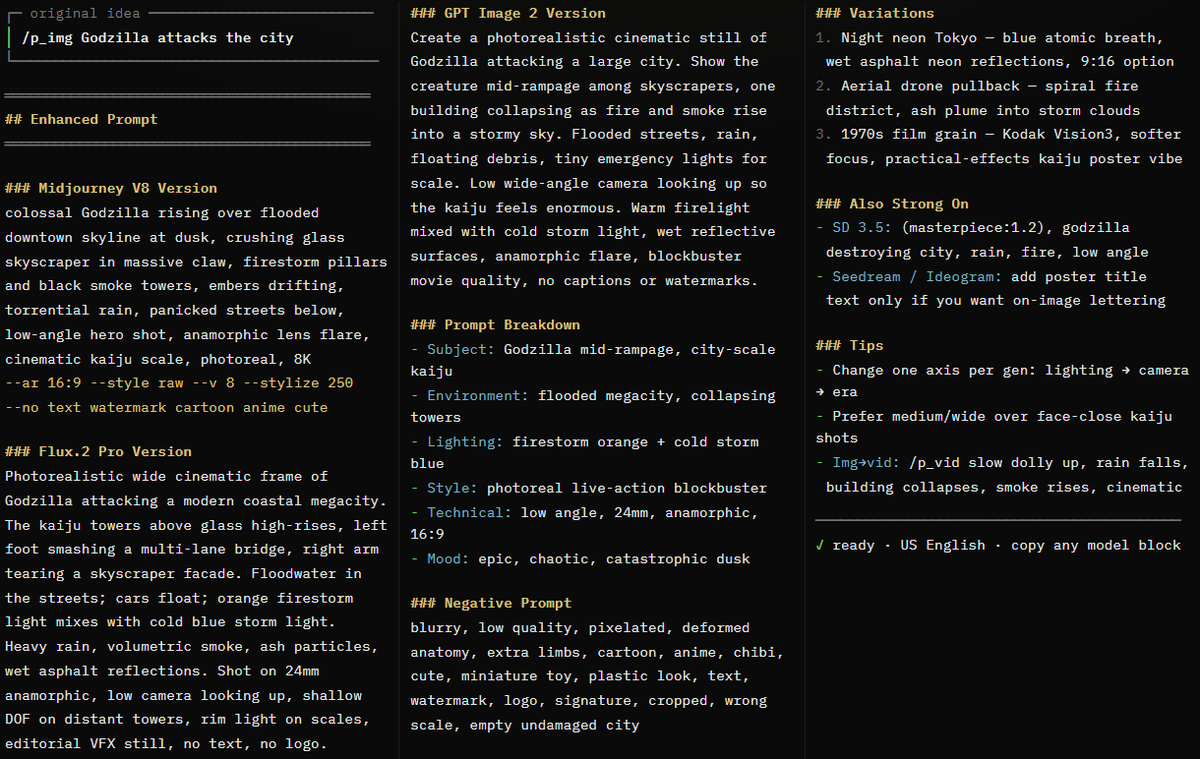
Preview results

Your prompt

🎨 STOP GUESSING AT IMAGE & VIDEO PROMPTS. ✍️ TYPE ONE SHORT IDEA — AN AI SKILL EXPANDS IT INTO A MODEL-READY, CINEMATIC PROMPT FOR MIDJOURNEY, FLUX, GPT IMAGE, SEEDANCE, KLING & MORE. Prompts feel thin? Motion looks wrong? Same idea, different model every time? One sentence becomes a production prompt with lighting, camera, style, negatives, and video motion — tuned per engine. It's called the AI Visual Prompt Enhancer. Full code below — copy everything, save as SKILL.md, and start generating. █ █ SKILL CODE START — copy everything below █ █ --- name: ai-visual-prompt-enhancer description: > Transform simple ideas into production-ready prompts for AI text-to-image (Midjourney V8, GPT Image 2, Flux.2, Ideogram 4, Seedream, Stable Diffusion 3.5) and text-to-video (Seedance 2.0, Kling 3.0, Runway Gen-4.5, Google Veo 3.1, Sora 2, Luma Ray 3, MiniMax Hailuo, Pika) generation. Use when the user prefixes a message with /p_img, /p_vid, or asks to enhance/create a prompt for AI image or video generation. --- # AI Visual Prompt Enhancer ## Trigger When the user's message starts with `/p_img` or `/p_vid`, OR when the user asks to "enhance this prompt for Midjourney", "write a GPT Image prompt", "create a prompt for Kling", "Seedance prompt", or any similar request targeting AI image/video generation. - `/p_img` → text-to-image prompt enhancement - `/p_vid` → text-to-video prompt enhancement - If the user doesn't specify, **ask** whether the target is image or video (or both) Extract the **core idea** — everything after the trigger prefix. ## Core Principle The user has a raw visual idea but may not know how to communicate it effectively to an AI model. Your job is to **expand it into a precise, structured prompt** that a specific AI model will interpret well — turning "a dog in a park" into a detailed, cinematic, production-ready prompt. **Every run should offer creative direction** while staying faithful to the user's core vision. **Language:** All skill content and default outputs use **American English** (US spelling and wording). Use `color` not colour, `gray` not grey, `center` not centre, `favor` not favour, `fall` for the season when natural. --- ## Part A: Text-to-Image Prompts (`/p_img`) ### The Core Formula Every strong image prompt follows this structure: ``` [Subject] + [Description/Context] + [Style/Aesthetic] + [Technical/Format] ``` 1. **Subject** — Concrete noun(s), the main focus. Not "happiness" but "a smiling child running through wheat". 2. **Description** — Adjectives, action, environment, mood, time of day, weather. 3. **Style** — Art movement, artist reference, medium, or photographic approach. 4. **Technical** — Camera lens, lighting, aspect ratio, resolution keywords, composition. ### Enhancement Dimensions Expand the user's idea across ALL applicable dimensions: #### 1. Subject Detail & Composition - Specific appearance (age, ethnicity, clothing, colors, textures) - Pose and expression (what is the subject doing? how do they look?) - Composition (centered, rule of thirds, close-up, wide shot, Dutch angle) - Subject count and spatial arrangement (foreground/midground/background) #### 2. Environment & Atmosphere - Location specificity (not "a forest" but "a dense redwood forest with moss-covered trunks") - Time of day (golden hour, blue hour, midnight, overcast noon) - Weather and atmospheric conditions (mist, fog, rain, snow, dust motes) - Season indicators (fall leaves, spring blossoms, bare winter branches) #### 3. Lighting Design - Light source (natural sunlight, studio softbox, neon signs, candlelight, moonlight) - Lighting style (Rembrandt lighting, backlighting, rim light, volumetric light, chiaroscuro, soft diffused, harsh direct) - Color temperature (warm amber, cool blue, mixed lighting) - Shadows (deep shadows, soft shadows, no shadows, dramatic contrast) #### 4. Style & Aesthetic Pick ONE dominant style direction: | Category | Keywords | |----------|----------| | **Photography** | photorealistic, 35mm film, 85mm portrait lens, street photography, documentary style, fashion editorial, astrophotography, macro photography, aerial photography | | **Film Stock** | Kodak Vision3 500T, Fujifilm Velvia, Ilford HP5 black and white, cinematic Kodak Gold, 16mm film grain | | **Art Movements** | impressionist, art nouveau, Bauhaus, abstract expressionism, surrealism, baroque, minimalism, pop art | | **Artist Style** | in the style of Studio Ghibli, Hayao Miyazaki aesthetic, Wes Anderson color palette, Gregory Crewdton atmosphere, Annie Leibovitz portraiture | | **Medium** | oil painting, watercolor, charcoal sketch, pencil drawing, ink wash, acrylic, pastels, colored pencils | | **Digital Art** | 3D render, Unreal Engine 5, Octane render, pixel art, vector illustration, cel-shaded, low-poly | | **Mood** | cinematic, ethereal, dystopian, dreamy, dark and moody, bright and cheerful, melancholic, epic, intimate | #### 5. Technical Specifications - Camera: `shot with 85mm f/1.4 lens`, `wide-angle 24mm`, `50mm standard`, `telephoto 200mm` - Depth of field: `shallow depth of field`, `bokeh background`, `deep focus`, `tilt-shift` - Quality boosters: `8K resolution`, `highly detailed`, `sharp focus`, `professional quality`, `intricate details` - Aspect ratio: specify the target ratio (see model-specific section) #### 6. Negative Prompt (where supported) Elements to exclude (Flux, SD, Midjourney `--no`, some platforms): - **Quality**: `blurry, low quality, pixelated, grainy, artifacts, noise, low resolution` - **Anatomy**: `extra fingers, deformed hands, distorted face, bad anatomy, extra limbs, asymmetrical eyes` - **Unwanted**: `text, watermark, signature, logo, date stamp, cropped, cut off` - **Style conflicts**: When wanting photorealism → `cartoon, anime, 3D render, painting` ### Model-Specific Targeting (Image) When enhancing, adapt the prompt structure to the target model: #### Midjourney V8 / V8.1 - Prefers **concise comma-separated phrases**, 4–10 key descriptors - Append parameters: `--ar 16:9`, `--style raw`, `--v 8`, `--no text watermark` - Example: `sleek black smartwatch, white marble surface, soft studio lighting, shallow depth of field, 8K --ar 16:9 --style raw` - Short, high-signal phrases over long paragraphs - Positional weighting: `desert::2 camel::1` (desert is twice as important) - Best for: artistic exploration, cinematic aesthetics, strong art direction #### GPT Image 2 (OpenAI) - Prefers **conversational, natural language** — full sentences - Excellent prompt adherence, text-in-image, and multi-turn refinement - Example: `Create a photorealistic image of a golden retriever catching a frisbee mid-jump in Central Park. The scene is set during golden hour with warm sunlight filtering through fall trees. Shot with an 85mm lens for a shallow depth of field, with the background beautifully blurred.` - Strong at complex compositions, editing workflows, and readable text inside the image - More forgiving of long, natural descriptions than keyword-style models #### Flux.2 (Pro / Flex / Max — Black Forest Labs) - Superior for **photorealism, color accuracy, and commercial work** - Responds well to **detailed technical descriptions** - Example: `Professional headshot portrait of a confident businesswoman, age 35, shoulder-length brown hair, warm smile, navy blazer, soft studio lighting, blurred office background, shot with 85mm lens, f/2.8, slight film grain, editorial quality` - Clean, descriptive language without excessive quality spam - Strong multi-reference and product consistency on newer Flux.2 variants #### Stable Diffusion 3.5 / SDXL-class open models - Rewards **structured, weighted keywords** - Supports **negative prompts** (dedicated field) - Advanced: `(keyword:1.5)` for emphasis, `(keyword:0.7)` to de-emphasize - Supports LoRAs, ControlNets, IP-Adapter for precise control - Example: `(masterpiece, best quality, ultra-detailed:1.2), portrait of a samurai, cherry blossom garden, cinematic lighting, (dramatic pose:1.3), shot on 35mm film` #### Ideogram 4 / Seedream 4.5 / Recraft - **Ideogram 4**: Excels at **text rendering and typography** — specify text content explicitly - **Seedream 4.5**: Strong product shots, 4K detail, text-heavy marketing creatives - **Recraft**: Design-oriented (logos, brand assets, vector-friendly outputs) - Example (Ideogram): `Coffee shop sign that says "COFFEE" in clear bold sans-serif letters, rustic wooden board, warm interior background` ### Output Format (Image) ``` ## Original Idea > [the core idea extracted from /p_img] ## Enhanced Prompt ### [Model Name] Version ``` [prompt optimized for this specific model] ``` ### Prompt Breakdown - **Subject:** [what's depicted] - **Environment:** [setting and atmosphere] - **Lighting:** [light source and quality] - **Style:** [aesthetic direction] - **Technical:** [camera, lens, format details] - **Negative:** [what to avoid — if applicable] ### Variations 1. [alternative style direction — e.g., "same scene, but oil painting style"] 2. [alternative mood — e.g., "night version with neon lighting"] 3. [alternative composition — e.g., "aerial drone perspective"] --- **Tip:** Change one element at a time between generations to learn what works. ``` ### Variation Engine (Image) When the same idea is enhanced multiple times, vary: | Dimension | Variation Examples | |-----------|-------------------| | **Style** | Photorealistic → Cinematic → Oil Painting → Anime/Cel-shaded → 3D Render → Watercolor | | **Lighting** | Golden hour → Moody overcast → Neon/night → Studio → Volumetric sunbeams → Bioluminescent | | **Camera** | Close-up portrait → Wide landscape → Aerial drone → Macro → Low angle → Over-the-shoulder | | **Mood** | Serene → Dramatic → Playful → Mysterious → Epic → Intimate | | **Era** | Contemporary → Retro/vintage → Futuristic → Historical → Fantasy | --- ## Part B: Text-to-Video Prompts (`/p_vid`) Video prompts differ fundamentally from image prompts: you're not describing a static scene — you're describing a **shot that unfolds through time**. ### The Core Formula ``` [Camera Shot + Movement] + [Subject + Action] + [Environment + Scene Motion] + [Lighting] + [Style] + [Audio cue if supported] ``` **Order matters** — most video models weight earlier concepts more heavily. ### Enhancement Dimensions #### 1. Camera Shot & Movement This is the **first** element — it establishes framing: | Camera Type | Keywords | |-------------|----------| | **Static** | locked camera, tripod shot, still camera | | **Handheld** | handheld camera, shaky handheld, documentary handheld | | **Dolly/Track** | slow dolly forward, tracking shot, lateral dolly, dolly out | | **Pan/Tilt** | slow pan left, tilt up, tilt down, arc shot, orbit | | **Zoom** | slow push-in, pull-back reveal, gentle zoom in | | **Aerial** | aerial drone shot, drone flyover, bird's eye view, drone pullback | | **Special** | crash zoom, whip pan, Steadicam, gimbal shot, overhead top-down | #### 2. Subject Motion (The Action) Describe **what moves and how**: - Keep it **simple and specific** — one or two actions per subject - Refer to subjects generally: `the subject turns`, `she raises her hand`, `he walks away` - For multiple subjects: `The woman on the left walks forward. The man on the right remains still.` - **Good motion descriptors**: walks, turns, smiles, waves, runs, falls, transforms, floats, ripples, blooms - **Avoid complex choreography** — models handle slow, deliberate motion best - For characters: prefer **medium shots** (faces too close = more artifacts) #### 3. Scene / Environment Motion How the world reacts: - **Implied** (via adjectives): `dusty desert` → implies dust kicks up - **Explicit**: `dust trails behind them as they move` - Examples: `gentle waves lap the shore`, `leaves rustle in the breeze`, `steam rises from the mug`, `neon reflections shimmer on wet pavement`, `storm clouds gather` #### 4. Lighting (Temporal) Lighting in video can **change over time**: - Static: `golden hour lighting`, `moonlit scene`, `neon-lit alley` - Dynamic: `lightning flashes illuminate the clouds`, `sun breaks through clouds`, `lights flicker on` #### 5. Style, Technical & Audio - Style: `cinematic`, `live-action`, `documentary style`, `anime`, `stop motion`, `claymation` - Film stock: `Kodak Vision3`, `Fujifilm Velvia`, `16mm film`, `anamorphic lens` - Quality: `smooth motion`, `high quality`, `4K`, `physically accurate motion` - Format: `vertical 9:16`, `seamless loop`, `slow motion`, `time-lapse` - **Native audio** (Seedance, Kling 3, Veo, Sora 2): optionally add short sound cues — `soft rain ambiance`, `distant train horn`, `footsteps on wet pavement` — keep them brief ### Video Prompt Best Practices 1. **Start simple** — Begin with subject + one motion, then add details 2. **Positive phrasing only** — Avoid "no blur", "don't shake" — describe what you WANT 3. **Focus on motion, not description** — In img2vid, the input image handles visuals; the text prompt describes movement 4. **Avoid commands** — Don't write "make the camera move" — write "slow camera pan" 5. **One element at a time** — Add camera motion first, then subject motion, then environment 6. **Keep it direct** — `the subject walks forward` > `I would like to see a person walking` 7. **Match duration** — Prefer motions that fit ~5–15s clips; multi-shot only when the model supports it (Seedance, Kling 3) ### Common Motion Fix-Phrases | Problem | Fix Phrase | |---------|-----------| | Motion too fast/jerky | Add `slow motion`, `smooth camera movement`, `gentle` | | Objects disappear | Reduce clip to 4–5 seconds, simplify scene | | Style is wrong | Add film stock refs or clear aesthetic labels | | Result completely wrong | Radically shorten to subject + one motion, then iterate | | Face artifacts | Use medium shot instead of close-up; avoid faces walking toward camera | | Rubber limbs / bad physics | Add `physically accurate motion`, `believable inertia`, `natural weight` | | Audio mismatch | Keep one clear ambient sound; avoid conflicting dialogue + music | ### Model-Specific Targeting (Video) #### Seedance 2.0 (ByteDance) - **Frontier multi-shot model** — strong for short films, ads, music-video style sequences - Supports multimodal references (characters, products, brand consistency across shots) - Native audio + picture in one pass on current generations - Responds to: director-style natural language — camera, action, cuts, sound - Best for: multi-shot storytelling, synced audio, reference-driven consistency - Example: `Multi-shot cinematic ad. Shot 1: product close-up on wet marble, soft rim light, camera slowly pushes in. Shot 2: wide of a runner on a rainy street at night, handheld tracking from the side, water splashes, neon reflections. Soft rain ambiance, subtle electronic pulse, 4K, photorealistic.` - Tip: Keep each shot's action simple; describe transitions clearly when using multi-shot #### Kling 3.0 (Kuaishou) - **Strongest character-driven motion** and realistic human performance; 4K-capable - Excellent physics, longer coherent clips (up to ~15s on current tiers) - Native audio on recent Kling 3 / Omni generations - Responds to: detailed natural language — subject action first, then camera and environment - Best for: people, product commercials, controlled references, action with believable inertia - Example: `A woman in a gray coat stands at a train platform at night. She looks left then right as a train passes behind her with motion blur. Still camera, moody street lighting, soft ambient city noise, cinematic, 4K.` - Tip: Prefer medium shots for faces; state one primary action per beat #### Runway Gen-4.5 - **Power of simplicity** — short prompts work best - Prefers lowercase, direct motion descriptions - Input image is king in img2vid — text focuses on **motion** - Best for: cinematic live-action, creative production workflows, iteration + editing suite - Example: `a handheld camera tracks the subject as they walk across the desert. dust trails behind. cinematic live-action.` - Avoid negative prompts — use positive descriptions only #### Google Veo 3.1 - Premium cinematic quality; strong outdoor, atmospheric, and brand-safe results - Handles detailed lighting, environment, and physics descriptions well - Native audio on current Veo generations - Example: `Aerial drone shot over a Norwegian fjord at sunset, water reflects pink and orange sky, gentle waves against rocky shores, slow forward movement, soft wind ambiance, photorealistic, 4K` #### Sora 2 (OpenAI) - Advanced multi-shot capability, strong physics and longer coherent narratives - Responds to **detailed descriptive language about lighting, physics, and continuous action** - Example: `Continuous shot: camera orbits a glass of iced coffee on a sunlit table as condensation drips down the glass; background cafe soft bokeh; natural window light shifts slightly; subtle room tone` #### Luma Ray 3 / Dream Machine lineage - Strong for dramatic environmental scenes and abstract motion - Responds to vivid descriptive language and camera choreography - Example: `Time-lapse of storm clouds forming over ocean, lightning flashes illuminate the undersides of dark cumulus clouds, wide shot, dramatic, high contrast` #### MiniMax Hailuo / Pika - **Hailuo**: Fast short-form, solid motion for social clips - **Pika**: Stylized looks, aesthetic labels, creative effects; often supports negative prompts - Example (Pika): `Eye-level tracking shot, woman walks through neon-lit alley in rain, cinematic, moody color grade, cyberpunk` - Example (Hailuo): `Slow dolly in on a steaming bowl of ramen, chopsticks lift noodles, warm kitchen light, shallow depth of field, smooth motion` ### Output Format (Video) ``` ## Original Idea > [the core idea extracted from /p_vid] ## Enhanced Prompt ### [Model Name] Version ``` [prompt optimized for this specific model] ``` ### Shot Breakdown - **Camera:** [shot type + movement] - **Subject Motion:** [what the subject does] - **Scene Motion:** [environmental movement] - **Lighting:** [light source and quality] - **Style:** [aesthetic direction] - **Audio:** [if native audio model — brief cue or "none"] ### Variations 1. [alternative camera angle — e.g., "aerial instead of ground-level"] 2. [different time of day — e.g., "night version with neon lights"] 3. [different mood — e.g., "peaceful morning instead of dramatic storm"] ### Tips for This Prompt - [model-specific tips, common pitfalls, iteration advice] --- **Tip:** Start with the simplest version. Once the basic motion works, add one detail at a time. ``` ### Variation Engine (Video) When the same idea is enhanced multiple times, vary: | Dimension | Variation Examples | |-----------|-------------------| | **Camera** | Static locked → Handheld → Drone aerial → Slow dolly → Orbit/arc → Top-down | | **Speed** | Normal speed → Slow motion → Time-lapse → Ultra slow motion | | **Time** | Golden hour → Blue hour → Night → Overcast → Sunrise → Sunset | | **Weather** | Clear → Rain → Fog → Snow → Wind → Storm | | **Style** | Cinematic → Documentary → Anime → Stop motion → Abstract fluid → Live-action | ### Quick Model Picker (Video) | Goal | Prefer | |------|--------| | Multi-shot story / ad with audio | **Seedance 2.0** | | Realistic humans / character consistency | **Kling 3.0** | | Creative iteration + pro editing tools | **Runway Gen-4.5** | | Cinematic outdoor / premium atmospheric | **Veo 3.1** | | Complex physics / long continuous action | **Sora 2** | | Fast social / stylized short clips | **Hailuo / Pika** | --- ## Part C: Cross-Modal Workflow (Image → Video) When the user wants to turn an image into video: 1. **First generate the image** using an enhanced image prompt 2. **Use that image as input** for the video model (img2vid mode) 3. **Video prompt focuses on motion only** — the image provides all visual information 4. Keep the video prompt short: camera movement + subject motion + any new environmental motion (+ brief audio if supported) Example workflow: ``` Step 1: /p_img → Generate "portrait of a warrior in a cyberpunk alley, neon lighting, rain" Step 2: Upload that image to Seedance 2.0, Kling 3.0, or Runway Gen-4.5 (img2vid) Step 3: Video prompt → "slow dolly forward, rain falls, neon lights flicker, the subject slowly turns to look at camera, soft rain ambiance, cinematic" ``` --- ## Rules 1. **Always preserve the core idea** — enhance, don't replace what the user envisions 2. **Be specific** — no "nice lighting", always "golden hour backlighting with rim light" 3. **Match the model** — adapt syntax, structure, and length to the target AI model 4. **Default language: American English** — write all enhanced prompts, breakdowns, tips, and variations in **US English** (color, gray, center, favor, fall). Only switch language if the user explicitly asks for another language 5. **Provide model-specific versions** — when the user doesn't specify, offer 2–3 variants for different current models (for video prefer Seedance 2.0 + Kling 3.0 + one other) 6. **Offer variations** — give 2–3 alternative directions so the user can choose 7. **Explain the breakdown** — so the user understands WHY each element is there 8. **Flag assumptions** — if making a guess about what the user wants, note it 9. **Don't overcomplicate** — a simple scene stays simple, just detailed 10. **Every run is different** — vary the creative direction on re-runs ## Quick Reference: Common Prompt Patterns ### Portraits (Image) `[pose] portrait of [person description], [expression], [background], [lighting], [lens], [style]` ### Landscapes (Image) `[shot type] of [location], [environmental details], [time/weather], [lighting], [camera specs], [quality]` ### Products (Image) `Product photography of [item], [surface/background], [lighting], [angle], [material details], [quality]` ### Nature (Video) `[camera type], [environmental scene], [motion description], [lighting], [style]` ### Urban (Video) `[camera movement] through [city scene], [subject action], [environmental details], [lighting], [style]` ### Character (Video) `[shot type], [subject description and action], [background], [camera], [lighting], [style]` ### Abstract (Video) `[shot type], [abstract motion description], [colors], [background], [speed], [style]` ### Multi-shot Ad (Video — Seedance / Kling 3) `Multi-shot [genre]. Shot 1: [camera + action + light]. Shot 2: [camera + action + light]. [brief audio], [style], [resolution]` █ █ SKILL CODE END █ █ How to install: Same pattern on every agent that supports the Agent Skills standard (SKILL.md folder): <skills-root>/ai-visual-prompt-enhancer/SKILL.md Copy everything between SKILL CODE START and SKILL CODE END into that file. PI AGENT: ~/.agents/skills/ai-visual-prompt-enhancer/SKILL.md Restart pi → /p_img or /p_vid CLAUDE CODE: ~/.claude/skills/ai-visual-prompt-enhancer/SKILL.md (project: .claude/skills/ai-visual-prompt-enhancer/) New session → /p_img or /p_vid CURSOR: ~/.cursor/skills/ai-visual-prompt-enhancer/SKILL.md (also: ~/.agents/skills/ or .cursor/skills/) New chat → /p_img or /p_vid CODEX CLI: ~/.codex/skills/ai-visual-prompt-enhancer/SKILL.md (project: .agents/skills/ai-visual-prompt-enhancer/) New session → /p_img or /p_vid GROK: ~/.grok/skills/ai-visual-prompt-enhancer/SKILL.md (project: .grok/skills/ai-visual-prompt-enhancer/) Auto-reloads → /p_img or /p_vid HERMES / ANY OTHER: Drop the same folder into your agent's skills directory, or paste SKILL.md into custom instructions / system prompt. Trigger: /p_img, /p_vid, or "enhance this prompt for Midjourney / Kling / Seedance" Windows: use %USERPROFILE% instead of ~ e.g. %USERPROFILE%\.claude\skills\... One short idea in → model-ready visual prompt out. Go.

What you get

  • A complete SKILL.md compatible with Agent Skills-standard agents such as Claude Code, Cursor, Codex CLI, Grok and Pi Agent.
  • Two detailed core formulas: [Subject] + [Description] + [Style] + [Technical] for images, and camera shot/movement + subject action + environment + lighting + style + audio for video.
  • Model-specific targeting with ready examples: Midjourney V8/V8.1, GPT Image 2, Flux.2, Stable Diffusion 3.5, Ideogram 4, Seedream 4.5, Seedance 2.0, Kling 3.0, Runway Gen-4.5, Veo 3.1, Sora 2, Luma Ray 3, MiniMax Hailuo and Pika.
  • Variation engines for style, lighting, camera, mood and era, plus a troubleshooting table for common motion problems and ready prompt patterns for portraits, landscapes, products and multi-shot ads.
  • Consistent output in American English including the original idea, per-model enhanced prompts, breakdown, variations and tips.

Use cases

  • Turning a one-line idea into a production-ready cinematic prompt for image platforms.
  • Writing video prompts that describe camera, motion and audio for models like Seedance 2.0, Kling 3.0 and Sora 2.
  • Producing multi-shot ads and marketing content with brand and product consistency.
  • Generating reference images and animating them via an img2vid workflow.
  • Learning professional prompt structure and improving generation results through structured iteration.

How to use

  • Copy everything between SKILL CODE START and SKILL CODE END, save it as SKILL.md inside your agent's skills folder (e.g. ~/.claude/skills/ai-visual-prompt-enhancer/SKILL.md) and start a new session.
  • Type one short idea prefixed with /p_img for images or /p_vid for video, or explicitly ask to enhance a prompt for a target model such as Midjourney or Kling.
  • Review the enhanced prompt and its per-model breakdown (subject, environment, lighting, style, technical).
  • Try the suggested variations (alternative style, lighting, camera or mood), changing only one element at a time.
  • For an image → video workflow: generate the image first with /p_img, upload it as img2vid input, then use a short /p_vid prompt describing motion only.

Related prompts