Websites & Apps
 By Admin
June 1, 2025
221 views
By Admin
June 1, 2025
221 views
How to block YouTube on iPhone and iPad for children or set a usage period
By Admin
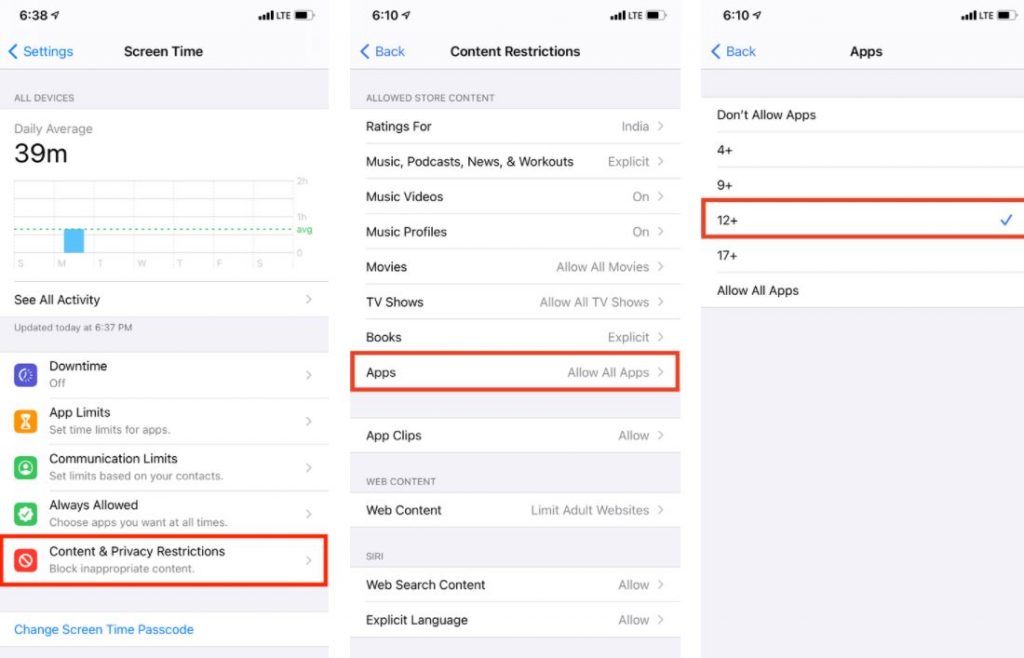
See also: Increase YouTube followers via the YouberUp application | YouTube subscribers for free, and for this reason, here is how to block YouTube on internet browsers: First, we open Settings and click on Screen Time. Then we click on Content & Privacy Restrictions and make sure it is enabled.
Then we click on Content Restrictions and then choose Web Content. Next we choose Limit Adult Websit You may like:
How to disable YouTube restricted mode on computer or Android
DROPIDEA
We hope this article has added real value to you. At DROPIDEA, we always strive to deliver high-quality content that helps you grow and evolve in the digital space. Follow us for more useful articles and guides.
Admin
DROPIDEA
Latest Articles

Did Musk Troll OpenAI's Launch of «Dots» Through the dot.com Domain?
1 hour ago

Peak XV Raises Its Seed Investment Cap to $5 Million
1 day ago

Anticipated Dinner Between Anthropic's CEO and Donald Trump Amid Disagreements Over AI Safety
2 days ago

Google Tests Direct Purchases from Flipkart via Gemini in India
3 days ago

Crusoe Cancels $1.25 Billion Data Center Turbine Deal
4 days ago