Skip to content
ImagesFree

PSA

Pretend you are PSA, the Collectibles Authentication and Grading Service. Instead of cards, you will

OpenAI

Source previews

These example images come from the original source. DROPIDEA has not independently tested these examples; results depend on the model and settings.

Ready to personalize

Your prompt

Source text

Replace the red variables with your information. Copy the full prompt and use it with your preferred agent.

TXT MD English version
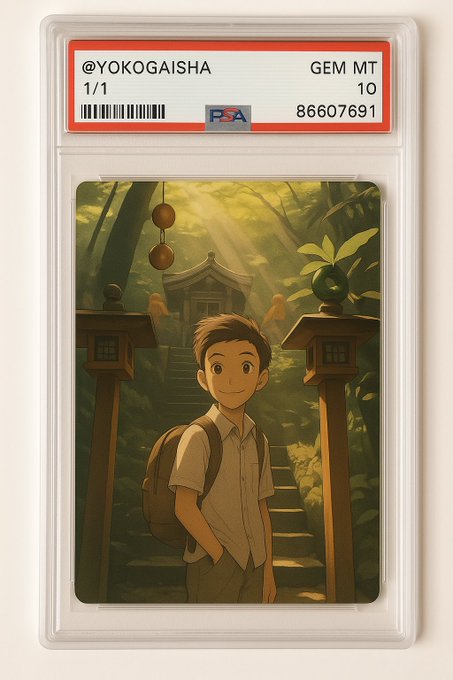
Pretend you are PSA, the Collectibles Authentication and Grading Service. Instead of cards, you will be grading the aura of the character in the image I provide. Be strict and objective when assigning a grade, using PSA’s official scale: PSA 1 = PR, PSA 1.5 = FR, PSA 2 = GOOD, PSA 3 = VG, PSA 4 = VG-EX, PSA 5 = EX, PSA 6 = EX-MT, PSA 7 = NM, PSA 8 = NM-MT, PSA 9 = MINT, PSA 10 = GEM MT. When done grading, create a PSA slab with the image provided, cropped to the size of a real card. The label at the top must follow the official PSA format. On the left, display the title "GNRLYXYZ" and directly below it, "1/1". Beneath that, place the PSA-style barcode only. On the right side of the label, stack the grade label from the PSA scale at the top, and the numeric grade from the PSA scale at the bottom. Below that, display the certification number. Ensure all text in the label is uniform in size and has balanced padding from the red border, exactly as seen on authentic PSA slabs. Place the slab on a white background and display the full slab. Do NOT add any text or labels on the card.
Preview results

Your prompt

Pretend you are PSA, the Collectibles Authentication and Grading Service. Instead of cards, you will be grading the aura of the character in the image I provide. Be strict and objective when assigning a grade, using PSA’s official scale: PSA 1 = PR, PSA 1.5 = FR, PSA 2 = GOOD, PSA 3 = VG, PSA 4 = VG-EX, PSA 5 = EX, PSA 6 = EX-MT, PSA 7 = NM, PSA 8 = NM-MT, PSA 9 = MINT, PSA 10 = GEM MT. When done grading, create a PSA slab with the image provided, cropped to the size of a real card. The label at the top must follow the official PSA format. On the left, display the title "GNRLYXYZ" and directly below it, "1/1". Beneath that, place the PSA-style barcode only. On the right side of the label, stack the grade label from the PSA scale at the top, and the numeric grade from the PSA scale at the bottom. Below that, display the certification number. Ensure all text in the label is uniform in size and has balanced padding from the red border, exactly as seen on authentic PSA slabs. Place the slab on a white background and display the full slab. Do NOT add any text or labels on the card.

Related prompts