Skip to content
ImagesFree

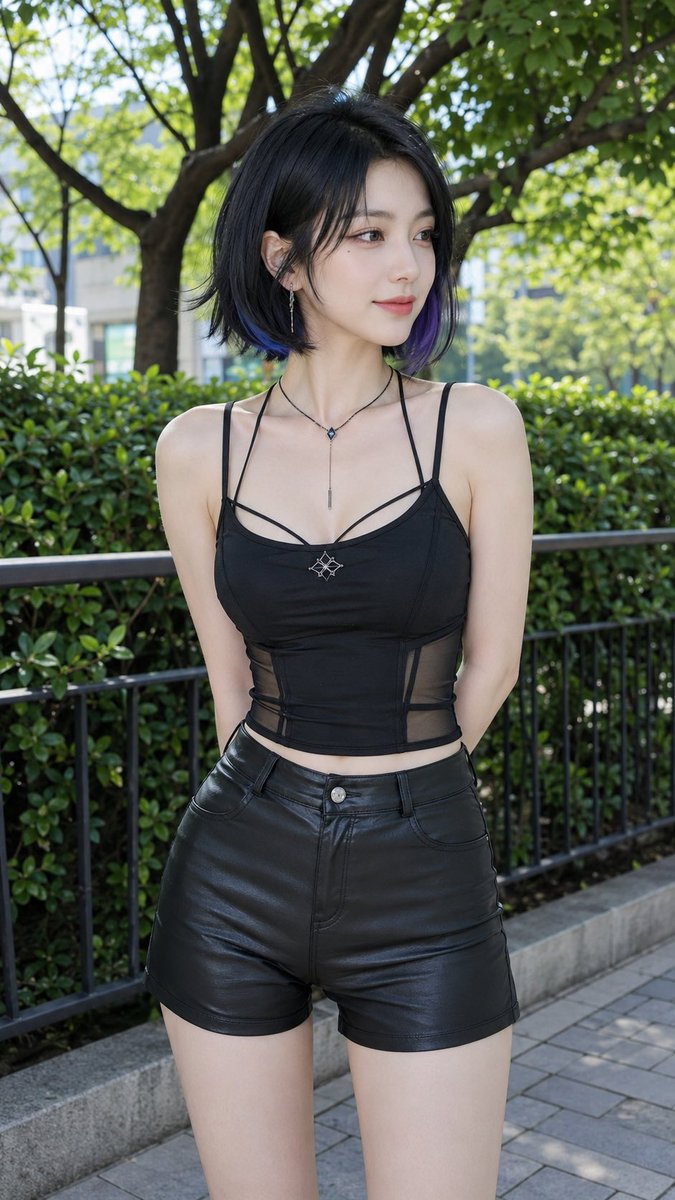
Realistic Urban Street Outdoor Fashion Portrait

A photorealistic prompt of a character standing in a bright urban green setting, 9:16 vertical half-to-large half-body composition, stable pose with hands behind the body or waist and gaze toward the front-right, ideal for showcasing outdoor fashion outfits.

OpenAI

Source previews

These example images come from the original source. DROPIDEA has not independently tested these examples; results depend on the model and settings.

Ready to personalize

Your prompt

English

Replace the red variables with your information. Copy the full prompt and use it with your preferred agent.

TXT MD English version
【Role】, real-life realistic urban street portrait, outdoor fashion outfit display, 9:16 vertical close-up half-body to large half-body composition. The character stands in an urban park, green walkway, or commercial district exterior greenery environment, with trees, shrubs, railings, and light gray walkways in the background; the environment is bright and refreshing, with clear background information that does not overpower the subject. The character is positioned in the center-left of the frame, body facing the camera frontally, shoulders and neck naturally relaxed, both hands placed behind the body or behind the waist, forming a stable standing posture with chest out, shoulders drawn in, and a clear waistline. The head turns slightly toward the right side of the frame, eyes looking toward the front-right, not directly at the camera, corners of the mouth… Created with @lovimg_com https://t.co/oDl7J2R5sY
Preview results

Your prompt

【Role】, real-life realistic urban street portrait, outdoor fashion outfit display, 9:16 vertical close-up half-body to large half-body composition. The character stands in an urban park, green walkway, or commercial district exterior greenery environment, with trees, shrubs, railings, and light gray walkways in the background; the environment is bright and refreshing, with clear background information that does not overpower the subject. The character is positioned in the center-left of the frame, body facing the camera frontally, shoulders and neck naturally relaxed, both hands placed behind the body or behind the waist, forming a stable standing posture with chest out, shoulders drawn in, and a clear waistline. The head turns slightly toward the right side of the frame, eyes looking toward the front-right, not directly at the camera, corners of the mouth… Created with @lovimg_com https://t.co/oDl7J2R5sY

Variable guide

【Role】

The person or model to appear in the shot; replace the entire bracket with the desired subject description.

Replace the 【Role】 marker at the start of the prompt with the subject description.

Example value

a young woman in a beige linen abaya with a brown shoulder bag

both hands placed behind the body or behind the waist

The desired hands placement in the pose; you may keep both options or choose only one.

Within the pose description sentence in the second paragraph; edit the hands phrase as needed.

Example value

both hands placed behind the waist

The head turns slightly toward the right side of the frame, eyes looking toward the front-right, not directly at the camera

The head and gaze direction; defines where the subject turns and looks within the frame.

At the end of the second paragraph; replace the head/gaze phrase with the desired direction.

Example value

The head turns slightly toward the left side of the frame, eyes looking directly at the camera

What you get

  • A photorealistic urban street-style portrait in a 9:16 vertical composition.
  • A subject standing in a bright urban green setting with a clear background that does not overpower the subject.
  • A stable standing pose with chest out, shoulders drawn in, a clear waistline, and hands behind the body or waist.
  • An indirect gaze toward the front-right that gives a natural, candid feel.

Use cases

  • Showcasing outdoor fashion looks for stores and e-commerce retailers.
  • Creating visual content for social media marketing campaigns.
  • Designing reference images for virtual models or visually consistent characters.
  • Producing candid-style portraits for fashion sites, blogs, and design work.

How to use

  • Define your subject and replace the 【Role】 marker at the start of the prompt with its description.
  • Adjust the hands position and head/gaze direction if you want a different default pose.
  • Add a description of the outfit you want to showcase within the subject description for more precise results.
  • Paste the prompt into an image generation tool that supports the 9:16 ratio, and upload a reference image of the subject if the tool requires one to lock the appearance.
  • Generate the image, compare it with the description, and rerun with small adjustments if needed.

Related prompts