
Result 1OpenAI
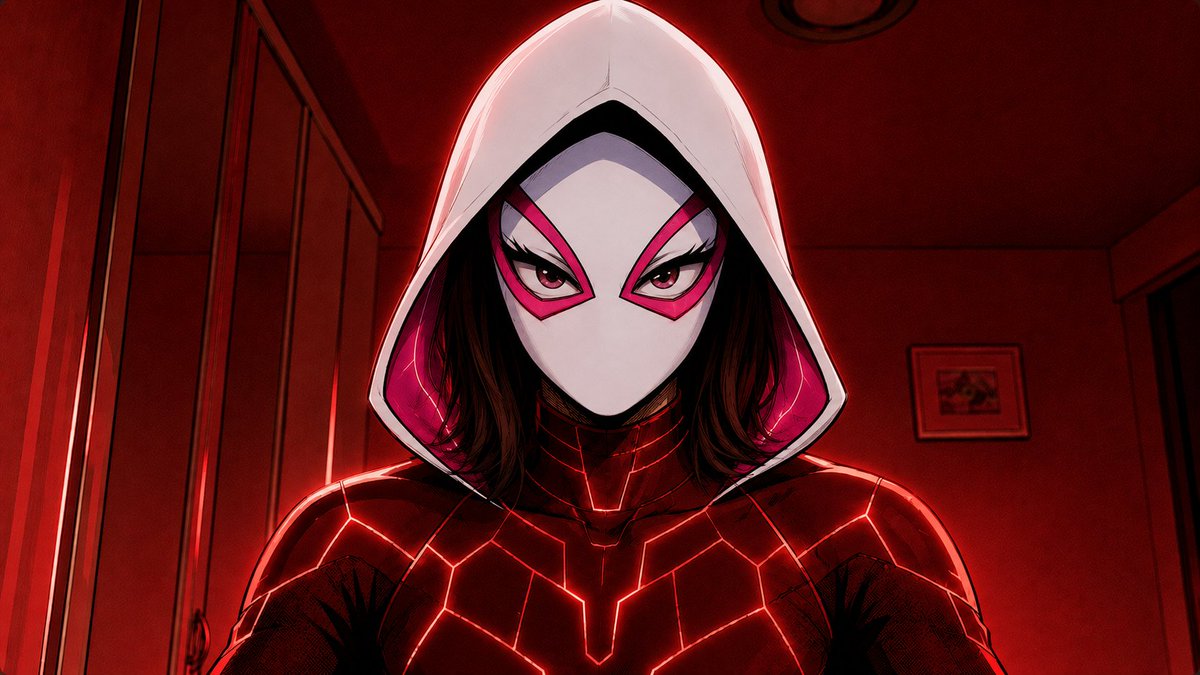
Two prompts that generate two versions of the same character in a cinematic comic/anime style: a blue version with a navy suit and half-face mask, and a red version with a full white mask, while fully preserving the character's identity, face, and pose from the reference image.
These example images come from the original source. DROPIDEA has not independently tested these examples; results depend on the model and settings.
Replace the red variables with your information. Copy the full prompt and use it with your preferred agent.
a dark navy futuristic superhero suit with glowing electric-blue geometric circuit linesThe suit description in the blue version.
BLUE IMAGE PROMPT, sentence beginning "Add a dark navy futuristic superhero suit..."
Example valuea silver futuristic suit with glowing cyan lines
a matching navy half-face mask covering the forehead, eyes, cheeks, and bridge of the noseThe half-face mask description in the blue version.
BLUE IMAGE PROMPT, sentence beginning "Add a matching navy half-face mask..."
Example valuea transparent blue visor covering only the eyes
a red and black futuristic suit with glowing red linesThe suit description in the red version.
RED IMAGE PROMPT, sentence beginning "Add a red and black futuristic suit..."
Example valuea dark crimson suit with glowing orange lines
a white full-face mask with sharp pink eye shapes and a white hood over the headThe full-face mask description in the red version.
RED IMAGE PROMPT, sentence beginning "plus a white full-face mask..."
Example valuea black full-face mask with glowing yellow eyes
A cinematic 2.5D painterly gouache-style animation prompt: 30 seconds across 8 dynamic cuts following Astra in the...
An isometric 3D diorama where the letters of your chosen word become miniature buildings and scenes drawn from a be...
Prompt generating a semi-photorealistic cinematic anime illustration featuring a girl and a cat on Mediterranean st...
Hand-drawn Japanese animation style prompt featuring a young rabbit-hooded adventurer and a glowing spirit companio...