Skip to content
ImagesFree

Cinematic Over-the-Shoulder Natural Portrait

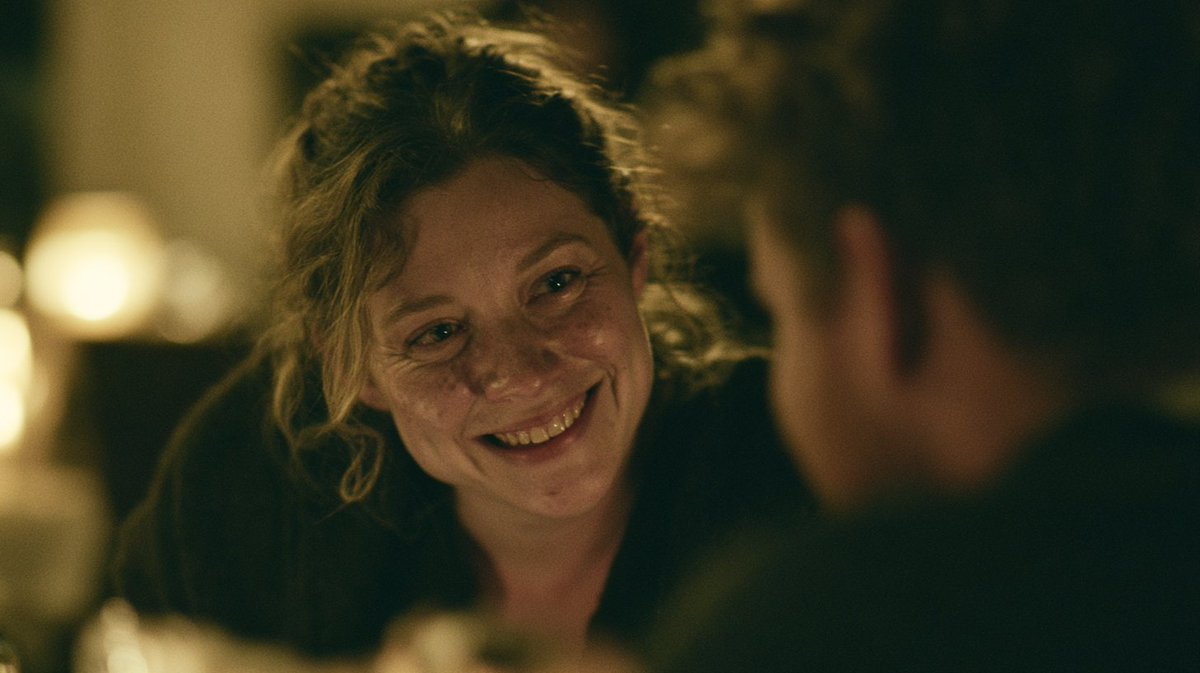
A realistic cinematic image prompt: an over-shoulder shot past a man's soft-focus head toward a woman in her late twenties across a small table, warm low evening light, full unretouched skin texture, ARRI Alexa 85mm T2.0 look, Midjourney negative list and flags preserved.

Midjourney

Source previews

These example images come from the original source. DROPIDEA has not independently tested these examples; results depend on the model and settings.

Ready to personalize

Your prompt

English

Replace the red variables with your information. Copy the full prompt and use it with your preferred agent.

TXT MD English version
cinematic over-shoulder shot, the soft-focus back of a man's head and shoulder at the right edge of frame, a woman in her late twenties in sharp focus across a small table, warm low evening light from frame-left. A forced bright smile on her face, the eyes a touch too wide. Full skin texture: visible pores across the nose and cheeks, vellus hair along the jaw, uneven undertone, a couple of dormant blemishes, a dry lower lip. An ordinary face, not a fashion model slightly asymmetric features. No makeup, no smoothing, no beautification. Shot on ARRI Alexa with an 85mm T2.0 spherical lens, shallow depth of field, filmic contrast with lifted blacks and gentle highlight rolloff, faint chromatic fringing. Natural cinematic grade. Fine organic grain. --no CG-like texture, plastic-like skin, oversaturation, airbrushed look, posed appearance, symmetrical face, sweat, wet skin, glossy skin, hard etched lines, makeup, skin smoothing, beauty retouching --ar 16:9 --raw --profile g9qiuh9
Preview results

Your prompt

cinematic over-shoulder shot, the soft-focus back of a man's head and shoulder at the right edge of frame, a woman in her late twenties in sharp focus across a small table, warm low evening light from frame-left. A forced bright smile on her face, the eyes a touch too wide. Full skin texture: visible pores across the nose and cheeks, vellus hair along the jaw, uneven undertone, a couple of dormant blemishes, a dry lower lip. An ordinary face, not a fashion model slightly asymmetric features. No makeup, no smoothing, no beautification. Shot on ARRI Alexa with an 85mm T2.0 spherical lens, shallow depth of field, filmic contrast with lifted blacks and gentle highlight rolloff, faint chromatic fringing. Natural cinematic grade. Fine organic grain. --no CG-like texture, plastic-like skin, oversaturation, airbrushed look, posed appearance, symmetrical face, sweat, wet skin, glossy skin, hard etched lines, makeup, skin smoothing, beauty retouching --ar 16:9 --raw --profile g9qiuh9

Variable guide

a woman in her late twenties in sharp focus

The woman's description: age and focus level.

At the start of the template, between "right edge of frame," and "across a small table"

Example value

a woman in her mid-thirties in sharp focus

warm low evening light from frame-left

The lighting description and its direction.

After "across a small table," and before "A forced bright smile"

Example value

soft cool daylight from frame-right

What you get

  • A cinematic over-the-shoulder shot past a soft-focus man's head toward a sharply focused woman across a small table.
  • Full realistic skin texture: pores, vellus hair, uneven undertone, dormant blemishes and a dry lower lip.
  • A forced bright smile with slightly too-wide eyes for a natural, unposed feel.
  • An ARRI Alexa 85mm T2.0 look: shallow depth of field, lifted blacks, gentle highlight rolloff, faint chromatic fringing, fine grain.
  • Automatic exclusion of CG texture, oversaturation, airbrushing and posed looks via the --no list.

Use cases

  • Realistic two-person cinematic dialogue scenes.
  • Natural, unretouched portraits for edits and visual storytelling.
  • Look tests for short-film projects.
  • References for warm low evening lighting design.
  • Ad content needing ordinary, true-to-life faces.

How to use

  • Copy the Arabic template as-is into Midjourney or a compatible image generator.
  • Edit the subject (SUBJECT) or lighting (LIGHTING) descriptions for your scene without touching the technical parameters.
  • Keep --no, --ar 16:9, --raw and --profile g9qiuh9 exactly as written; they control style, aspect ratio and profile.
  • Note that the Arabic-translated --no list may be interpreted less reliably than English; use the original English version if artifacts appear.
  • Generate several images and compare skin-texture realism and composition before choosing the final one.

Related prompts