Skip to content
ImagesFree

Turn a Video Prompt into a Finished Storyboard Sheet

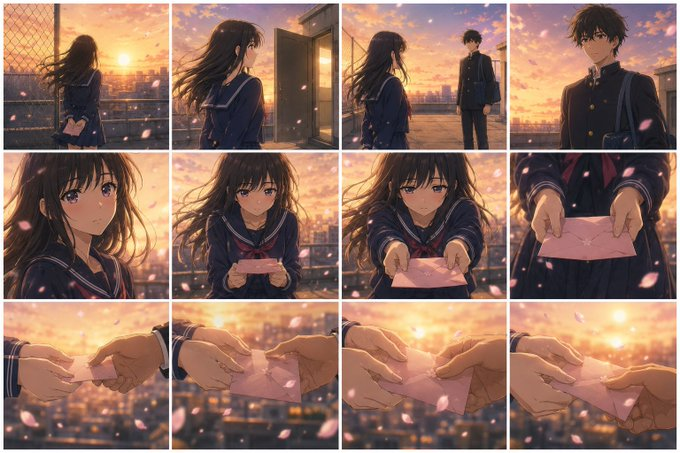
Turns a video prompt into one finished storyboard contact sheet, automatically breaking the action into an adaptive number of cinematic keyframes while preserving character identity, wardrobe, props, lighting, style, and continuity, with no captions or invented elements.

OpenAI

Source previews

These example images come from the original source. DROPIDEA has not independently tested these examples; results depend on the model and settings.
Ready to personalize

Your prompt

English

Replace the red variables with your information. Copy the full prompt and use it with your preferred agent.

TXT MD English version
Turn the VIDEO PROMPT below into one finished storyboard contact sheet. Break the visible action into the appropriate number of keyframes automatically. Use fewer panels for simple scenes and more panels for complex action, prop continuity, transformations, multiple characters, or important reactions. Each panel must be a completed cinematic still from the same video world, not a rough sketch or written shot list. Rules: - Arrange panels in a clean adaptive grid, in chronological order from left to right and top to bottom. - The overall sheet can use any aspect ratio needed to keep all panels readable. - Preserve character identity, wardrobe, props, environment, lighting, style, screen direction, character count, and object continuity. - Each panel shows one clear visible moment only. For an action, choose the strongest readable frame, usually contact, impact, reaction, transformation result, or final position. - Do not invent new characters, props, actions, or locations. - Do not add captions, panel numbers, arrows, dialogue, subtitles, sound cues, camera notes, or explanatory text. VIDEO PROMPT: -Enter your video prompt here-
Preview results

Your prompt

Turn the VIDEO PROMPT below into one finished storyboard contact sheet. Break the visible action into the appropriate number of keyframes automatically. Use fewer panels for simple scenes and more panels for complex action, prop continuity, transformations, multiple characters, or important reactions. Each panel must be a completed cinematic still from the same video world, not a rough sketch or written shot list. Rules: - Arrange panels in a clean adaptive grid, in chronological order from left to right and top to bottom. - The overall sheet can use any aspect ratio needed to keep all panels readable. - Preserve character identity, wardrobe, props, environment, lighting, style, screen direction, character count, and object continuity. - Each panel shows one clear visible moment only. For an action, choose the strongest readable frame, usually contact, impact, reaction, transformation result, or final position. - Do not invent new characters, props, actions, or locations. - Do not add captions, panel numbers, arrows, dialogue, subtitles, sound cues, camera notes, or explanatory text. VIDEO PROMPT: -Enter your video prompt here-

Variable guide

-Enter your video prompt here-

The video description to turn into a storyboard; replace it entirely with your own.

Replace the line '-Enter your video prompt here-' at the end of the template.

Example value

A man opens an old door in an abandoned library as dusty light floods the room

What you get

  • One sheet collecting all storyboard panels in a clean adaptive grid.
  • Finished cinematic panels capturing the strongest readable frames of the action.
  • A panel count that automatically adapts to scene complexity (fewer for simple, more for complex).
  • Preserved character identity, wardrobe, props, lighting, style, and screen direction.
  • A sheet free of captions, numbers, arrows, dialogue, and notes.

Use cases

  • Summarizing a script or action scene into keyframes before production.
  • Planning transformations or complex reaction sequences visually.
  • Pitching a shot proposal to a production team or client on one page.
  • Keeping character and prop continuity across a multi-moment scene.

How to use

  • Write a clear, specific video prompt covering characters, setting, and the action or transformation.
  • Replace the line '-Enter your video prompt here-' at the end of the template with your prompt.
  • Send the complete template to an image model that supports storyboard sheets.
  • Review the output: each panel must be a finished cinematic still, ordered left to right, top to bottom.
  • Refine your prompt and retry if identity, continuity, or panel count needs adjusting.

Related prompts