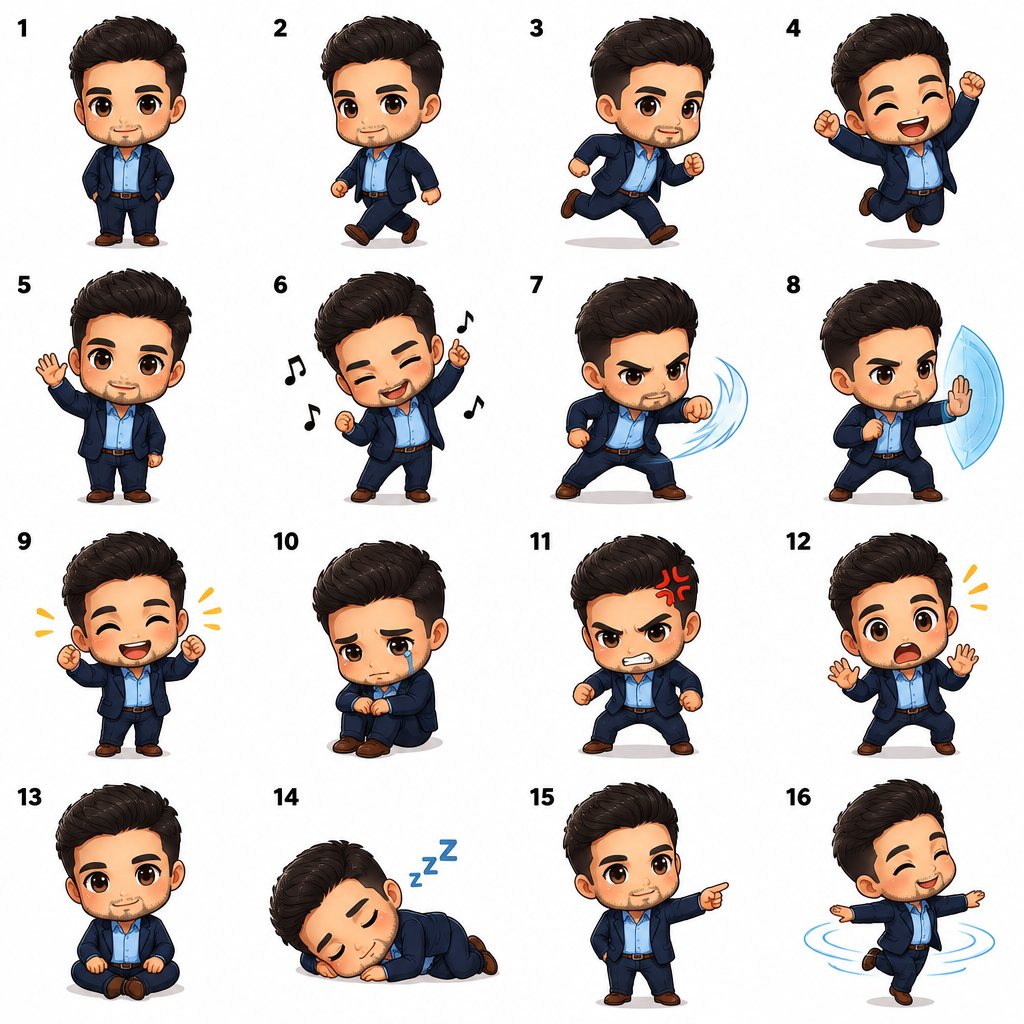
Chibi sprite sheet with 16 poses in 4x4 grid
A prompt that generates a chibi character sprite sheet with 16 different poses arranged in a 4x4 grid on a white background, with consistent style and poses numbered 1-16, producing a single image of the same character.
Source previews
These example images come from the original source. DROPIDEA has not independently tested these examples; results depend on the model and settings.
Your prompt
Replace the red variables with your information. Copy the full prompt and use it with your preferred agent.
Variable guide
[describe tu personaje]The description of the character to be drawn in all poses; replace the marker entirely with your description.
In the prompt, after "Character:" on the first line, replace [describe tu personaje] completely.
Example value[describe tu personaje] → a young girl with curly pink hair, a blue overall dress, and white sneakers
What you get
- A single image containing a complete sprite sheet of one chibi character.
- 16 poses arranged in a 4x4 grid: idle, walking, running, jumping, waving, dancing, attacking, defending, happy, sad, angry, surprised, sitting, sleeping, pointing, spinning.
- A uniform white background that makes it easy to cut out the characters later.
- A consistent art style across all poses, with each pose numbered 1-16.
Use cases
- Producing sprite sheets for 2D games and indie projects.
- Creating animated character assets for comics or illustrations.
- Preparing consistent expression and motion references for a single character in digital storytelling.
- Designing stickers or emoticons of a unified character for social platforms.
How to use
- Decide on a clear description of your character: appearance, hairstyle and hair color, outfit, and any distinctive features.
- Copy the template and replace the [describe tu personaje] marker entirely (including the square brackets) with your character description.
- Keep the list of 16 poses, the 4x4 grid, the white background, and the 1-16 numbering instruction unchanged.
- Paste the edited prompt into your image generation tool (such as GPT Image 2.5); do not paste the final explanatory paragraph, as it is not part of the prompt.
- Generate the image and wait; the tool should produce a single image with the same character in 16 poses.
- Review the resulting grid for style consistency and regenerate with an adjusted description if needed.
Related prompts
Flat Geometric Editorial Character Poster
Transforms an uploaded reference image into an editorial character poster using sophisticated flat geometric shapes...
Seventies Folk Cut-Paper Dreamscape
A 1970s-inspired cut-paper folk art prompt featuring textured surfaces, elongated figures, earthy pastels, and deco...
Playful Watermelon Editorial Sketch
A vertical semi-realistic editorial sketchbook illustration depicting a playful woman in a humorous candid moment e...
Papercraft Fox Among Folded Maple Leaves
Artistic prompt featuring a layered papercraft fox strolling through a forest of origami maple leaves under soft mo...
