Skip to content
ImagesFree

Photorealistic character sheet from three references

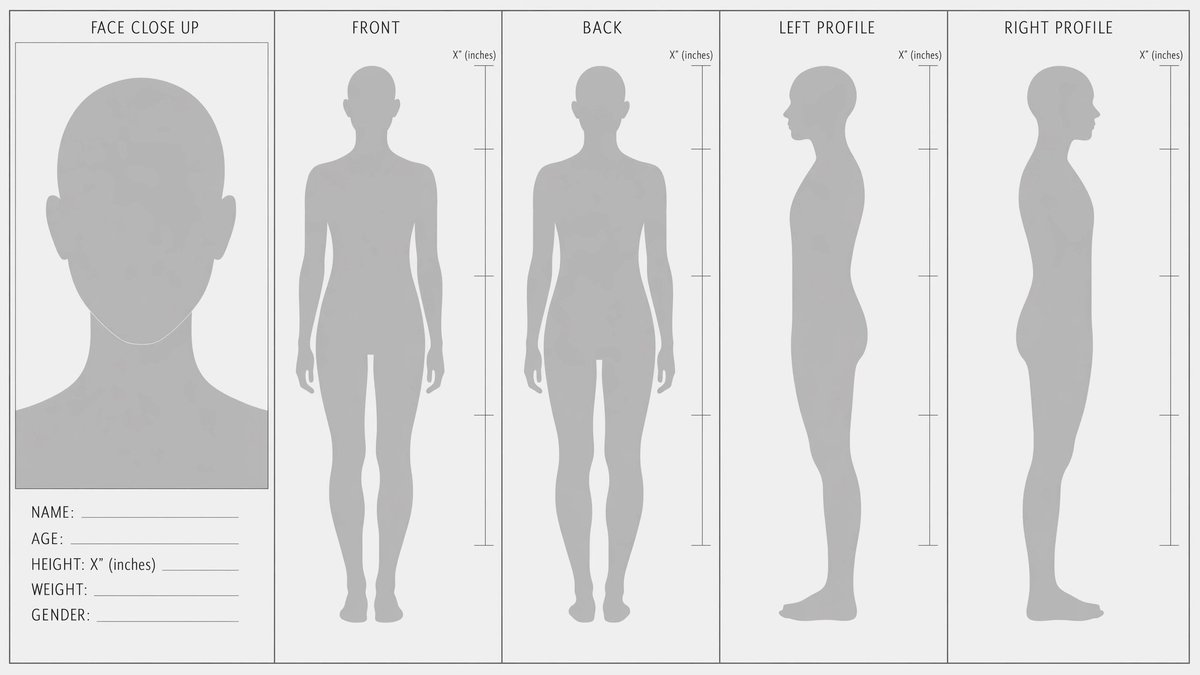
Generates a full character sheet following the layout in Image 1, preserving the character identity from Image 2, reproducing branding exactly from Image 3, filling in name, age, height, weight and gender, and scaling the inch ruler to match the specified height.

Image generation

Source previews

These example images come from the original source. DROPIDEA has not independently tested these examples; results depend on the model and settings.

Ready to personalize

Your prompt

English

Replace the red variables with your information. Copy the full prompt and use it with your preferred agent.

TXT MD English version
Create a character sheet using the layout shown in Image 1, featuring the character from Image 2. Preserve the character's identity, facial features, hairstyle, body proportions, and overall silhouette consistently across every panel. The character should wear the outfit shown in the reference, matching the garments, fit, materials, colors, textures, accessories, footwear, and styling as accurately as possible. Maintain the intended silhouette (including oversized or fitted proportions where applicable), and ensure the footwear is fully visible at the bottom of each full-body frame. If branding or logos are present, reproduce them exactly as shown in Image 3. Match the logo design, placement, proportions, capitalization, and typography precisely. Use only the exact text shown in the reference where text appears. Do not add, duplicate, alter, or invent any branding, wordmarks, or additional text. Render the character with realistic human anatomy and natural body proportions. The body shape, height, and proportions must remain identical across every panel. Use a photorealistic visual style with realistic skin texture, subtle natural imperfections, accurate fabric behavior, and physically believable lighting. Avoid glossy AI-looking skin, excessive sharpening, stylized rendering, or cinematic color grading (including teal-orange). Fill the information block exactly with the provided character details: NAME: {Name} AGE: {Age} HEIGHT: {Height} WEIGHT: {Weight} GENDER: {Gender} Replace every ruler placeholder labeled X" (inches) with {Height}, and scale the character against the ruler so the figure accurately matches that height rather than automatically reaching the top of the ruler. Ensure the ruler and figure alignment are physically consistent. The final result should match the composition and layout of Image 1 while faithfully preserving the character identity from Image 2 and any branding from Image 3.
Preview results

Your prompt

Create a character sheet using the layout shown in Image 1, featuring the character from Image 2. Preserve the character's identity, facial features, hairstyle, body proportions, and overall silhouette consistently across every panel. The character should wear the outfit shown in the reference, matching the garments, fit, materials, colors, textures, accessories, footwear, and styling as accurately as possible. Maintain the intended silhouette (including oversized or fitted proportions where applicable), and ensure the footwear is fully visible at the bottom of each full-body frame. If branding or logos are present, reproduce them exactly as shown in Image 3. Match the logo design, placement, proportions, capitalization, and typography precisely. Use only the exact text shown in the reference where text appears. Do not add, duplicate, alter, or invent any branding, wordmarks, or additional text. Render the character with realistic human anatomy and natural body proportions. The body shape, height, and proportions must remain identical across every panel. Use a photorealistic visual style with realistic skin texture, subtle natural imperfections, accurate fabric behavior, and physically believable lighting. Avoid glossy AI-looking skin, excessive sharpening, stylized rendering, or cinematic color grading (including teal-orange). Fill the information block exactly with the provided character details: NAME: {Name} AGE: {Age} HEIGHT: {Height} WEIGHT: {Weight} GENDER: {Gender} Replace every ruler placeholder labeled X" (inches) with {Height}, and scale the character against the ruler so the figure accurately matches that height rather than automatically reaching the top of the ruler. Ensure the ruler and figure alignment are physically consistent. The final result should match the composition and layout of Image 1 while faithfully preserving the character identity from Image 2 and any branding from Image 3.

Variable guide

{Name}

The character's name exactly as it will appear.

The line NAME: {Name} in the information block.

Example value

Layla Hassan

{Age}

The character's age in years.

The line AGE: {Age} in the information block.

Example value

24

{Height}

The height used in the info block and on the ruler.

The line HEIGHT: {Height} and the X" ruler replacement sentence.

Example value

5 ft 7 in

{Weight}

The character's weight.

The line WEIGHT: {Weight} in the information block.

Example value

132 lb

{Gender}

The character's gender.

The line GENDER: {Gender} in the information block.

Example value

Female

X"

The X" ruler marker tied to the height value.

The ruler placeholder replacement sentence; automatically filled with {Height}.

Example value

X"

What you get

  • A complete character sheet following the Image 1 layout with consistent panels.
  • A character keeping the same face, hairstyle, body proportions and silhouette in every panel.
  • An outfit matching the reference in garments, materials, colors, textures, accessories and footwear.
  • Logos and text reproduced exactly from Image 3 with no additions or alterations.
  • A filled information block with name, age, height, weight and gender, plus an inch ruler scaled to the given height.

Use cases

  • Fashion character design showing one character in multiple angles and outfits.
  • Consistent character references for comics, games and storytelling projects.
  • Apparel or product documentation with accurate brand logos for brand presentations.
  • Reference sheets for digital illustration and character dressing workflows.

How to use

  • Upload three reference images: Image 1 for the character sheet layout, Image 2 for the character's features and outfit, and Image 3 for logos or text if present.
  • Replace {Name}, {Age}, {Height}, {Weight} and {Gender} in the information block with your character's actual details.
  • Make sure {Height} is also used in place of the X" ruler placeholder so the figure is scaled correctly.
  • Leave the photorealistic style instructions and constraints (such as avoiding teal-orange grading and adding no branding) untouched, as they protect realism.
  • Submit the prompt to get a character sheet matching the layout, identity and branding of the references.

Related prompts