Skip to content
ImagesFree

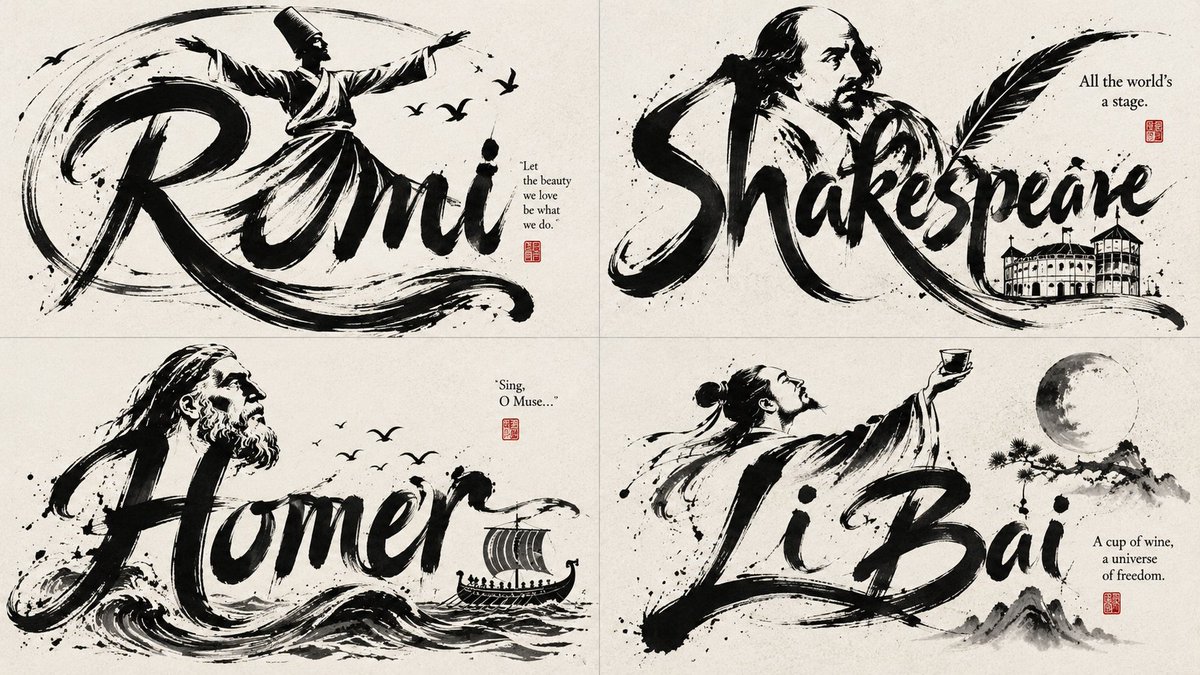
Black Ink Kinetic AI Inferred Wordmark

This prompt turns a single word into one integrated mark combining readable typography with an AI-inferred subject silhouette, all drawn in expressive black brush strokes with clean negative space. It infers the word's meaning, visual rhythm and symbolic potential, and transforms letter strokes into bodily or symbolic parts inside the wordmark.

OpenAI

Source previews

These example images come from the original source. DROPIDEA has not independently tested these examples; results depend on the model and settings.

Ready to personalize

Your prompt

English

Replace the red variables with your information. Copy the full prompt and use it with your preferred agent.

TXT MD English version
class Variables: word = "[WORD]" embodied_subject = "infer from word meaning, sound, culture, action, or emotional tone" style = "minimal black ink kinetic AI inferred wordmark" class WordDNA: meaning = "infer core concept, movement, emotion, object, role, or discipline" letters = "analyze shapes of each letter in WORD" rhythm = "infer visual tempo: graceful, explosive, calm, sharp, flowing, heavy, playful" icon_potential = "infer what figure or symbol belongs naturally to the word" class LetterformSystem: structure = "keep the word readable" transformation = "turn selected strokes into body or symbolic parts" flow = "connect letters with sweeping brush lines" hierarchy = "largest strokes support both typography and silhouette" class EmbodiedSubject: pose = "infer expressive gesture from WORD" anatomy = "head, torso, limbs, tool, tail, fabric, wings, or aura derived only from letter strokes" integration = "subject is inside the typography, not pasted on top" motion = "use AI inferred style arcs to imply movement" class InkRendering: material = "AI infers" stroke_quality = "pressure variation, taper, dry brush, feathering, confident curves" finish = "logo-ready, elegant, minimal, high contrast" def render(): return ''' Render [WORD] as a single integrated AI inferred style word-figure mark: readable typography fused with an inferred subject silhouette, all created from expressive black brush strokes and clean negative space. '''
Preview results

Your prompt

class Variables: word = "[WORD]" embodied_subject = "infer from word meaning, sound, culture, action, or emotional tone" style = "minimal black ink kinetic AI inferred wordmark" class WordDNA: meaning = "infer core concept, movement, emotion, object, role, or discipline" letters = "analyze shapes of each letter in WORD" rhythm = "infer visual tempo: graceful, explosive, calm, sharp, flowing, heavy, playful" icon_potential = "infer what figure or symbol belongs naturally to the word" class LetterformSystem: structure = "keep the word readable" transformation = "turn selected strokes into body or symbolic parts" flow = "connect letters with sweeping brush lines" hierarchy = "largest strokes support both typography and silhouette" class EmbodiedSubject: pose = "infer expressive gesture from WORD" anatomy = "head, torso, limbs, tool, tail, fabric, wings, or aura derived only from letter strokes" integration = "subject is inside the typography, not pasted on top" motion = "use AI inferred style arcs to imply movement" class InkRendering: material = "AI infers" stroke_quality = "pressure variation, taper, dry brush, feathering, confident curves" finish = "logo-ready, elegant, minimal, high contrast" def render(): return ''' Render [WORD] as a single integrated AI inferred style word-figure mark: readable typography fused with an inferred subject silhouette, all created from expressive black brush strokes and clean negative space. '''

Variable guide

[WORD]

The word to turn into an integrated wordmark; replace it with a single word (or name) you want fused into a typography-plus-silhouette mark.

Replace [WORD] in the word = "[WORD]" line inside class Variables, and in the Render [WORD] phrase inside the render() return value

Example value

FALCON

What you get

  • A single integrated wordmark combining readable typography with an inferred subject silhouette.
  • Expressive black brush strokes with pressure variation, taper and clean negative space.
  • A minimal, elegant, high-contrast, logo-ready finish.

Use cases

  • Brand and startup logo design.
  • Wordmarks for events, teams and creative projects.
  • Quick logo concepts to refine later.
  • Visual identity designs in a kinetic black-ink style.

How to use

  • Replace [WORD] with your chosen word in both of its locations (the word line and the render() return value).
  • Send the complete template to your logo or image generation model.
  • Review the inferred subject and ink style output; adjust the style or embodied_subject values if you want to steer the inference.
  • Use the result as the basis for your logo, keeping the expressive black brush strokes and high contrast.

Related prompts