Result 1OpenAI
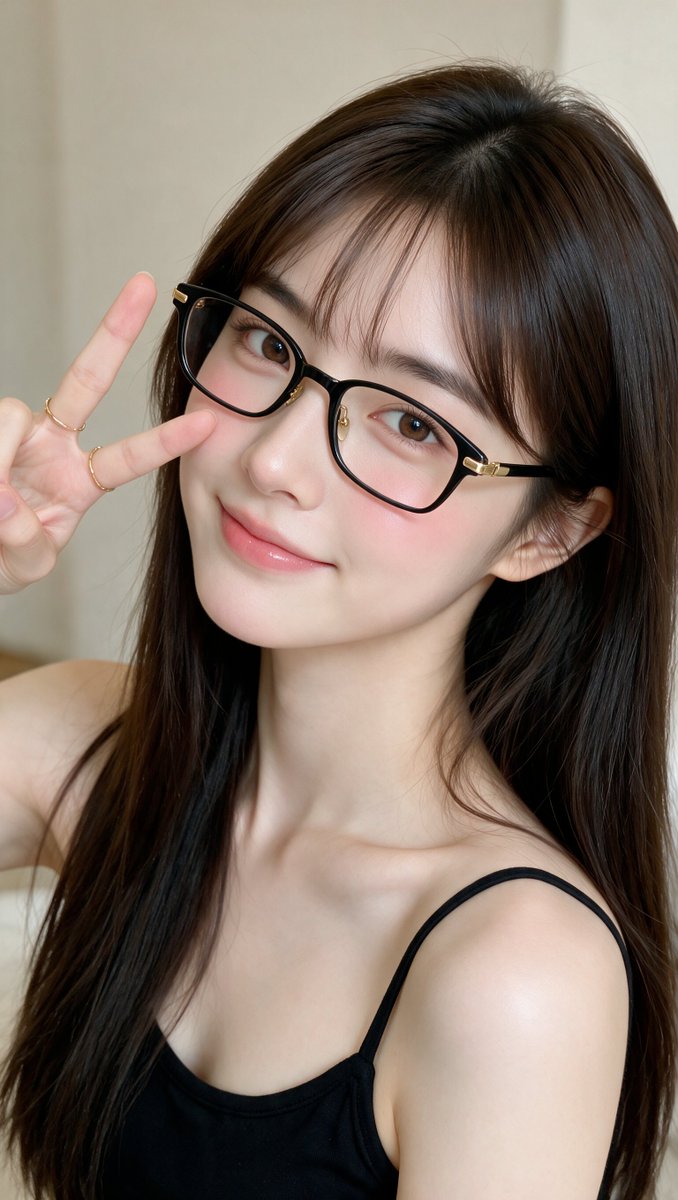
A photorealistic image-generation prompt for a close-up portrait of an East Asian woman in her early 20s with thin black glasses, curtain bangs and a V-sign pose, soft indoor lighting, neutral beige background, 9:16 aspect ratio at 4K, in an intimate professional selfie style.
These example images come from the original source. DROPIDEA has not independently tested these examples; results depend on the model and settings.

Replace the red variables with your information. Copy the full prompt and use it with your preferred agent.
long, straight, silky dark brown hairDescription of the hairstyle, color and texture.
First paragraph right after "She has...", plus the "Hair:" line in the details list.
Example valuelong wavy black hair
thin black rectangular glasses with subtle gold metal accentsThe glasses' shape, color and metal details.
First paragraph "thin black rectangular glasses with subtle gold metal accents", plus the "Glasses:" line.
Example valuethin round gold-framed glasses
thin black spaghetti-strap topDescription of the top garment.
Second paragraph "thin black spaghetti-strap top", plus the "Clothing:" line.
Example valuewhite wide-strap top
gentle, slightly playful expressionFacial expression and overall mood; also update the "Mood:" line and the "intimate and cute aesthetic" phrase in the third paragraph to keep the mood consistent.
First paragraph "gentle, slightly playful expression", plus the "Mood:" line.
Example valuecalm, confident expression
A photographic prompt crafted to generate hyper-realistic, unposed smartphone snapshots taken by a friend at a nigh...
Prompt generating an ultra-realistic photo of a young man wearing white Shalwar Kameez by a lake at sunset, specify...
An advanced cinematic AI video prompt crafting a 15-second seamless loop psychedelic Japanese horror music video fe...
Prompt to generate a photorealistic character reference sheet for a young medieval village woman featuring multi-an...