Skip to content
ImagesFree

11-Layer Cinematic Prompt Formula

A marketing post contrasting a generic prompt with a fully specified 11-layer version (camera, film stock, subject, environment, lighting, composition, mood) to achieve cinematic AI photography, with engagement steps to get the guide free.

Image generation

Source previews

These example images come from the original source. DROPIDEA has not independently tested these examples; results depend on the model and settings.

Ready to personalize

Your prompt

English

Replace the red variables with your information. Copy the full prompt and use it with your preferred agent.

TXT MD English version
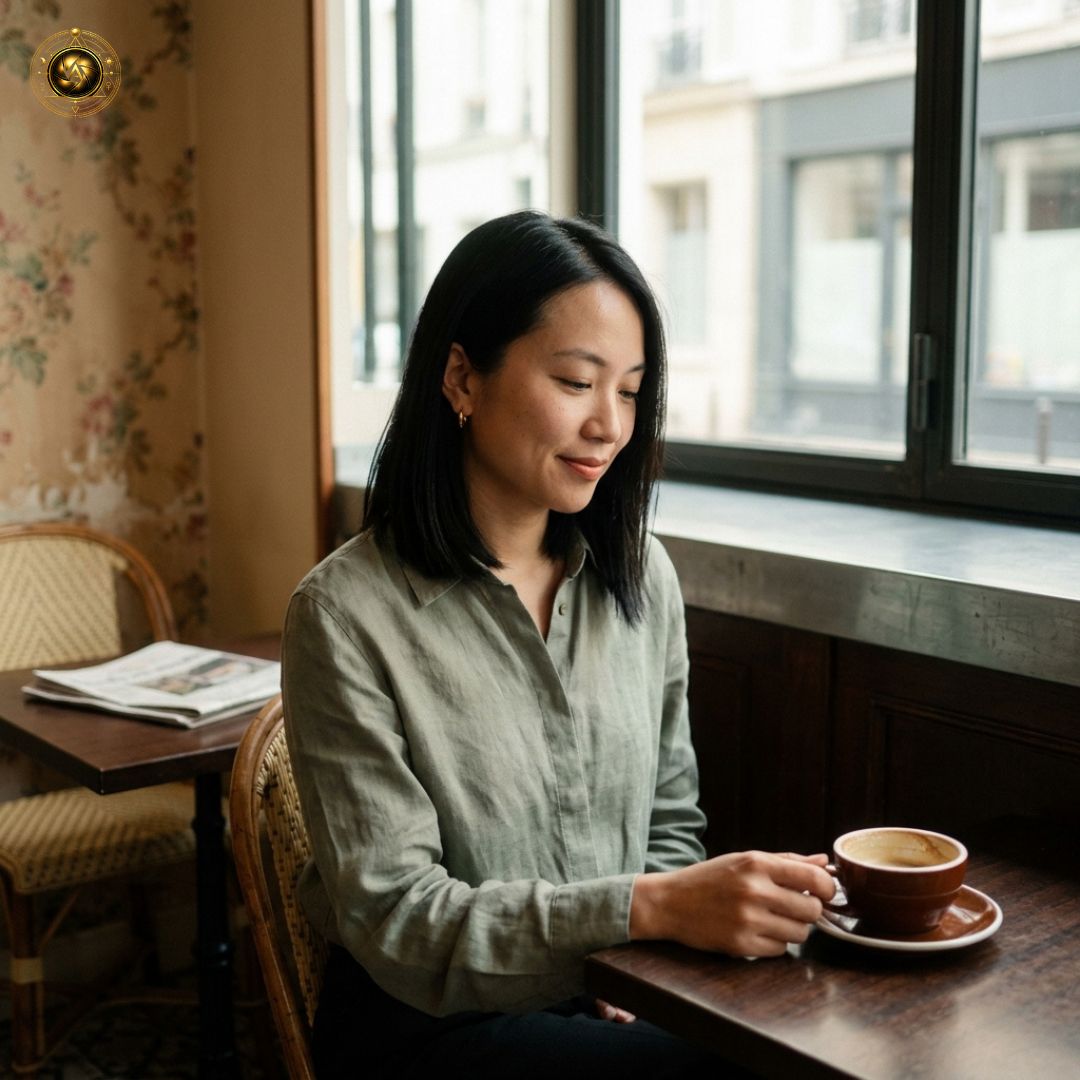
"A beautiful woman in a cafe, cinematic" Result: Generic face, flat lighting, no sense of place. The AI filled in every decision you didn't make. It chose the camera, the lens, the lighting, the depth of field, the wardrobe, the color grade. It chose wrong. Same scene. 11-layer prompt: Camera: Leica SL3 with Leica APO-Summicron-SL 50mm f/2 at f/2.0. Optical filter: Tiffen Black Pro-Mist 1/4 for subtle bloom and softened highlights. Film stock: Kodak VISION3 250D for rich, natural daylight skin rendering with fine grain. Subject: A 28-year-old Vietnamese woman with straight black hair cut to her collarbone, wearing a muted sage linen shirt and small gold hoop earrings. No makeup visible except a light lip tint. Environment: A small Parisian-style corner cafe with dark wood tables, a zinc bar counter, and a large street-facing window. Faded floral wallpaper on one wall. A half-finished espresso on the table. Lighting: Natural daylight from the large window camera-right as the key light, creating a soft directional wash across her face with a gentle shadow on the far cheek. No artificial fill. The ambient warmth of the cafe interior provides deep warm tones in the shadows. Composition: Medium shot, subject on the right third of frame, looking down at the cup with a slight smile. The window provides leading lines from the upper right. Mood: Quiet, analog, lived-in. Warm midtones with slightly desaturated greens and browns. The Black Pro-Mist gives a nostalgic softness to the highlights. That prompt produces an image that looks like a page from Kinfolk magazine. Not a stock photo. Not a template. A photo that feels like it was taken by someone who was there. That difference — generic versus specific — comes down to how many layers you control. I mapped the entire system into a formula. 11 layers. Each one with examples, before/after comparisons, and the exact syntax that triggers the AI to execute rather than guess. Worth $97. Free right now if you: - Like this post - Comment "Prompt Hack" - Follow @ArefAichemist #AIArt #AIPhotography #CinematicAI #PromptHacking #CreativeAI #AITools
Preview results

Your prompt

"A beautiful woman in a cafe, cinematic" Result: Generic face, flat lighting, no sense of place. The AI filled in every decision you didn't make. It chose the camera, the lens, the lighting, the depth of field, the wardrobe, the color grade. It chose wrong. Same scene. 11-layer prompt: Camera: Leica SL3 with Leica APO-Summicron-SL 50mm f/2 at f/2.0. Optical filter: Tiffen Black Pro-Mist 1/4 for subtle bloom and softened highlights. Film stock: Kodak VISION3 250D for rich, natural daylight skin rendering with fine grain. Subject: A 28-year-old Vietnamese woman with straight black hair cut to her collarbone, wearing a muted sage linen shirt and small gold hoop earrings. No makeup visible except a light lip tint. Environment: A small Parisian-style corner cafe with dark wood tables, a zinc bar counter, and a large street-facing window. Faded floral wallpaper on one wall. A half-finished espresso on the table. Lighting: Natural daylight from the large window camera-right as the key light, creating a soft directional wash across her face with a gentle shadow on the far cheek. No artificial fill. The ambient warmth of the cafe interior provides deep warm tones in the shadows. Composition: Medium shot, subject on the right third of frame, looking down at the cup with a slight smile. The window provides leading lines from the upper right. Mood: Quiet, analog, lived-in. Warm midtones with slightly desaturated greens and browns. The Black Pro-Mist gives a nostalgic softness to the highlights. That prompt produces an image that looks like a page from Kinfolk magazine. Not a stock photo. Not a template. A photo that feels like it was taken by someone who was there. That difference — generic versus specific — comes down to how many layers you control. I mapped the entire system into a formula. 11 layers. Each one with examples, before/after comparisons, and the exact syntax that triggers the AI to execute rather than guess. Worth $97. Free right now if you: - Like this post - Comment "Prompt Hack" - Follow @ArefAichemist #AIArt #AIPhotography #CinematicAI #PromptHacking #CreativeAI #AITools

What you get

  • An explanation of the difference between generic and layer-specific prompting
  • A ready 11-layer prompt template with exact camera, lens, filter, and film stock specifications
  • Complete descriptions of subject, environment, lighting, composition, and mood
  • An offer to get a full guide with examples and before/after comparisons in exchange for simple engagement

Use cases

  • Creating realistic cinematic AI photography
  • Learning to build advanced multi-layer prompts
  • Producing social media content about AI photography
  • Promoting products or guides through engagement posts

How to use

  • Read the post and study how a specific prompt turned a generic scene into a Kinfolk-style image.
  • Apply the seven visible layers (camera, film stock, subject, environment, lighting, composition, mood) to your own idea.
  • Swap the subject and cafe details with your own choices while keeping the technical camera and film syntax intact.
  • Like the post, comment "Prompt Hack", and follow @ArefAichemist to receive the full guide for free.
  • Use the full 11-layer formula in your preferred image generation tool.

Related prompts