Skip to content
ImagesFree

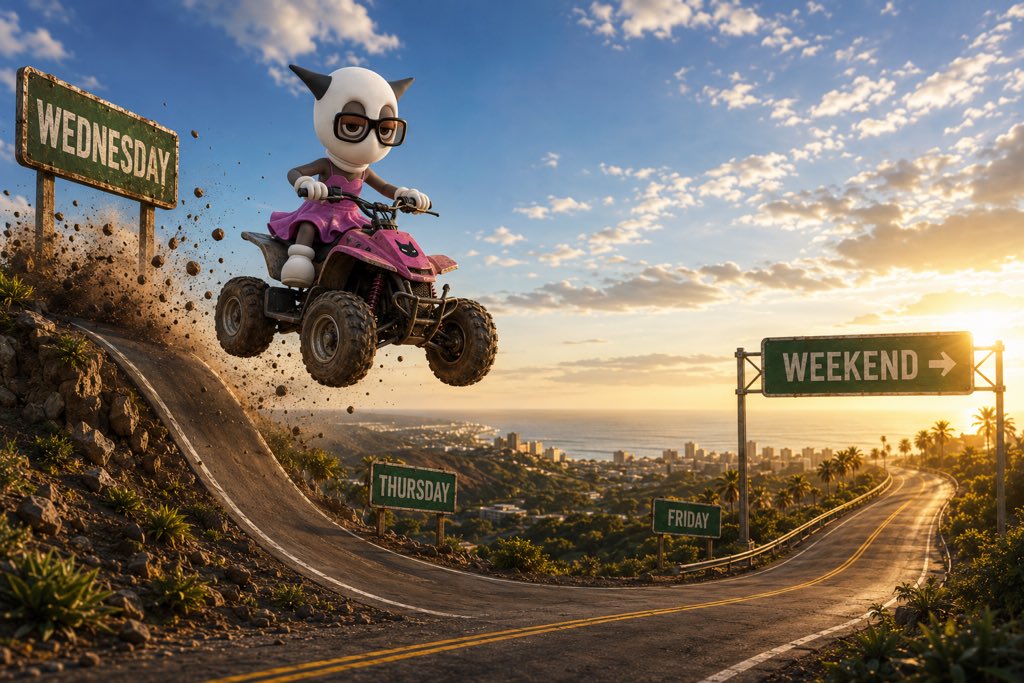
Escape Wednesday Prompt Share to Weekend

Cinematic prompt: upload any character, and the prompt auto-picks a fitting vehicle to launch them airborne from Wednesday across Thursday and Friday toward a glowing Weekend in one action shot.

Image generation

Source previews

These example images come from the original source. DROPIDEA has not independently tested these examples; results depend on the model and settings.
Ready to personalize

Your prompt

English

Replace the red variables with your information. Copy the full prompt and use it with your preferred agent.

TXT MD English version
WEDNESDAY PROMPT SHARE 🏍️💨 Let’s get over the hump. Upload ANY character + copy the prompt below. The prompt chooses a ride that fits your character and sends them flying out of Wednesday toward the weekend. 👇 PROMPT BELOW If you try it, post your result in the replies. I’m reposting some of my favorites today. Let’s see who makes it to the weekend. 😂 PROMPT SHARE — GET OVER THE HUMP 🏁 Use my uploaded character as the absolute visual reference. Preserve their exact appearance, proportions, anatomy, clothing, colors, accessories and facial features. Do not redesign them or add features that aren’t present. Create ONE cinematic action image of the character escaping WEDNESDAY and launching toward the WEEKEND. Automatically choose ONE vehicle that naturally fits the character (motorcycle, ATV, scooter, go-kart, car, etc.). Adapt the vehicle to the character—never the character to the vehicle. Composition moves clearly LEFT → RIGHT: WEDNESDAY sign + elevated launch point → character completely airborne over open air → ONE continuous landing road → small THURSDAY sign → FRIDAY sign → glowing WEEKEND → sign at the horizon. The character has already cleared Wednesday and is flying FORWARD toward Weekend, not vertically upward. Use a dramatic wide 3/4 tracking angle, spinning wheels, flying gravel, dust, motion blur and cinematic golden-hour lighting. Wednesday is darker/cooler; Weekend is bright, warm and inviting. ONE character. ONE vehicle. ONE road. No storyboard, duplicates, extra roads, second hump, character redesign or added facial features. If the reference has no mouth, DO NOT ADD ONE. Make the story instantly readable: WEDNESDAY → THURSDAY → FRIDAY → WEEKEND. @BoredApeYC
Preview results

Your prompt

WEDNESDAY PROMPT SHARE 🏍️💨 Let’s get over the hump. Upload ANY character + copy the prompt below. The prompt chooses a ride that fits your character and sends them flying out of Wednesday toward the weekend. 👇 PROMPT BELOW If you try it, post your result in the replies. I’m reposting some of my favorites today. Let’s see who makes it to the weekend. 😂 PROMPT SHARE — GET OVER THE HUMP 🏁 Use my uploaded character as the absolute visual reference. Preserve their exact appearance, proportions, anatomy, clothing, colors, accessories and facial features. Do not redesign them or add features that aren’t present. Create ONE cinematic action image of the character escaping WEDNESDAY and launching toward the WEEKEND. Automatically choose ONE vehicle that naturally fits the character (motorcycle, ATV, scooter, go-kart, car, etc.). Adapt the vehicle to the character—never the character to the vehicle. Composition moves clearly LEFT → RIGHT: WEDNESDAY sign + elevated launch point → character completely airborne over open air → ONE continuous landing road → small THURSDAY sign → FRIDAY sign → glowing WEEKEND → sign at the horizon. The character has already cleared Wednesday and is flying FORWARD toward Weekend, not vertically upward. Use a dramatic wide 3/4 tracking angle, spinning wheels, flying gravel, dust, motion blur and cinematic golden-hour lighting. Wednesday is darker/cooler; Weekend is bright, warm and inviting. ONE character. ONE vehicle. ONE road. No storyboard, duplicates, extra roads, second hump, character redesign or added facial features. If the reference has no mouth, DO NOT ADD ONE. Make the story instantly readable: WEDNESDAY → THURSDAY → FRIDAY → WEEKEND. @BoredApeYC

Variable guide

my uploaded character

Upload the reference character image with your message; it serves as the absolute visual reference.

Image attachment in the same message as the prompt text

Example value

A cartoon ape avatar wearing sunglasses and a leather jacket

motorcycle, ATV, scooter, go-kart, car, etc

The list of vehicles the prompt auto-picks from; you can edit it.

Inside the parentheses in the line 'Automatically choose ONE vehicle that naturally fits the character'

Example value

motorcycle, ATV, scooter, go-kart, car, etc

What you get

  • One cinematic action image with a wide 3/4 tracking angle
  • Your character with identical appearance, features and colors, unaltered
  • One vehicle adapted to the character, with spinning wheels, dust and motion blur
  • A lighting gradient from darker/cooler Wednesday to bright, warm Weekend
  • An instantly readable story: WEDNESDAY → THURSDAY → FRIDAY → WEEKEND

Use cases

  • Interactive mid-week social media post
  • Playful marketing content for a brand or NFT community
  • Recurring weekly cartoon cards with consistent characters
  • A visual Wednesday pick-me-up for a team or audience

How to use

  • Upload the character image you want to use as an attachment in the same message.
  • Copy the full prompt and send it together with the image.
  • Let the prompt automatically choose the fitting vehicle rather than specifying one yourself.
  • Check the result: Wednesday sign on the left, then Thursday and Friday signs, then the glowing Weekend sign at the horizon.
  • If you try it, post your result in the replies so the poster can reshare favorites.

Related prompts