Result 1Gemini
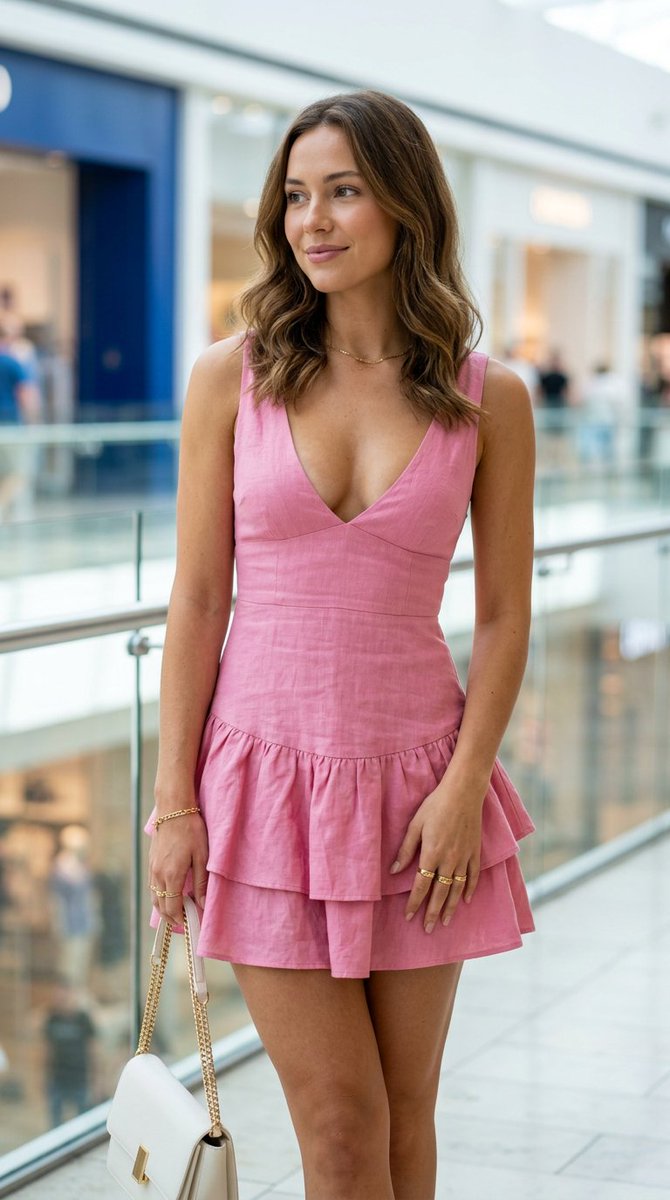
A photorealistic image-generation prompt: an eye-level portrait of a softly smiling woman in a bright indoor mall, wearing a pink mini dress and gold accessories, with a blurred retail background and diffuse natural light.
These example images come from the original source. DROPIDEA has not independently tested these examples; results depend on the model and settings.

Replace the red variables with your information. Copy the full prompt and use it with your preferred agent.
shoulder-length wavy hairDescription of hairstyle, length, and color
Replace "shoulder-length wavy hair" in the template
Example valuelong straight brown hair
sleeveless low-cut pink mini dressFull dress description including sleeves, neckline, length, and color
Replace "sleeveless low-cut pink mini dress" in the template
Example valuea long blue dress with sleeves and a high neckline
small white structured handbag on a gold chain strapDescription of the handbag's shape, color, and strap
Replace "small white structured handbag on a gold chain strap" in the template
Example valuea black leather shoulder bag with a short strap
necklace, left-wrist bracelet, and several ringsDescription of the gold jewelry or alternatives
Replace "necklace, left-wrist bracelet, and several rings" in the template
Example valuegold earrings and a single ring
Glass railings, storefronts, and blue, white, and tan bokehDescription of mall background elements and bokeh colors
Replace "Glass railings, storefronts, and blue, white, and tan bokeh" in the template
Example valuelarge windows, warm lighting, and orange-and-wine bokeh
A prompt for creating a premium vertical four-panel streetwear campaign collage from an uploaded facial identity re...
A photorealistic image-generation prompt for a vertical summer portrait of a fictional adult Japanese woman in a st...
A prompt for a photorealistic fantasy fashion portrait featuring a woman with elven details, black and orange cloth...
An ultra-photorealistic fashion editorial prompt featuring a low-angle outdoor portrait in a suburban setting with...