Skip to content
ImagesFree

Cinematic Golden-Hour Portrait Restoration

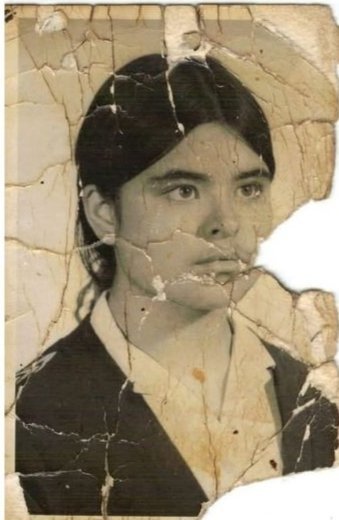
A prompt to restore an uploaded portrait cinematically while strictly preserving pose, expression, and composition, adding warm golden-hour side lighting with a dramatic wall shadow, and upscaling to Ultra-HD with realistic skin texture and reduced noise.

Gemini

Source previews

These example images come from the original source. DROPIDEA has not independently tested these examples; results depend on the model and settings.

Ready to personalize

Your prompt

English

Replace the red variables with your information. Copy the full prompt and use it with your preferred agent.

TXT MD English version
Cinematic portrait restoration. Strictly preserve original pose, expression, and composition. Add warm golden-hour side lighting casting a defined, dramatic shadow on the wall behind. Upscale to Ultra-HD: sharpen details, enhance realistic skin texture, and reduce noise. Mood: Mysterious, high-contrast, warm highlights, deep shadows, photorealistic.
Preview results

Your prompt

Cinematic portrait restoration. Strictly preserve original pose, expression, and composition. Add warm golden-hour side lighting casting a defined, dramatic shadow on the wall behind. Upscale to Ultra-HD: sharpen details, enhance realistic skin texture, and reduce noise. Mood: Mysterious, high-contrast, warm highlights, deep shadows, photorealistic.

What you get

  • A restored version of the portrait with the original pose, expression, and composition.
  • Warm golden-hour side lighting with a defined, dramatic shadow on the wall.
  • Sharper details, realistic skin texture, and reduced noise at Ultra-HD quality.
  • A mysterious, high-contrast mood with deep shadows and a photorealistic look.

Use cases

  • Restoring old or low-quality personal portraits.
  • Turning ordinary portraits into cinematic shots.
  • Preparing headshots for portfolios or social media.
  • Creating dramatic images for covers or posters.

How to use

  • Upload the original portrait you want restored as a reference image; the prompt depends on it.
  • Copy the prompt as is and paste it with the image into an AI image editing tool.
  • Keep the term Ultra-HD and the technical instructions unchanged.
  • Review the result to confirm pose, expression, and composition match the original, and regenerate if needed.

Related prompts