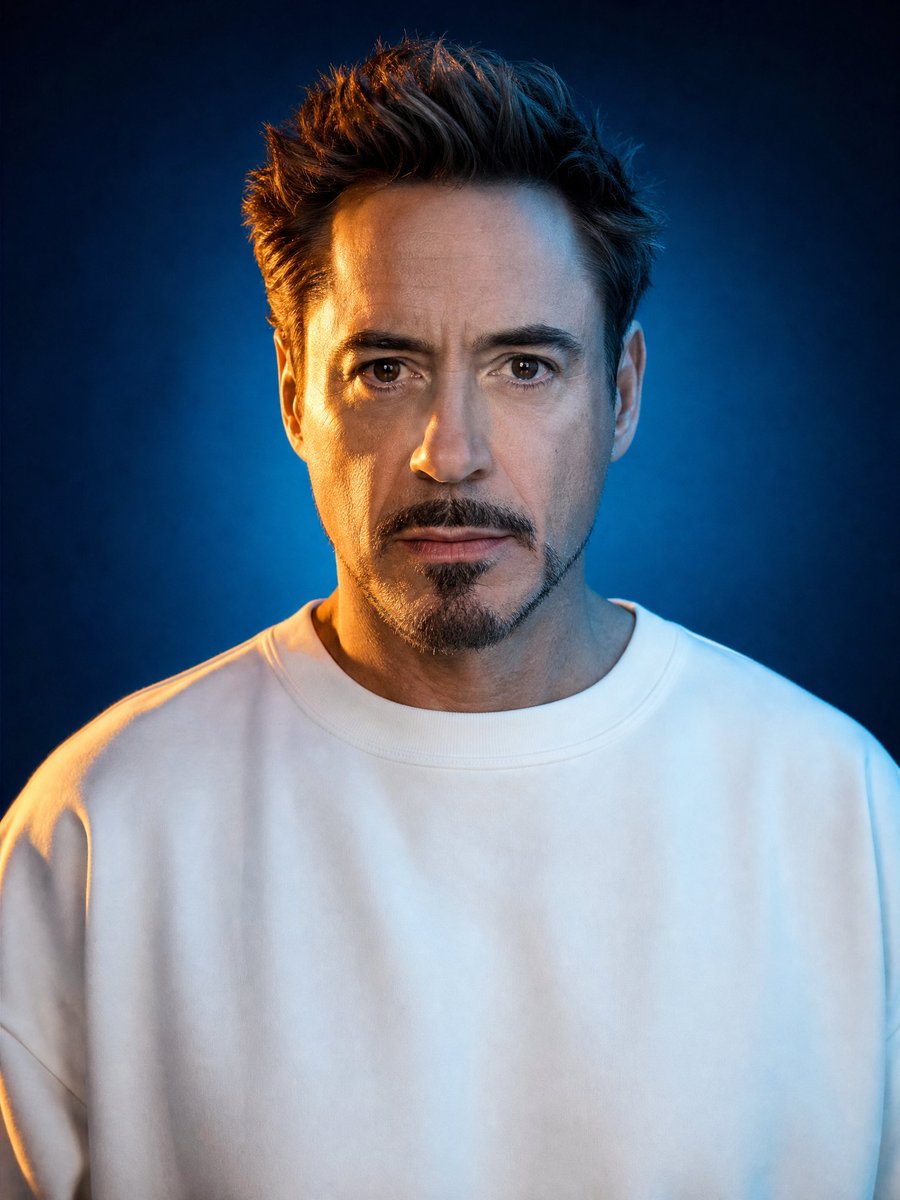
Cinematic Dual-Tone Hyperrealistic Studio Portrait
A complete JSON prompt template for generating a hyperrealistic studio portrait photograph with cinematic split lighting: a warm amber rim from camera-left and cool blue ambient fill, a navy-to-teal gradient backdrop, a vertical 4:5 aspect ratio, and natural skin and hair detail at 8k resolution.
Source previews
These example images come from the original source. DROPIDEA has not independently tested these examples; results depend on the model and settings.
Your prompt
Replace the red variables with your information. Copy the full prompt and use it with your preferred agent.
Variable guide
Person Name/Uploaded ImageThe person's name or a reference to their uploaded image to render the portrait for.
prompt_template.subject — replace the text Person Name/Uploaded Image.
Example valueAhmed Ali/Uploaded Image
plain oversized white crewneck t-shirt or sweatshirtThe desired clothing; a plain English value yields the best results.
prompt_template.wardrobe.clothing — replace the current English text.
Example valueplain oversized charcoal grey hoodie
What you get
- A hyperrealistic studio portrait photograph, chest-up crop, vertical 4:5 aspect ratio.
- Cinematic split lighting: a warm amber/orange rim from camera-left and cool blue ambient fill with high contrast.
- A seamless studio backdrop graded from deep navy to teal with subtle corner vignette.
- Natural skin texture with visible pores and individual hair strands under the rim light, with no plastic look.
- An 8k, filmic teal-and-orange graded result intended to be indistinguishable from a real studio photograph.
Use cases
- Cinematic professional headshots for profiles and resumes.
- Single or artist cover art in a dual-tone studio style.
- Marketing decks and presentations needing a clean, high-end portrait.
- Photorealistic in-game character or fictional persona stills.
- Consistent cinematic-looking social media content.
How to use
- Replace the value of prompt_template.subject with the person's name, or upload a reference image of them if your model supports image-to-image, since this template is designed to render a specific person.
- Optionally edit prompt_template.wardrobe.clothing for a different outfit, and keep all technical settings such as 85mm, f/2.8, 4:5 and 8k unchanged.
- Copy the entire JSON object and paste it into a generation tool that accepts structured JSON prompts (such as an API or advanced prompt editor).
- If your tool does not support JSON, convert the string values into one continuous description preserving every detail, and paste negative_prompt into the separate negative field if available.
- Generate at a vertical 4:5 aspect ratio, then verify: sharp eyes, an amber rim on one side, and blue ambient fill on the other.
- Retry with only small lighting or wardrobe tweaks if needed to perfect the dual-tone look.
Related prompts
Candid Smartphone Restaurant Moment Photo Prompt
A photographic prompt crafted to generate hyper-realistic, unposed smartphone snapshots taken by a friend at a nigh...
Photorealistic Portrait of Man in White by Lake
Prompt generating an ultra-realistic photo of a young man wearing white Shalwar Kameez by a lake at sunset, specify...
Gothic Yokai Carnival Music Video
An advanced cinematic AI video prompt crafting a 15-second seamless loop psychedelic Japanese horror music video fe...
Photorealistic Medieval Village Woman Character Sheet
Prompt to generate a photorealistic character reference sheet for a young medieval village woman featuring multi-an...
