Skip to content
ImagesFree

mo9ba AI Video Creative Design System Guide

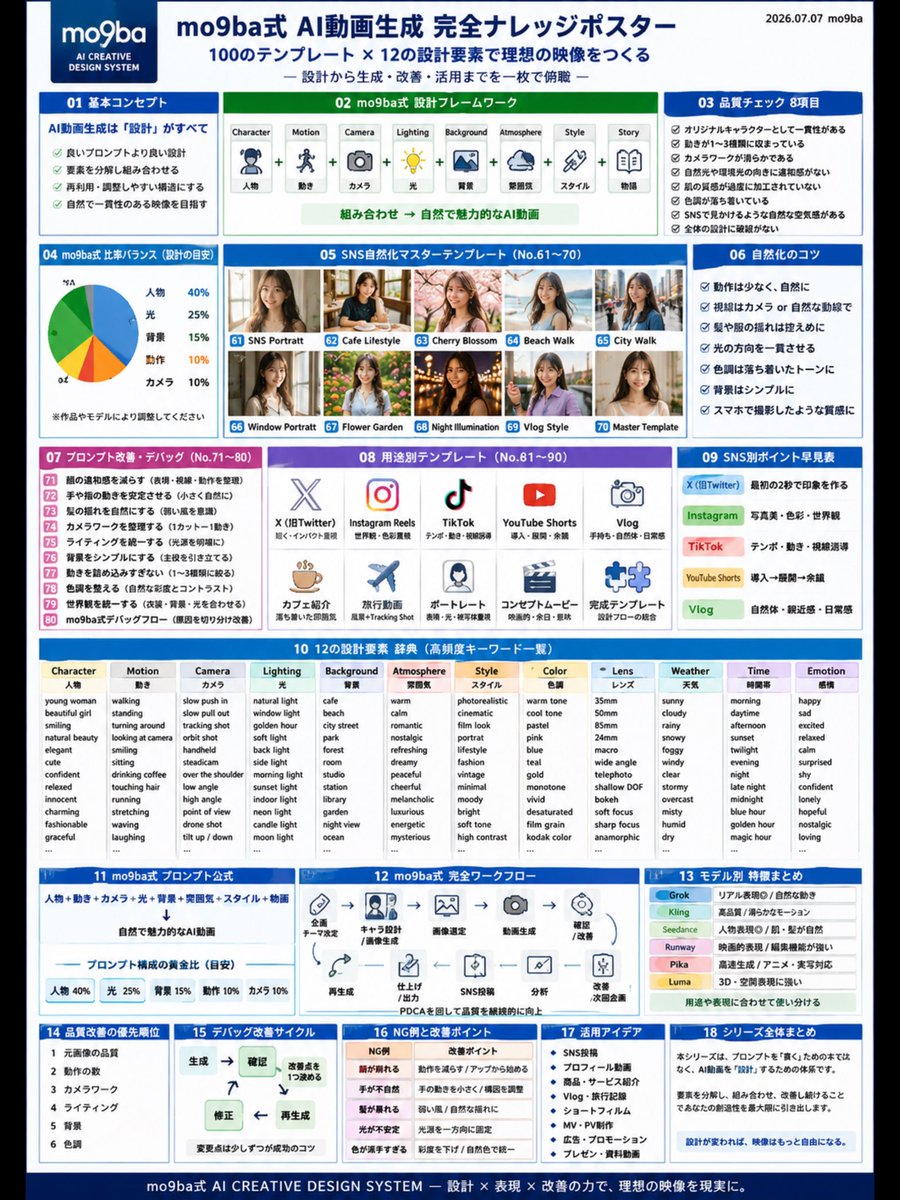
A knowledge poster explaining the mo9ba method: treat AI video as a creative design system rather than isolated prompts. It covers the thinking order from Character to Story, 8 post-generation quality checks, platform-specific design for X, Instagram, TikTok, YouTube Shorts and Vlogs, tips for a natural non-AI look, a PDCA improvement cycle, and a combinatorial design dictionary of elements.

Image generation

Source previews

These example images come from the original source. DROPIDEA has not independently tested these examples; results depend on the model and settings.

Ready to personalize

Your prompt

English

Replace the red variables with your information. Copy the full prompt and use it with your preferred agent.

TXT MD English version
🔴【① #AIVideoGeneration is about "design," not "#prompts"] What you need in the era of making AI videos is not a magic sentence, but a "design blueprint." Character ↓ Motion ↓ Camera ↓ Lighting ↓ Background ↓ Atmosphere ↓ Story When you think in this order, the quality of your AI videos becomes stable all at once. In the mo9ba method, it is organized not as a Prompt but as the AI Creative Design System. 🔴【② 8 Quality Check Items for AI Videos】 Points to look at after generation👇 ✅ Character consistency ✅ Motion is limited to 1–3 types ✅ Camera is stable ✅ Light direction is natural ✅ Skin texture is not over-processed ✅ Background is organized ✅ Looks natural on SNS ✅ No breakdown in the overall design For AI videos, the power of review is more important than creation. 🔴【③ mo9ba Method AI Video Design Frame】 AI videos can be organized into the following 8 elements. ① Character|Person ② Motion|Movement ③ Camera|Camera ④ Lighting|Light ⑤ Background|Background ⑥ Atmosphere|Mood ⑦ Style|Style ⑧ Story|Narrative When you break down and then combine these 8 elements, regeneration, correction, and application become easier. 🔴【④ Differences in AI Videos for SNS】 X: Make an impression in the first 2 seconds Instagram: Photo beauty, color, worldview TikTok: Tempo, movement, eye-line guidance YouTube Shorts: Intro → Development → Lingering aftertaste Vlog: Natural feel, familiarity, everyday feel Even with the same AI video, just changing the design based on the posting platform changes how it gets across. 🔴【⑤ Tips to Make AI Videos Look Natural】 To reduce the AI-like feel, ・Keep motion minimal ・Keep gaze natural ・Keep hair movement subtle ・Unify the light direction ・Keep tones light and calm ・Keep the background simple ・Give it a texture like it was shot on a smartphone Naturalness over flashiness. This is the basics of AI videos that look natural on SNS without any sense of discomfort. 🔴【⑥ AI Video Production is PDCA】 For AI videos, an improvement cycle is more important than aiming to complete them in one shot. Generate ↓ Check ↓ Decide on 1 improvement point ↓ Correct ↓ Regenerate Face breaks down Hands look unnatural Movement is stiff Light is unnatural If you separate and check the causes, the quality gradually rises. 🔴【⑦ mo9ba Method AI Creative Design System】 Think of it not as a prompt collection, but as a "design dictionary" for AI videos. Character Motion Camera Lighting Background Atmosphere Style Color Lens Weather Time Emotion Story By combining these, it becomes an AI video production system that can expand infinitely, rather than a one-off Prompt. 🔴【⑧ Final Conclusion】 What is important in AI video generation is, not writing a good prompt, but creating a good design. Decide the character. Narrow down the motion. Choose the camera. Adjust the lighting. Organize the background. Add the story. When the design changes, the imagery becomes far more free. #AIVideoGeneration #GenerativeAI #ImageToVideo #AIVideo #AICreative #PromptEngineering #GenerativeAIUtilization #AIBeauty #NaturalizationPrompt #SNSOperation #AIVideo #Shorts #Instagram #TikTok #PromptDesign #Grok #Kling #Runway #PromptEngineering #ImageToVideo #mo9baKnowledgePoster #Memo
Preview results

Your prompt

🔴【① #AIVideoGeneration is about "design," not "#prompts"] What you need in the era of making AI videos is not a magic sentence, but a "design blueprint." Character ↓ Motion ↓ Camera ↓ Lighting ↓ Background ↓ Atmosphere ↓ Story When you think in this order, the quality of your AI videos becomes stable all at once. In the mo9ba method, it is organized not as a Prompt but as the AI Creative Design System. 🔴【② 8 Quality Check Items for AI Videos】 Points to look at after generation👇 ✅ Character consistency ✅ Motion is limited to 1–3 types ✅ Camera is stable ✅ Light direction is natural ✅ Skin texture is not over-processed ✅ Background is organized ✅ Looks natural on SNS ✅ No breakdown in the overall design For AI videos, the power of review is more important than creation. 🔴【③ mo9ba Method AI Video Design Frame】 AI videos can be organized into the following 8 elements. ① Character|Person ② Motion|Movement ③ Camera|Camera ④ Lighting|Light ⑤ Background|Background ⑥ Atmosphere|Mood ⑦ Style|Style ⑧ Story|Narrative When you break down and then combine these 8 elements, regeneration, correction, and application become easier. 🔴【④ Differences in AI Videos for SNS】 X: Make an impression in the first 2 seconds Instagram: Photo beauty, color, worldview TikTok: Tempo, movement, eye-line guidance YouTube Shorts: Intro → Development → Lingering aftertaste Vlog: Natural feel, familiarity, everyday feel Even with the same AI video, just changing the design based on the posting platform changes how it gets across. 🔴【⑤ Tips to Make AI Videos Look Natural】 To reduce the AI-like feel, ・Keep motion minimal ・Keep gaze natural ・Keep hair movement subtle ・Unify the light direction ・Keep tones light and calm ・Keep the background simple ・Give it a texture like it was shot on a smartphone Naturalness over flashiness. This is the basics of AI videos that look natural on SNS without any sense of discomfort. 🔴【⑥ AI Video Production is PDCA】 For AI videos, an improvement cycle is more important than aiming to complete them in one shot. Generate ↓ Check ↓ Decide on 1 improvement point ↓ Correct ↓ Regenerate Face breaks down Hands look unnatural Movement is stiff Light is unnatural If you separate and check the causes, the quality gradually rises. 🔴【⑦ mo9ba Method AI Creative Design System】 Think of it not as a prompt collection, but as a "design dictionary" for AI videos. Character Motion Camera Lighting Background Atmosphere Style Color Lens Weather Time Emotion Story By combining these, it becomes an AI video production system that can expand infinitely, rather than a one-off Prompt. 🔴【⑧ Final Conclusion】 What is important in AI video generation is, not writing a good prompt, but creating a good design. Decide the character. Narrow down the motion. Choose the camera. Adjust the lighting. Organize the background. Add the story. When the design changes, the imagery becomes far more free. #AIVideoGeneration #GenerativeAI #ImageToVideo #AIVideo #AICreative #PromptEngineering #GenerativeAIUtilization #AIBeauty #NaturalizationPrompt #SNSOperation #AIVideo #Shorts #Instagram #TikTok #PromptDesign #Grok #Kling #Runway #PromptEngineering #ImageToVideo #mo9baKnowledgePoster #Memo

What you get

  • A complete mo9ba design methodology for AI video instead of isolated prompts
  • An 8-item post-generation quality checklist
  • A framework of 8 elements that can be decomposed and recombined
  • Platform-specific design guidance for each social network
  • Practical tips for a natural, smartphone-shot look
  • A PDCA improvement cycle for gradually raising quality
  • An expanded design dictionary of elements (Character, Motion, Camera, Lighting, Background, Atmosphere, Style, Color, Lens, Weather, Time, Emotion, Story)

Use cases

  • AI video creators posting on X, Instagram, TikTok and YouTube Shorts
  • Prompt designers seeking more stable, repeatable results
  • Digital marketing teams producing short videos for social campaigns
  • Trainers and consultants explaining AI video workflows to students or clients
  • Any creator wanting a structured review and improvement system for generated videos

How to use

  • Read section ① and adopt the thinking order: Character, Motion, Camera, Lighting, Background, Atmosphere, Story before writing any generation prompt.
  • After each generation, apply the 8-item quality checklist from section ② to the result and identify failures.
  • Break your idea down using the 8 elements in section ③, then combine them to make regeneration and correction easier.
  • Adjust the design per platform using section ④ guidance (first 2 seconds impression on X, photo beauty on Instagram, tempo on TikTok).
  • Apply section ⑤ naturalness tips to reduce the AI look, then follow the PDCA cycle in section ⑥: generate, check, decide on 1 improvement point, correct, regenerate.

Related prompts