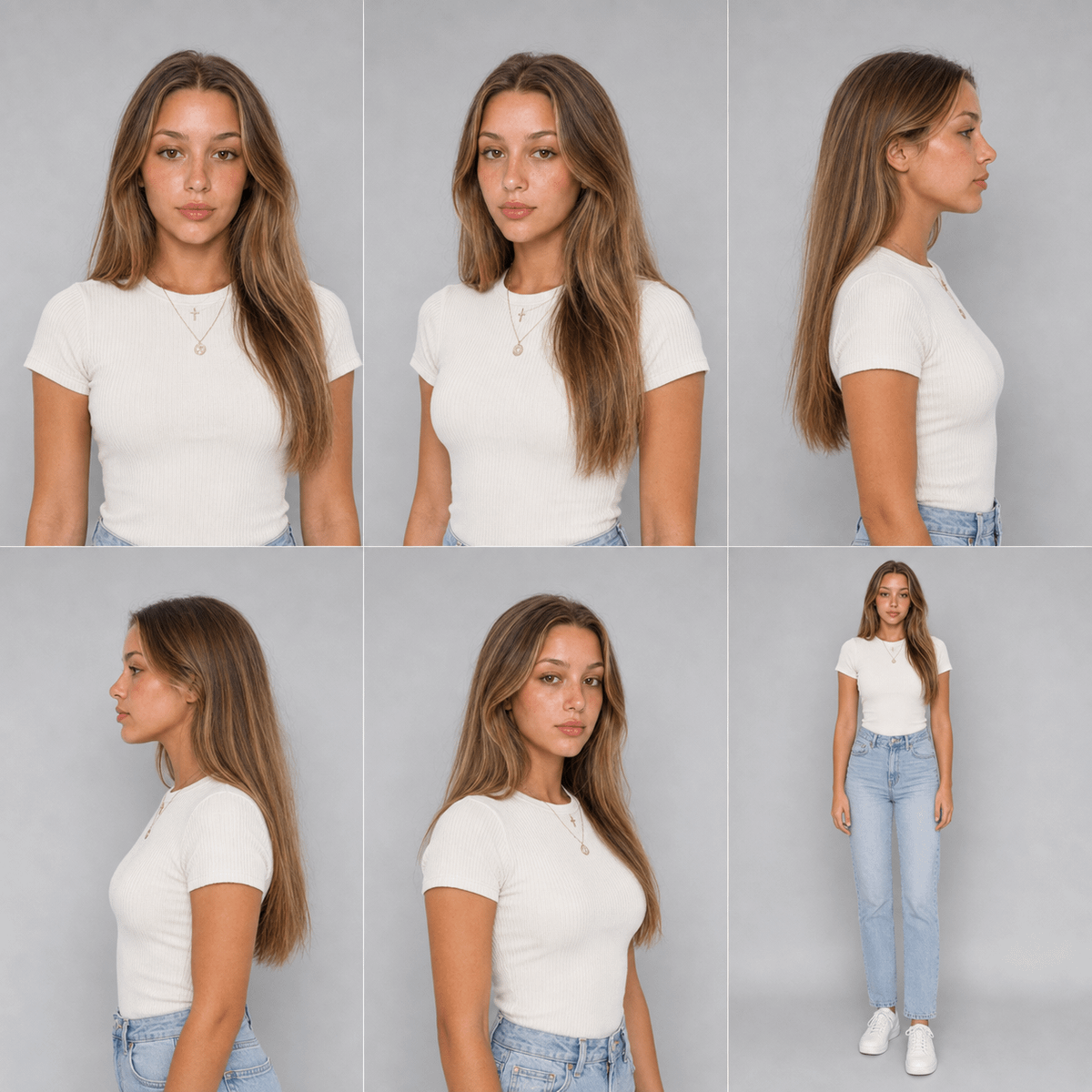
Photorealistic 6-Panel Identity Turnaround Sheet
Prompt for generating a photorealistic 6-panel turnaround sheet of the same woman from the uploaded photo, preserving facial identity, freckles, eye color, hairline, and skin texture across multiple angles and outfits.
Source previews
These example images come from the original source. DROPIDEA has not independently tested these examples; results depend on the model and settings.
Your prompt
Replace the red variables with your information. Copy the full prompt and use it with your preferred agent.
Variable guide
fitted cream ribbed t-shirtTop garment in the front view with shoulders.
Inside the "Panels:" line of the template.
Example valuefitted cream ribbed t-shirt
light blue high-waisted jeans and white sneakersFull-body shot outfit.
End of the "Panels:" line in the template.
Example valuelight blue high-waisted jeans and white sneakers
two thin gold necklaces with a cross and a round coin pendantTwo thin necklaces shown across panels.
End of the template.
Example valuetwo thin gold necklaces with a cross and a round coin pendant
Neutral grey studio backgroundUnified studio background.
Start of the third paragraph of the template.
Example valueNeutral grey studio background
What you get
- A photorealistic turnaround sheet of 6 panels in a single image.
- Panels at: front headshot, front with shoulders, right profile, left profile, three-quarter angle, and full-body shot.
- Preserved facial identity, freckle placement, eye color, hairline, and natural skin texture with visible pores.
- Soft even lighting, neutral grey studio background, consistent color and exposure across panels.
- No text, labels, borders, beauty filters, or retouching.
Use cases
- Fashion design and presenting multiple outfits on the same model.
- Creating consistent character references for illustration.
- Unified model identity for e-commerce clothing campaigns.
- Reference sheets for game and comic character development.
- Testing identity consistency of image generation tools before production.
How to use
- Upload a clear, high-resolution photo of the reference woman with face, freckles, and neck clearly visible.
- Paste the template as-is into an image generation tool that supports identity references, ensuring the uploaded photo is attached as the identity reference.
- Optionally edit only the outfit, jewelry, or background variables to change the look while keeping all technical constraints intact.
- Submit and expect a single sheet containing 6 panels with the same person in every panel.
- Compare the output panels against the original photo to verify consistent facial features, eye color, and freckle placement.
- Regenerate with the same reference as needed until identity consistency across all six panels is acceptable.
Related prompts
Candid Smartphone Restaurant Moment Photo Prompt
A photographic prompt crafted to generate hyper-realistic, unposed smartphone snapshots taken by a friend at a nigh...
Photorealistic Portrait of Man in White by Lake
Prompt generating an ultra-realistic photo of a young man wearing white Shalwar Kameez by a lake at sunset, specify...
Gothic Yokai Carnival Music Video
An advanced cinematic AI video prompt crafting a 15-second seamless loop psychedelic Japanese horror music video fe...
Photorealistic Medieval Village Woman Character Sheet
Prompt to generate a photorealistic character reference sheet for a young medieval village woman featuring multi-an...