Skip to content
ImagesFree

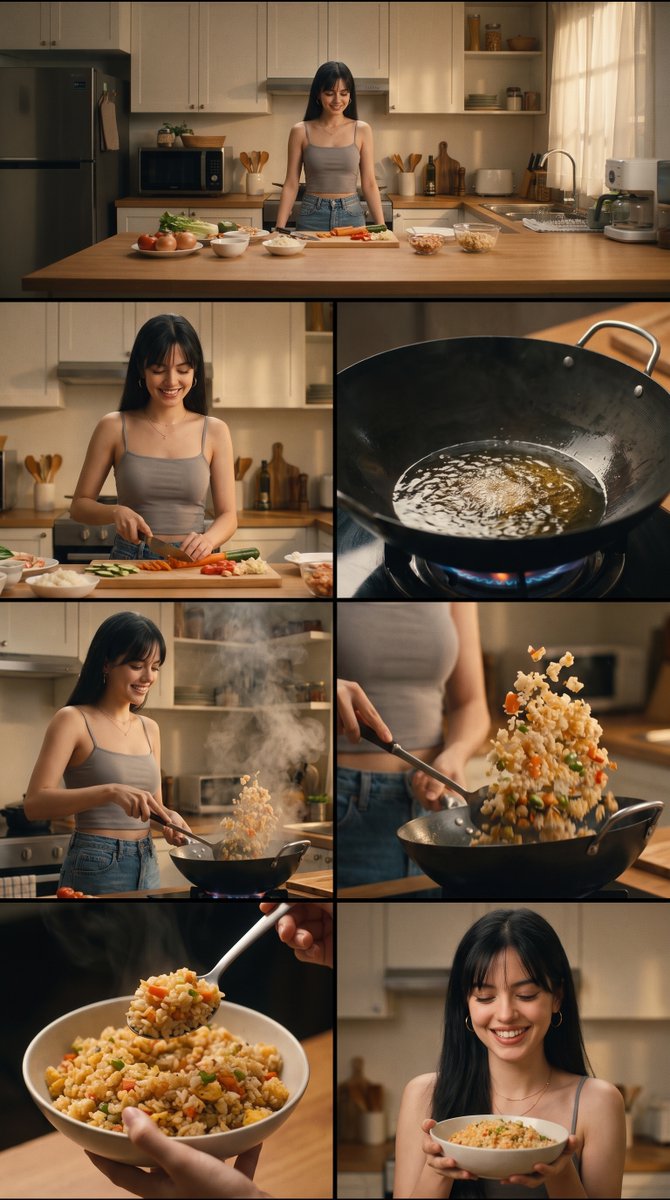
Cinematic 6-Panel Storyboard for Ultra-Realistic Video

Create an ultra-realistic cinematic 6-panel storyboard depicting a character doing a chosen activity, plus a full video prompt that turns the storyboard into a 10s cinematic video with strict character consistency, smooth scene transitions, no full storyboard display, and ASMR style.

Gemini

Source previews

These example images come from the original source. DROPIDEA has not independently tested these examples; results depend on the model and settings.
Ready to personalize

Your prompt

English

Replace the red variables with your information. Copy the full prompt and use it with your preferred agent.

TXT MD English version
Create a cinematic ultra-realistic image with a 6-panel storyboard scene, depicting a character doing (desired activity). VIDEO PROMPT: MAIN GOAL: Create a cinematic video from a multi-panel storyboard. 10s duration. CHARACTER CONSISTENCY: Flow (character reference) Maintain exact character identity across all scenes. VIDEO STRUCTURE: Generate video as a sequence of distinct scenes, corresponding to each panel of the provided storyboard. Each scene should transition smoothly into the next. INITIAL FRAME HANDLING: Crucially, **DO NOT display the entire storyboard image in the initial 1-2 seconds of the video.** Start the video directly with the first scene from the storyboard, then transition through subsequent scenes sequentially. CAMERA & EDITING: Use cinematic camera movements appropriate for each scene. Ensure seamless transitions between scenes without showing the full storyboard layout at any point. No jump cuts unless specified per scene, ASMR video style. ATMOSPHERE: [Adjust to match the overall mood of the storyboard, for example: "Dynamic, engaging, narrative flow."]. Negative Prompt: "backsound, full storyboard display, multiple panels at once, grid layout, split screen, initial static storyboard image, all scenes visible at start, inconsistent character, character identity drift, bun, tied hair, short hair, blurry, low quality, watermark, text."
Preview results

Your prompt

Create a cinematic ultra-realistic image with a 6-panel storyboard scene, depicting a character doing (desired activity). VIDEO PROMPT: MAIN GOAL: Create a cinematic video from a multi-panel storyboard. 10s duration. CHARACTER CONSISTENCY: Flow (character reference) Maintain exact character identity across all scenes. VIDEO STRUCTURE: Generate video as a sequence of distinct scenes, corresponding to each panel of the provided storyboard. Each scene should transition smoothly into the next. INITIAL FRAME HANDLING: Crucially, **DO NOT display the entire storyboard image in the initial 1-2 seconds of the video.** Start the video directly with the first scene from the storyboard, then transition through subsequent scenes sequentially. CAMERA & EDITING: Use cinematic camera movements appropriate for each scene. Ensure seamless transitions between scenes without showing the full storyboard layout at any point. No jump cuts unless specified per scene, ASMR video style. ATMOSPHERE: [Adjust to match the overall mood of the storyboard, for example: "Dynamic, engaging, narrative flow."]. Negative Prompt: "backsound, full storyboard display, multiple panels at once, grid layout, split screen, initial static storyboard image, all scenes visible at start, inconsistent character, character identity drift, bun, tied hair, short hair, blurry, low quality, watermark, text."

Variable guide

(desired activity)

The activity the character should perform in the storyboard, such as cooking, dancing, or painting.

In the first line of the template, replace (desired activity) entirely, including the parentheses, with the desired activity.

Example value

cooking an Italian dish

[Adjust to match the overall mood of the storyboard, for example: "Dynamic, engaging, narrative flow."]

A description of the overall atmosphere for the video, matching the storyboard's mood.

In the ATMOSPHERE line near the end of the template, replace the entire bracketed text including the square brackets with your atmosphere description, or replace only the quoted English phrase inside the quotes.

Example value

calm, warm, slow narrative flow

What you get

  • An ultra-realistic cinematic 6-panel storyboard image of the chosen character activity.
  • A ready video prompt that turns the storyboard into a 10s cinematic video.
  • Explicit instructions to start the video with the first scene without ever showing the full storyboard layout.
  • A negative prompt that bans unwanted elements such as tied hair, low quality, and watermarks.

Use cases

  • Creating short ASMR-style videos of daily activities with a consistent character.
  • Turning multi-panel illustrated stories into coherent cinematic videos.
  • Producing 10-second short narrative content for social media.
  • Keeping a character's identity consistent across scenes for marketing or educational videos.

How to use

  • Decide the activity the character should perform and replace (desired activity) in the first line of the template.
  • Adjust the atmosphere description in the ATMOSPHERE line to match the mood you want for the storyboard.
  • Upload or attach a character reference image, since the prompt relies on Flow (character reference) to maintain identity consistency.
  • First generate the storyboard image using the opening part of the prompt.
  • Copy the full VIDEO PROMPT section including the negative prompt as-is into a video generation tool that supports storyboards.
  • Keep technical values such as the 10s duration and panel numbers unchanged to preserve the intended structure.

Related prompts