Mr. Play Astronomical's recent video made me realize that I need to celebrate Ms. Leaflit more. What better way than to turn everyone into slime, um folk?
As always, feel free to edit this as you see fit, and please have fun!
Rise of Slime Guardian
[Prompt Starts Here]
Masterpiece-quality | Octane Render | Shallow Depth of Field | 16:9 Aspect Ratio
Image1 = primary character reference
ALL OF THE FOLLOWING IS LAW, IT IS NOT A SUGGESTION - Render finish is absolute: ultra-clean, polished digital rendering with smooth, continuous tonal transitions, clean airbrushed gradients, broad soft value transitions, refined natural texture only, and a high-fidelity cinematic finish. Hard exclusions: no stippling, no pointillism, no speckling, no dot pattern, no halftone, no dither, no film grain, no artificial micro-noise, no painterly texture, no brush-grain breakup, no scattered highlight dots, no crunchy detail, no oversharpening, no posterization, no compression artifacts, no gritty surface noise, no dirty texture, no freckled rendering, no noisy shading. Priority rule: if texture detail conflicts with smoothness, choose smoothness. If detail conflicts with clean gradients, choose clean gradients. Keep surfaces cohesive, polished, and noise-free. Preserve the referenced characters’ face shapes, hairstyle, hair color, eye color, correct number of limbs and fingers, personality, body language, signature color palette, outfit motifs, species traits, accessories, silhouette, body shape, body proportions, and overall character vibe. If the character has a mask, do not change it. If the character does not have a head, do not invent one. Do not lose character recognizability. Do not turn the character into a generic person or unrelated design. Do not overcrowd the composition. Do not introduce extra characters or duplicates. Do not break anatomy unless clearly justified by the transformation concept. Do not make the scene visually confusing or unreadable. Do not explicitly list or name the hidden influences used. Do not let the environment overpower the character. Extremely clean animation aesthetic. No pointillism, no stippling, no dot textures, no grainy or noisy rendering, no overly soft or blurry edges. All lines are crisp and intentional. All shading transitions are controlled and professional. High contrast with excellent form definition. Cinematic composition language with strong emotional intensity conveyed purely through rendering and lighting choices.
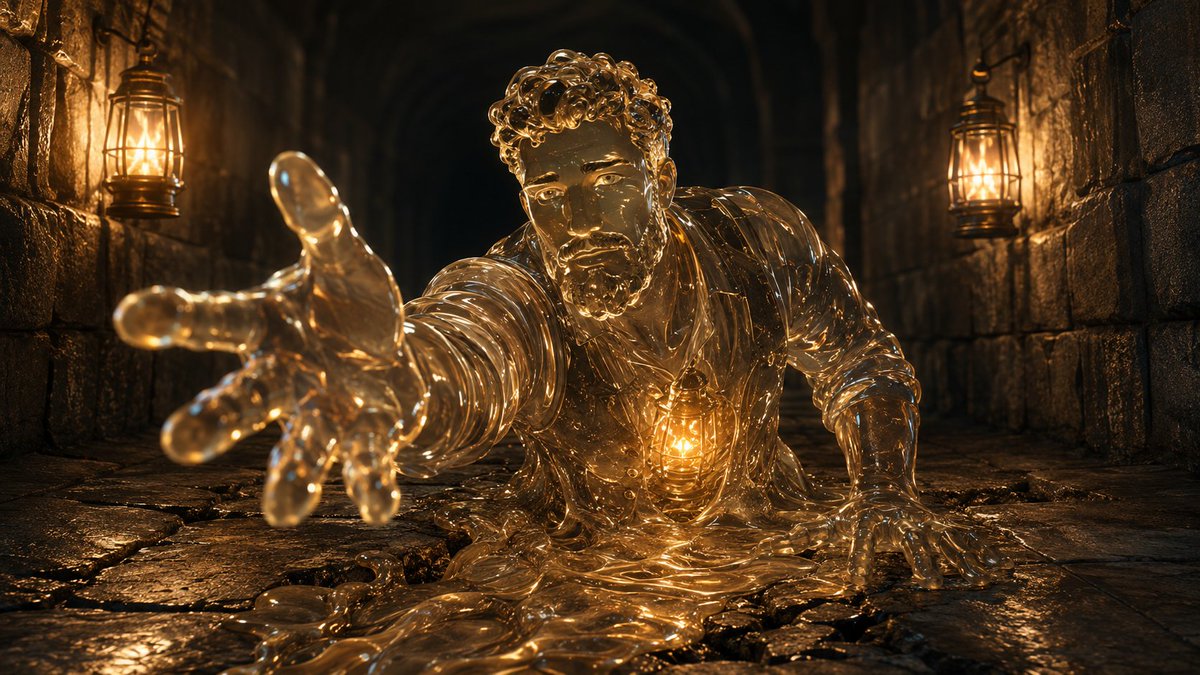
In a stone hallway, using strong Chiaroscuro Shading, a slime version of Image1 will emerge from the floor. Image1 must not take up more than 75% of the image. There must not be any flesh drawn. Image1 must entirely be slime. There must not be any flesh, hair, or skin.
The stone hallway will use Image1 to determine the type of stone, the grout in between the stone, and the caustics from the torchlight. There will be a single torch on each wall. These torches will be determined by Image1 for the shape and will be the only sources of light in the image. Micro-caustics will be in the
Image1 will be rising from a crack in the floor as a slime. Image1 will only emerge from the waist up. Image1 will be transparent and use Image1 for the color scheme. The light from the torches will shine through Image1. Buried deep within the chest of Image1 will be a core. The shape of the core will be determined by Image1 and will have a soft Bioluminescent Refraction. Micro-caustics will be present throughout Image1. Within Image1 will be Volumetric Dispersion with Subsurface Scattering. The bulk of the slime on the floor will have Specular Highlight Distortions where the torchlight hits. Image1 will be dragging themselves from the crack and crawling forward toward the camera, with a hand extended toward the camera. Image1 will have an eager expression on their face. Where the torchlight reflects off of Image1, there will be a strong Chromatic Aberration effect using the color scheme of Image1.
[Prompt Ends Here]
#promptoftheday #AI #AiArt #Art #PromptEngineering #CharacterDesign #DigitalArt #CommunityPrompt #SCU #Skyebros