Skip to content
ImagesFree

Mobile AI Cinematic Ad Video Workflow Guide

A comprehensive mobile-first workflow guide for generating 30-second cinematic commercial videos using Seedance 2.5 and CapCut.

Image generation

Source previews

These example images come from the original source. DROPIDEA has not independently tested these examples; results depend on the model and settings.
Ready to personalize

Your prompt

English

Replace the red variables with your information. Copy the full prompt and use it with your preferred agent.

TXT MD English version
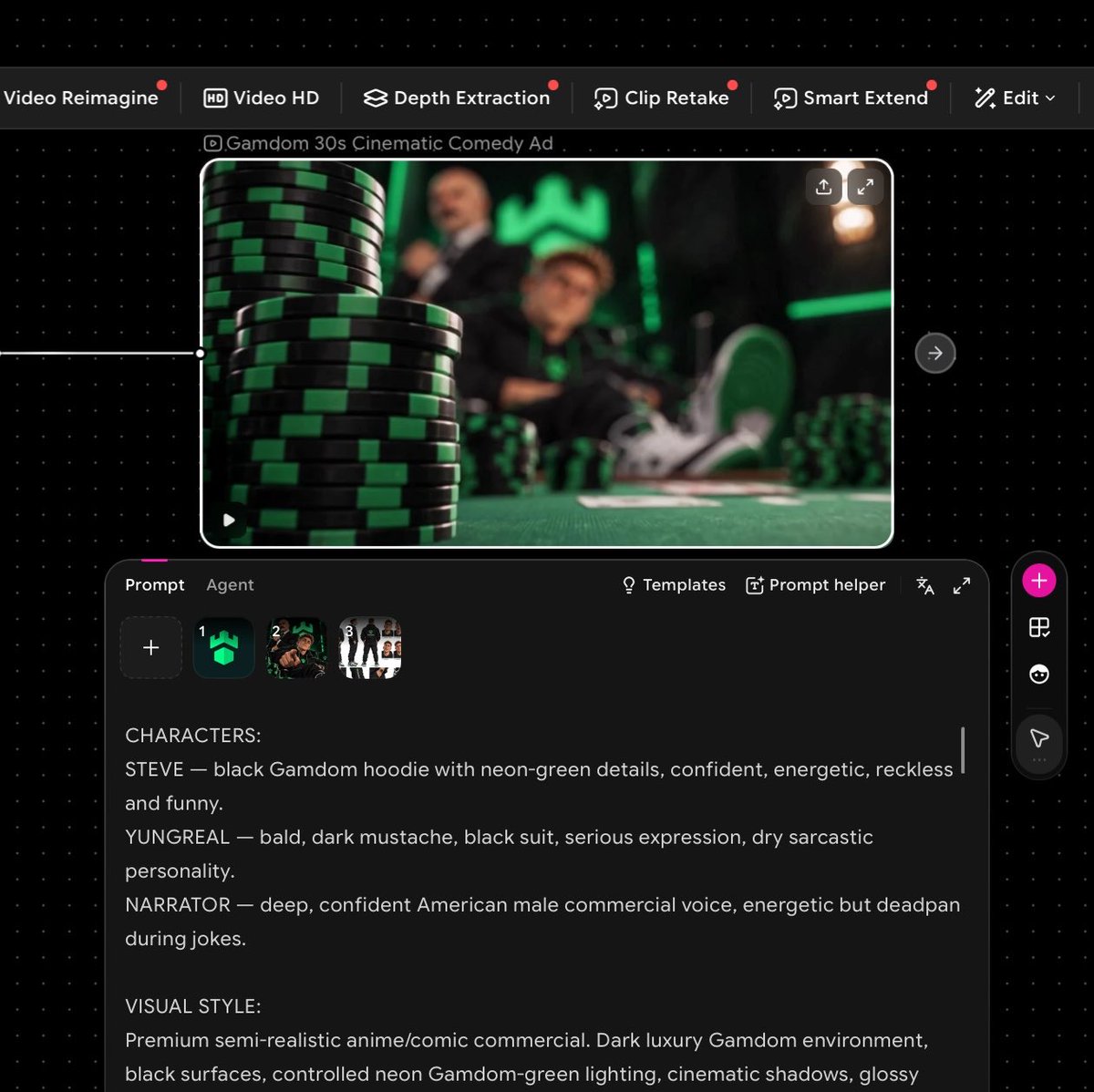
I made this entire video on my phone using just two tools: @OiiOii_AI for Seedance 2.5 @capcutapp for the final upscale and polish No PC. No complicated editing setup. And you can do it too. Here’s how: Start with the idea. I wanted a short cinematic GAMDOM ad, so I first mapped out the characters, setting, dialogue and overall direction. Create your reference images. This is important. Give each main character a clear reference image and include the correct brand/logo assets. Consistent references means more consistent generations. Open @OiiOii_AI and select Seedance 2.5. Upload your character and brand references, then use Omni Ref so Seedance has visual references to follow. Write ONE detailed prompt. Don’t just describe the scene. I included: timestamps + camera movements + character actions + dialogue + narrator + lighting + visual style + branding rules. For example: 0:00–0:04 Macro tracking shot across black-and-green casino chips. Rack focus reveals the characters behind the table… Then continue shot-by-shot until the full 30 seconds is mapped out. Lock your branding. For branded videos, explicitly tell the model to use the exact supplied logo and not redesign, distort or replace it. I repeated this rule throughout the prompt. Generate with Seedance 2.5. I used 16:9, 30 seconds and let Seedance handle the cinematic motion, dialogue scenes and camera work. Take the final generation into @capcutapp. This is where I upscale it and do the last bit of polishing sharpness, timing, audio levels and export quality. That’s basically it. Idea → references → detailed storyboard prompt → Seedance 2.5 on @OiiOii_AI → CapCut upscale → finished ad. All from my phone. The biggest difference isn’t having expensive equipment. It’s how detailed you are with the prompt and references.
Preview results

Your prompt

I made this entire video on my phone using just two tools: @OiiOii_AI for Seedance 2.5 @capcutapp for the final upscale and polish No PC. No complicated editing setup. And you can do it too. Here’s how: Start with the idea. I wanted a short cinematic GAMDOM ad, so I first mapped out the characters, setting, dialogue and overall direction. Create your reference images. This is important. Give each main character a clear reference image and include the correct brand/logo assets. Consistent references means more consistent generations. Open @OiiOii_AI and select Seedance 2.5. Upload your character and brand references, then use Omni Ref so Seedance has visual references to follow. Write ONE detailed prompt. Don’t just describe the scene. I included: timestamps + camera movements + character actions + dialogue + narrator + lighting + visual style + branding rules. For example: 0:00–0:04 Macro tracking shot across black-and-green casino chips. Rack focus reveals the characters behind the table… Then continue shot-by-shot until the full 30 seconds is mapped out. Lock your branding. For branded videos, explicitly tell the model to use the exact supplied logo and not redesign, distort or replace it. I repeated this rule throughout the prompt. Generate with Seedance 2.5. I used 16:9, 30 seconds and let Seedance handle the cinematic motion, dialogue scenes and camera work. Take the final generation into @capcutapp. This is where I upscale it and do the last bit of polishing sharpness, timing, audio levels and export quality. That’s basically it. Idea → references → detailed storyboard prompt → Seedance 2.5 on @OiiOii_AI → CapCut upscale → finished ad. All from my phone. The biggest difference isn’t having expensive equipment. It’s how detailed you are with the prompt and references.

Variable guide

GAMDOM

Name of the target brand or advertised entity

In the concept section: 'I wanted a short cinematic GAMDOM ad'

Example value

GAMDOM

0:00–0:04 Macro tracking shot across black-and-green casino chips. Rack focus reveals the characters behind the table…

Detailed breakdown of the shot including timestamp and camera direction

In the prompt example section

Example value

0:00–0:04 Macro tracking shot across black-and-green casino chips. Rack focus reveals the characters behind the table…

16:9

Video framing aspect ratio

In the generation parameters: 'I used 16:9, 30 seconds'

Example value

16:9

30 seconds

Overall length of the generation

In the generation parameters: 'I used 16:9, 30 seconds'

Example value

30 seconds

What you get

  • A structured mobile-first methodology for prompting and producing consistent AI commercial clips.
  • Best practices for locking brand identity and character consistency using reference anchors.
  • A polished, high-definition cinematic video ready for distribution without desktop editing suites.

Use cases

  • Rapid mobile production of high-converting social media brand ads and promos.
  • Commercial concept pitching and animated storyboards for agencies and clients.
  • Independent marketing campaigns created end-to-end on a smartphone.

How to use

  • Outline your ad concept, characters, and prepare high-clarity reference images for characters and official brand logos.
  • Open your video generation tool (Seedance 2.5 on OiiOii_AI) and upload reference images via visual referencing (Omni Ref).
  • Write a single, highly detailed storyboard prompt dividing the timeline second-by-second including camera movements, actions, dialogue, lighting, and strict branding enforcement.
  • Generate the clip using your target aspect ratio and desired total duration.
  • Export the generated video into CapCut on mobile to upscale clarity, tune audio levels, adjust timings, and finalize.

Related prompts