Skip to content
ImagesFree

Style Grok prompt share: Post-Apocalyptic Anime Cinematic ⚔️ What if your favourite anime had a $200M budget? This is what it woul

Style Grok prompt share: Post-Apocalyptic Anime Cinematic ⚔️ What if your favourite anime had a $200M budget? This is what it woul

Image generation

Source previews

These example images come from the original source. DROPIDEA has not independently tested these examples; results depend on the model and settings.

Ready to personalize

Your prompt

Source text

Replace the red variables with your information. Copy the full prompt and use it with your preferred agent.

TXT MD English version
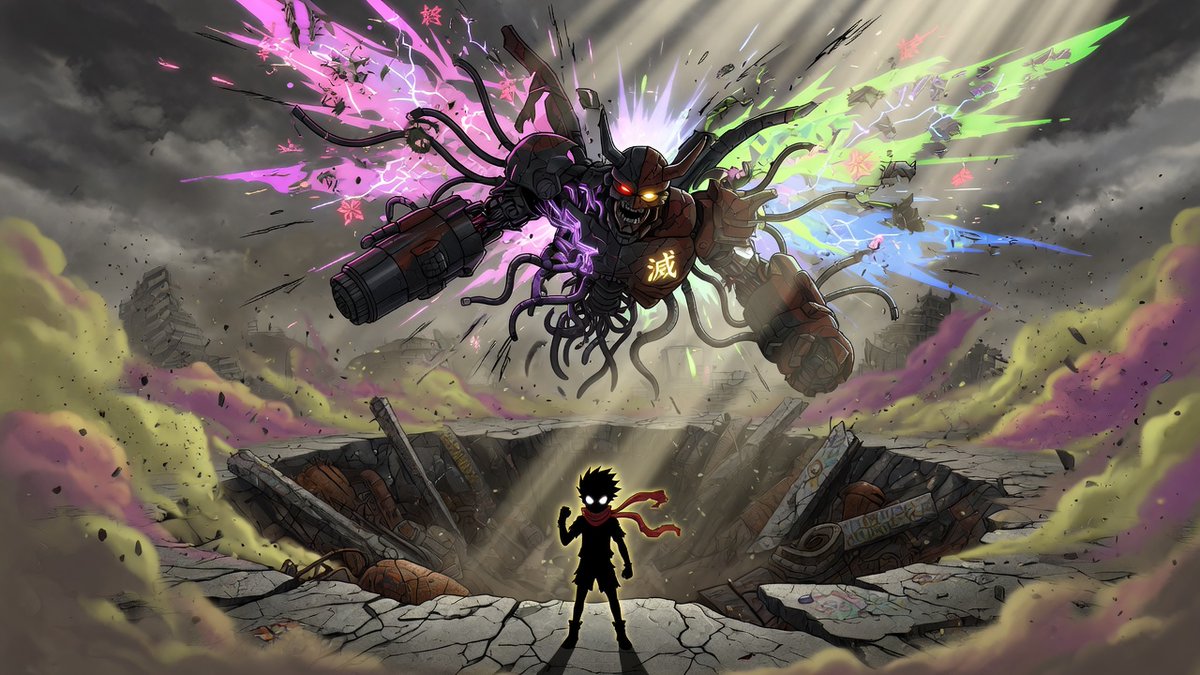
Style Grok prompt share: Post-Apocalyptic Anime Cinematic ⚔️ What if your favourite anime had a $200M budget? This is what it would look like. I created all these images using Grok — directly from the chat. No extra tools. No plugins. Just open a chat and type. 🔥 Here's how 👇 ① Go to https://t.co/j0YShox8X1 or open the Grok app ② Open a new chat — just like texting ③ Tap on 'Imagine' ④ Choose Quality mode from the prompt box ⑤ Paste: [YOUR SUBJECT] + the style block below ⑥ Hit Enter — Grok generates the image right inside the chat 🎨 COPY THIS STYLE — works everywhere: post-apocalyptic anime cinematic, hand-drawn cel shading with ultra-detailed linework, dramatic sakuga motion energy lines, vivid desaturated wasteland palette with explosive accent colors, crumbling concrete and rust textures, volumetric toxic dust clouds, hyper-expressive anime eyes with detailed iris reflection, dynamic Dutch angle composition, god rays breaking through ash clouds, Makoto Shinkai atmospheric depth meets Hiroyuki Imaishi explosive energy, 4K anime film render. Try these subjects: → [a teenage boy on a collapsed skyscraper, mechanical arm glowing] → [a silver-haired girl charging with dual flaming katanas] → [a flooded Tokyo in ruins, girl rowing through bioluminescent streets] → [a massive villain fusing with a machine god above a crater] The secret? Lock the style. Change only the subject. Open Grok. Paste. Generate. That's it. 🎯 This is the anime film nobody made yet 🌑 Save this. Your inner otaku will thank you 🙏
Preview results

Your prompt

Style Grok prompt share: Post-Apocalyptic Anime Cinematic ⚔️ What if your favourite anime had a $200M budget? This is what it would look like. I created all these images using Grok — directly from the chat. No extra tools. No plugins. Just open a chat and type. 🔥 Here's how 👇 ① Go to https://t.co/j0YShox8X1 or open the Grok app ② Open a new chat — just like texting ③ Tap on 'Imagine' ④ Choose Quality mode from the prompt box ⑤ Paste: [YOUR SUBJECT] + the style block below ⑥ Hit Enter — Grok generates the image right inside the chat 🎨 COPY THIS STYLE — works everywhere: post-apocalyptic anime cinematic, hand-drawn cel shading with ultra-detailed linework, dramatic sakuga motion energy lines, vivid desaturated wasteland palette with explosive accent colors, crumbling concrete and rust textures, volumetric toxic dust clouds, hyper-expressive anime eyes with detailed iris reflection, dynamic Dutch angle composition, god rays breaking through ash clouds, Makoto Shinkai atmospheric depth meets Hiroyuki Imaishi explosive energy, 4K anime film render. Try these subjects: → [a teenage boy on a collapsed skyscraper, mechanical arm glowing] → [a silver-haired girl charging with dual flaming katanas] → [a flooded Tokyo in ruins, girl rowing through bioluminescent streets] → [a massive villain fusing with a machine god above a crater] The secret? Lock the style. Change only the subject. Open Grok. Paste. Generate. That's it. 🎯 This is the anime film nobody made yet 🌑 Save this. Your inner otaku will thank you 🙏

Related prompts