Skip to content
ImagesFree

Prompt Share 🚨 Drop your character. Let’s see their moveset… pictogram style ⚔️ Prompt 👇 (Recommended: Gemini Nano Banana) A clean

Prompt Share 🚨 Drop your character. Let’s see their moveset… pictogram style ⚔️ Prompt 👇 (Recommended: Gemini Nano Banana) A clean

Gemini

Source previews

These example images come from the original source. DROPIDEA has not independently tested these examples; results depend on the model and settings.

Ready to personalize

Your prompt

Source text

Replace the red variables with your information. Copy the full prompt and use it with your preferred agent.

TXT MD English version
Prompt Share 🚨 Drop your character. Let’s see their moveset… pictogram style ⚔️ Prompt 👇 (Recommended: Gemini Nano Banana) A clean minimalistic pictogram sheet featuring the uploaded reference character performing a full combat move set. 🧬 LIKENESS INTEGRITY (CRITICAL) Preserve the exact core identity of the character: • head-to-body proportions • eye shape, spacing, stylization • silhouette and geometry • original color palette (simplified, not changed) Do not humanize. Do not alter anatomy. Do not modify facial structure. Every pose must clearly read as the SAME character. 🎨 STYLE — FLAT COMBAT ICON SYSTEM • Ultra-minimal vector-style flat design • Solid color fills only (no gradients) • No texture, no lighting, no rendering • Clean geometric simplification • Bold, readable silhouettes Each pose should feel like a game ability icon or fighting system pictogram ⚔️ COMBAT MOVESET (CORE SET) Create a grid of 12–16 distinct combat poses: • idle combat stance • forward punch • heavy punch • high kick • low sweep kick • defensive block • dodge / lean • jump attack • landing impact pose • charging / power-up • sprint attack • backward evade • guard stance • finisher strike • stunned / hit reaction • victory stance Each pose must feel mid-action, not static. 📐 COMPOSITION — GRID SYSTEM • Clean grid layout (rows and columns) • Equal spacing between all poses • Each character centered in its own tile • Consistent scale across all poses • No overlap between figures Background: plain white or very light neutral 🎥 PERSPECTIVE SIMPLIFICATION • Mostly side view or slight 3/4 angle • No perspective distortion • No camera drama • Designed for readability at small sizes ⚡ ACTION CLARITY RULES (VERY IMPORTANT) • Each move must be instantly readable as a silhouette • Limbs clearly separated (no tangling) • Strong directional movement (clear left/right flow) • Exaggerate pose clarity, NOT anatomy Think: one-frame animation key poses 🎨 COLOR SYSTEM • Use original character colors, simplified into flat tones • Optional: subtle accent color for energy emphasis (very minimal) • No shading or gradients 🚫 NEGATIVE CONSTRAINTS No gradients No shadows No lighting effects No motion blur No textures No realistic rendering No background elements No weapons unless part of original design No extra accessories No text 🎯 OUTPUT INTENT A professional combat icon set / moveset sheet that could be used in a fighting game UI, clean, consistent, and instantly readable. ar 1:1
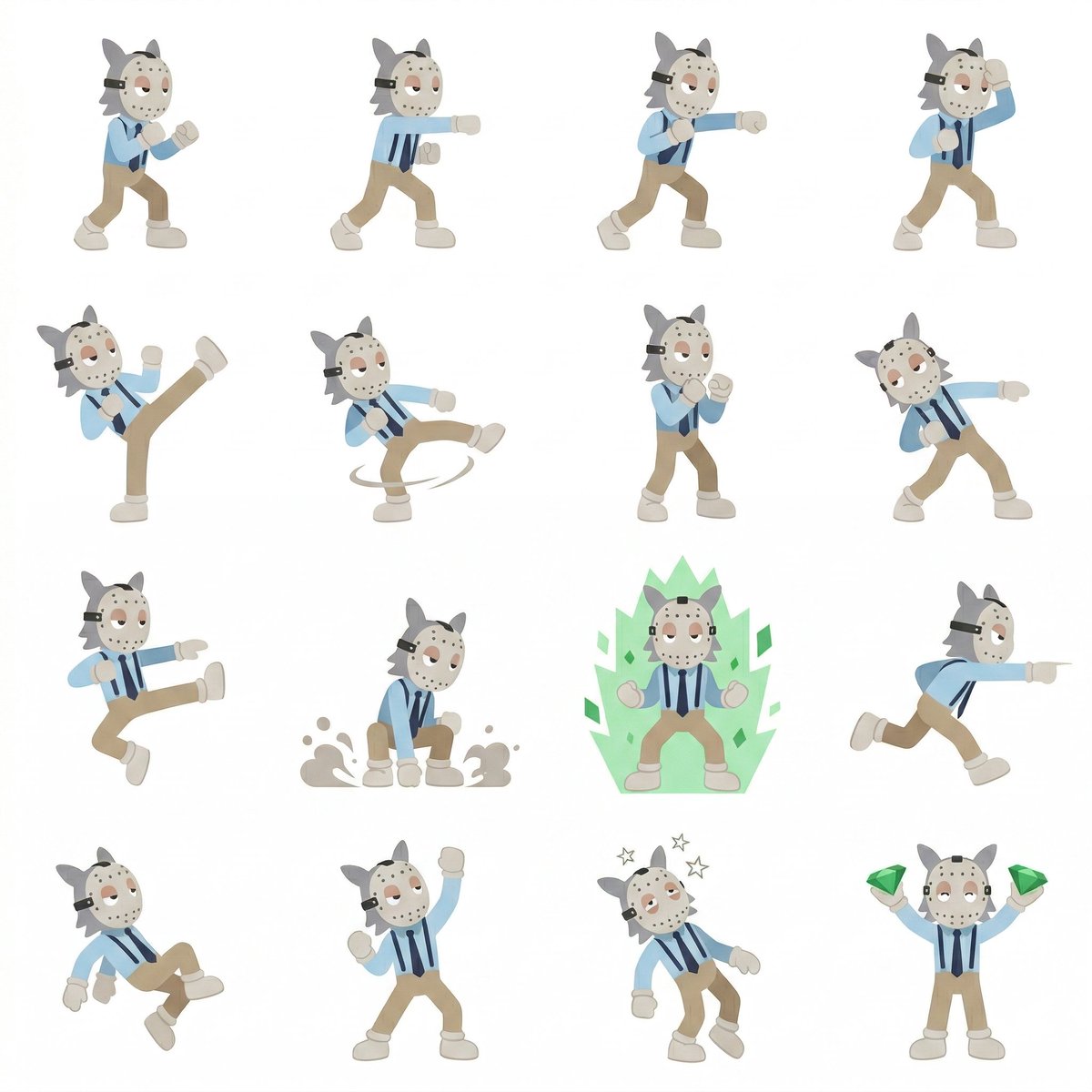
Preview results

Your prompt

Prompt Share 🚨 Drop your character. Let’s see their moveset… pictogram style ⚔️ Prompt 👇 (Recommended: Gemini Nano Banana) A clean minimalistic pictogram sheet featuring the uploaded reference character performing a full combat move set. 🧬 LIKENESS INTEGRITY (CRITICAL) Preserve the exact core identity of the character: • head-to-body proportions • eye shape, spacing, stylization • silhouette and geometry • original color palette (simplified, not changed) Do not humanize. Do not alter anatomy. Do not modify facial structure. Every pose must clearly read as the SAME character. 🎨 STYLE — FLAT COMBAT ICON SYSTEM • Ultra-minimal vector-style flat design • Solid color fills only (no gradients) • No texture, no lighting, no rendering • Clean geometric simplification • Bold, readable silhouettes Each pose should feel like a game ability icon or fighting system pictogram ⚔️ COMBAT MOVESET (CORE SET) Create a grid of 12–16 distinct combat poses: • idle combat stance • forward punch • heavy punch • high kick • low sweep kick • defensive block • dodge / lean • jump attack • landing impact pose • charging / power-up • sprint attack • backward evade • guard stance • finisher strike • stunned / hit reaction • victory stance Each pose must feel mid-action, not static. 📐 COMPOSITION — GRID SYSTEM • Clean grid layout (rows and columns) • Equal spacing between all poses • Each character centered in its own tile • Consistent scale across all poses • No overlap between figures Background: plain white or very light neutral 🎥 PERSPECTIVE SIMPLIFICATION • Mostly side view or slight 3/4 angle • No perspective distortion • No camera drama • Designed for readability at small sizes ⚡ ACTION CLARITY RULES (VERY IMPORTANT) • Each move must be instantly readable as a silhouette • Limbs clearly separated (no tangling) • Strong directional movement (clear left/right flow) • Exaggerate pose clarity, NOT anatomy Think: one-frame animation key poses 🎨 COLOR SYSTEM • Use original character colors, simplified into flat tones • Optional: subtle accent color for energy emphasis (very minimal) • No shading or gradients 🚫 NEGATIVE CONSTRAINTS No gradients No shadows No lighting effects No motion blur No textures No realistic rendering No background elements No weapons unless part of original design No extra accessories No text 🎯 OUTPUT INTENT A professional combat icon set / moveset sheet that could be used in a fighting game UI, clean, consistent, and instantly readable. ar 1:1

Related prompts